

This tutorial provides the detailed flow of creating a date picker example in java where we will be creating two classes i.e. DatePickercker class and DatePickerExample class. DatePickercker class will deal with the actual logic of date picker and DatePickerExample class provides the steps to create JFrame in which JButton will be used for picking date and JTextField for displaying date etc.
-
- Open Eclipse, Go to File-> New-> Java Project, you will get below view

-
- A dialog box will pop up which will ask you to enter the project details.

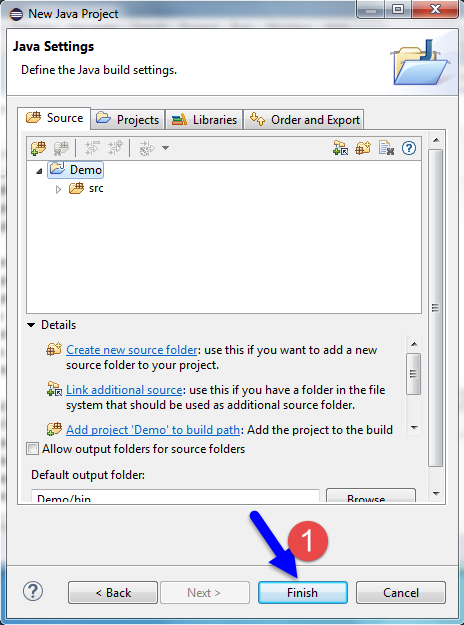
-
- Select your project, from the package explorer as shown below :
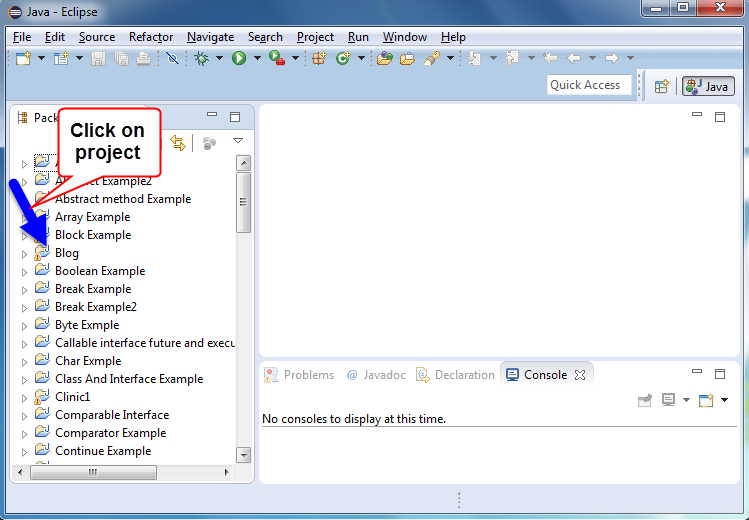
-
- Follow the below steps to create new class
- Click on Project, right click on src -> New -> Class as shown below :
- Follow the below steps to create new class
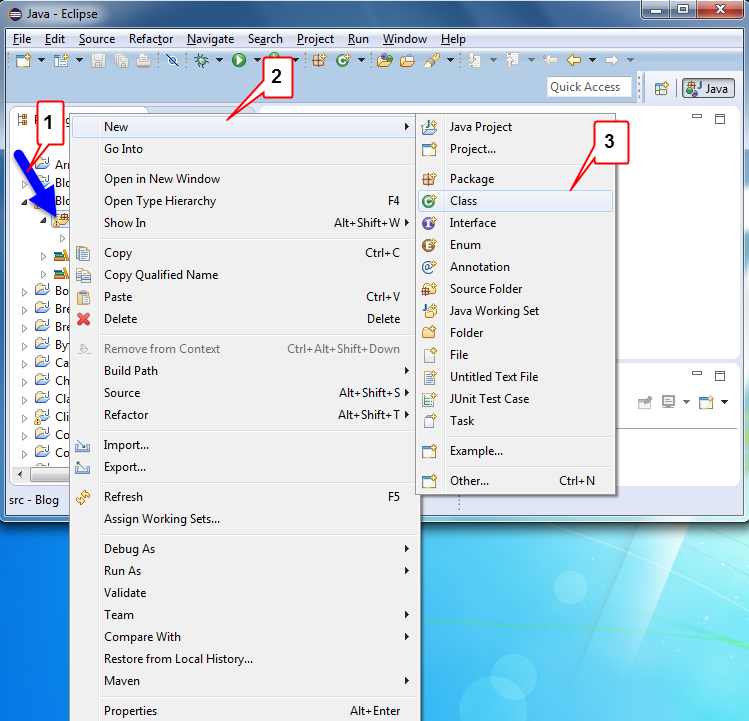
-
-
- A dialog box will appear where you will have to set your class name and then select Finish button.
-
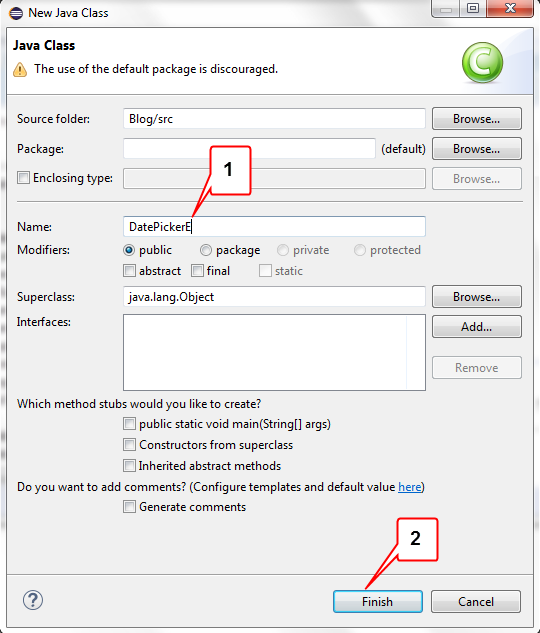
-
-
- Now create two classes one is DatePicker.java and second one is DatePickerExample.java .
-
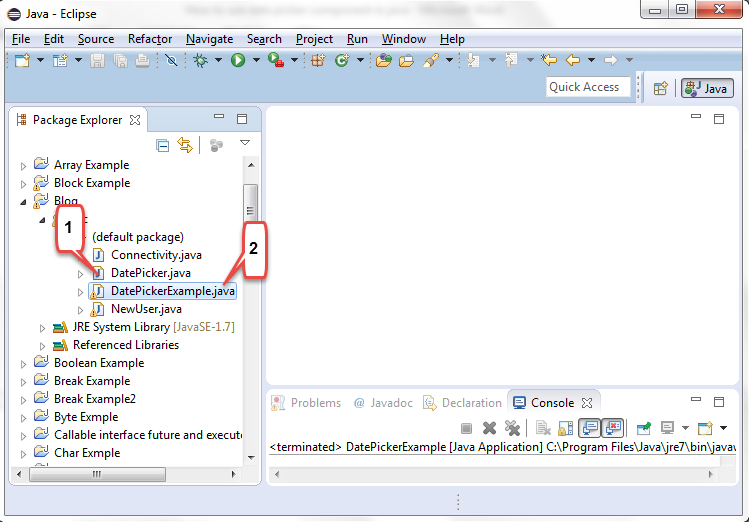

Example :
DatePicker.java
In this DatePicker.java write the Actual logic code
//import statements
import java.awt.*;
import java.awt.event.*;
import javax.swing.*;

//create class
class DatePicker
{
	//define variables
        int month = java.util.Calendar.getInstance().get(java.util.Calendar.MONTH);
        int year = java.util.Calendar.getInstance().get(java.util.Calendar.YEAR);
        //create object of JLabel with alignment
        JLabel l = new JLabel("", JLabel.CENTER);
        //define variable
        String day = "";
        //declaration
        JDialog d;
        //create object of JButton
        JButton[] button = new JButton[49];

        public DatePicker(JFrame parent)//create constructor
        {
        	//create object
                d = new JDialog();
                //set modal true
                d.setModal(true);
                //define string
                String[] header = { "Sun", "Mon", "Tue", "Wed", "Thur", "Fri", "Sat" };
                //create JPanel object and set layout
                JPanel p1 = new JPanel(new GridLayout(7, 7));
                //set size
                p1.setPreferredSize(new Dimension(430, 120));
                //for loop condition
                for (int x = 0; x < button.length; x++)
                {
                	//define variable
                        final int selection = x;
                        //create object of JButton
                        button[x] = new JButton();
                        //set focus painted false
                        button[x].setFocusPainted(false);
                        //set background colour
                        button[x].setBackground(Color.white);
                        //if loop condition
                        if (x > 6)
                        //add action listener
                        button[x].addActionListener(new ActionListener()
                        {
                                 public void actionPerformed(ActionEvent ae)
                                 {
                                       day = button[selection].getActionCommand();
                                       //call dispose() method
                                       d.dispose();
                                 }
                        });
                        if (x < 7)//if loop condition
                        {
                                button[x].setText(header[x]);
                                //set fore ground colour
                                button[x].setForeground(Color.red);
                        }
                        p1.add(button[x]);//add button
                }
                //create JPanel object with grid layout
                JPanel p2 = new JPanel(new GridLayout(1, 3));

                //create object of button for previous month
                JButton previous = new JButton("<< Previous");
                //add action command
                previous.addActionListener(new ActionListener()
                {
                        public void actionPerformed(ActionEvent ae)
                        {
                            //decrement month by 1
                            month--;
                            //call method
                            displayDate();
                        }
                });
                p2.add(previous);//add button
                p2.add(l);//add label
                //create object of button for next month
                JButton next = new JButton("Next >>");
                //add action command
                next.addActionListener(new ActionListener()
                {
                        public void actionPerformed(ActionEvent ae)
                        {
                             //increment month by 1
                             month++;
                             //call method
                            displayDate();
                        }
                });
                p2.add(next);// add next button
                //set border alignment
                d.add(p1, BorderLayout.CENTER);
                d.add(p2, BorderLayout.SOUTH);
                d.pack();
                //set location
                d.setLocationRelativeTo(parent);
                //call method
                displayDate();
                //set visible true
                d.setVisible(true);
        }

        public void displayDate()
        {
        	for (int x = 7; x < button.length; x++)//for loop
        	button[x].setText("");//set text
      	        java.text.SimpleDateFormat sdf = new java.text.SimpleDateFormat("yyyy-MM-dd");
                //create object of SimpleDateFormat
                java.util.Calendar cal = java.util.Calendar.getInstance();
                //create object of java.util.Calendar
        	cal.set(year, month, 1); //set year, month and date
         	//define variables
        	int dayOfWeek = cal.get(java.util.Calendar.DAY_OF_WEEK);
        	int daysInMonth = cal.getActualMaximum(java.util.Calendar.DAY_OF_MONTH);
        	//condition
        	for (int x = 6 + dayOfWeek, day = 1; day <= daysInMonth; x++, day++)
        	//set text
        	button[x].setText("" + day);
        	l.setText(sdf.format(cal.getTime()));
        	//set title
        	d.setTitle("Date Picker");
        }

        public String setPickedDate()
        {
        	//if condition
        	if (day.equals(""))
        		return day;
            java.text.SimpleDateFormat sdf = new java.text.SimpleDateFormat("dd-MM-yyyy");
            java.util.Calendar cal = java.util.Calendar.getInstance();
            cal.set(year, month, Integer.parseInt(day));
            return sdf.format(cal.getTime());
        }
}

class Picker
{
        public static void main(String[] args) // main method
        {
        	//create object of JLabel and set label
        	JLabel label = new JLabel("Selected Date:");
        	//create object of JTextField and declare it final
        	final JTextField text = new JTextField(20);
        	//create object of JButton
        	JButton b = new JButton("popup");
        	//create object of JPanel
        	JPanel p = new JPanel();
        	p.add(label);
        	p.add(text);
        	p.add(b);
        	//create object of JFrame and declare it final
        	final JFrame f = new JFrame();
        	f.getContentPane().add(p);
        	f.pack();
        	f.setVisible(true);
        	//add action listener
        	b.addActionListener(new ActionListener()
        	{
        		public void actionPerformed(ActionEvent ae)
        		{
        			//set text i.e. date
        			text.setText(new DatePicker(f).setPickedDate());
        		}
            });
        }
}
Example :
DatePickerExample.java
In this class write the code which creates JFrame, add JButton for picking date and add JTextField for displaying date.
//import statements
import java.awt.EventQueue;
import java.awt.event.ActionEvent;
import java.awt.event.ActionListener;
import javax.swing.JButton;
import javax.swing.JFrame;
import javax.swing.JPanel;
import javax.swing.JTextField;
import javax.swing.border.EmptyBorder;

//create class and extend with JFrame
public class DatePickerExample extends JFrame
{
		//add JPanel to the contentPane
		private JPanel contentPane;
		//declare variable
		private JTextField txtDate;

		/**
		 * Launch the application.
		 */
		public static void main(String[] args)// main method
		{	// it will call the run method on that object
			EventQueue.invokeLater(new Runnable()
			{
				public void run()
				{
					try // try block
					{
					     //create frame object
					     DatePickerExample frame = new DatePickerExample();
					     frame.setVisible(true);//set visible true
				        }
				        catch (Exception e) //catch the exception
				        {
				         	e.printStackTrace();
				        }
			        }
		        });
	        }

	/**
	 * Create the frame.
	 */
	//create constructor of class
	public DatePickerExample()
	{
		//set title
		setTitle("Date Picker ");
		//set close operation on frame
		setDefaultCloseOperation(JFrame.EXIT_ON_CLOSE);
		//set bounds of frame
		setBounds(100, 100, 450, 300);
		//create new JPanel in contentPane
		contentPane = new JPanel();
		//set border of frame
		contentPane.setBorder(new EmptyBorder(5, 5, 5, 5));
		//set contentPane
		setContentPane(contentPane);
		//set layout null
		contentPane.setLayout(null);

		//create text field
		txtDate = new JTextField();
		//set bounds of text field
		txtDate.setBounds(101, 107, 86, 20);
		//add text field to contentPane
		contentPane.add(txtDate);
		//set columns
		txtDate.setColumns(10);

		//create button and there object
		JButton btnNewButton = new JButton("New button");
		//perform action listener
		btnNewButton.addActionListener(new ActionListener()
		{
			//performed action
			public void actionPerformed(ActionEvent arg0)
			{
				//create frame new object  f
				final JFrame f = new JFrame();
				//set text which is collected by date picker i.e. set date
				txtDate.setText(new DatePicker(f).setPickedDate());
			}
		});
		//set button bound
		btnNewButton.setBounds(223, 106, 27, 23);
		//add button in contentPane
		contentPane.add(btnNewButton);
	}
}
Output :

You will get below output :
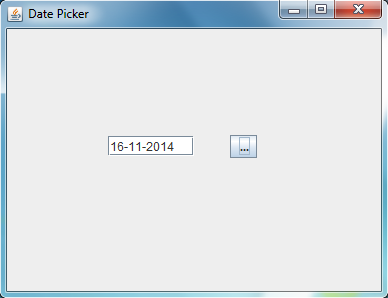
In this tutorial we learnt about how to use Date picker component in java with example.
About the Author




thanks a lot.
This has help me lot. Thank you for post.