

A few months ago, I built a chatbot that confidently gave wrong answers.
It looked smart. It sounded convincing. But it hallucinated product details, outdated policies, and even made up information that didn’t exist.
That’s when I realized a core limitation of large language models: They are great at reasoning—but terrible at remembering accurate, up-to-date facts.
This is why concepts like AI explainability and reliability are becoming critical in modern systems—especially when models generate confident but incorrect outputs.
If you want to explore this deeper, read more about why explainability is critical in AI system design.
The solution? Retrieval-Augmented Generation (RAG).
Instead of forcing an AI model to “remember everything,” a RAG system lets it:
- Search for relevant information
- Retrieve the right context
- Generate answers grounded in real data
In this guide, you’ll learn how to build a RAG system step by step using Python, even if you’re not from a strong coding background.
By the end, you’ll have a working system and understand:
- How RAG architecture works
- How to implement retrieval + generation
- How to improve accuracy and avoid hallucinations
Let’s build it from scratch.
What is a RAG System?
A RAG system combines two things:
- Retrieval system → Finds relevant information
- Language model (LLM) → Generates answers
Instead of relying on memory (which causes hallucinations), the model looks up information first, then answers.
Simple analogy: Open-book exam vs closed-book exam.
RAG Architecture (Simple View)
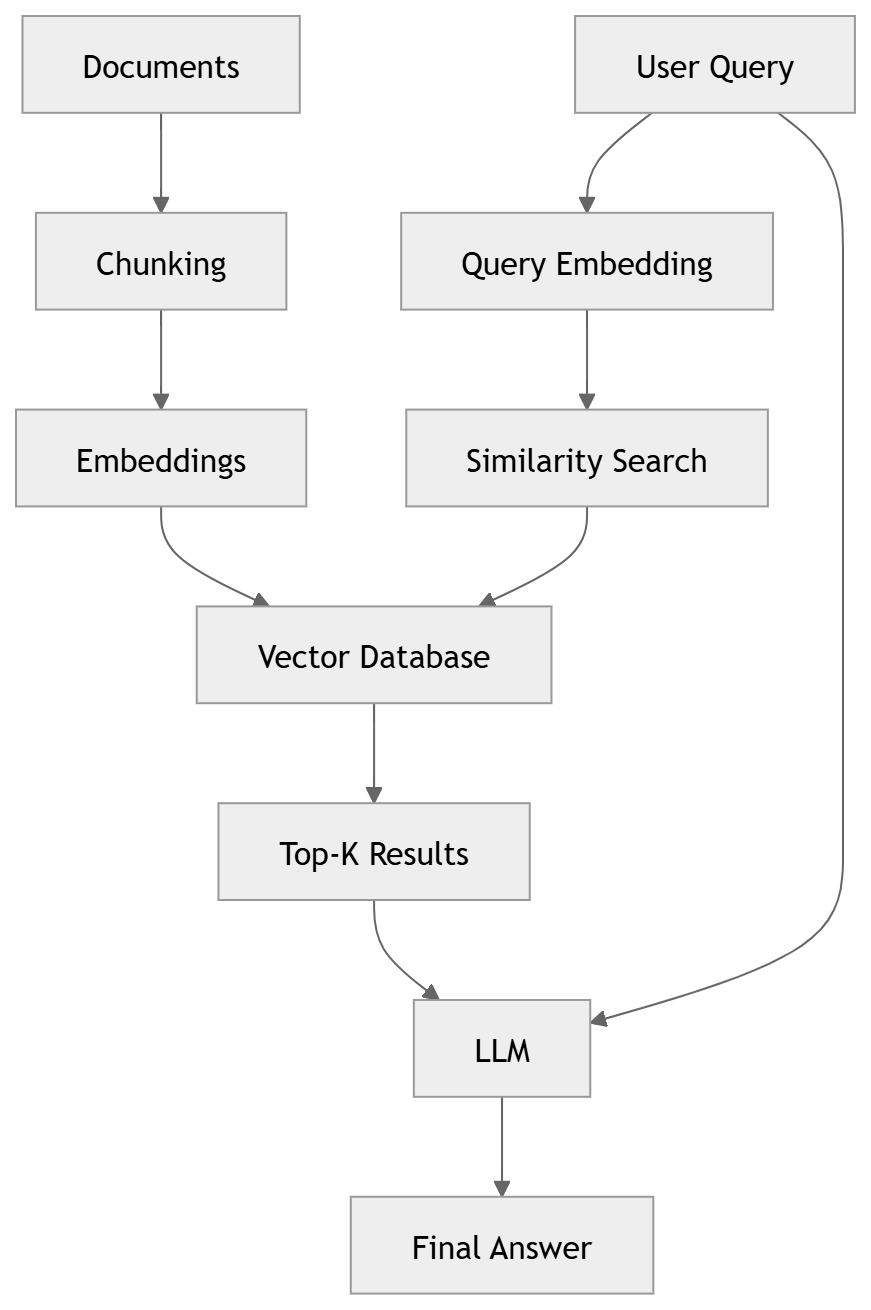
A typical RAG pipeline looks like this:
Documents → Chunking → Embeddings → Vector Database
User Query → Retrieval → LLM → Final Answer
We’ll build this exact pipeline step by step.
How This Works
- Documents are split into smaller chunks
- Each chunk is converted into embeddings (vectors)
- Stored inside a vector database
- User query is also converted into an embedding
- System retrieves the most relevant chunks
- LLM generates an answer using that context
The key idea: LLM doesn’t rely on memory—it relies on retrieved knowledge
Step 1: Set Up Environment
Install Required Libraries
Run this in your terminal:

pip install sentence-transformers faiss-cpu openai
Step 2: Prepare Your Data
Start simple. Create a small dataset inside your Python file:
documents = [

    "Our refund policy allows returns within 30 days.",

    "Shipping takes 3-5 business days.",

    "We support Visa, Mastercard, and PayPal.",

    "Customer support is available 24/7 via email."

]
Each line is a document chunk.
Step 3: Create Embeddings
Embeddings convert text into numbers so machines can understand meaning.
from sentence_transformers import SentenceTransformer

model = SentenceTransformer('all-MiniLM-L6-v2')
embeddings = model.encode(documents)
Step 4: Store in Vector Database (FAISS)
import faiss
import numpy as np

# Get dimension of embeddings
dimension = embeddings.shape[1]

# Create FAISS index
index = faiss.IndexFlatL2(dimension)

# Add embeddings to index
index.add(np.array(embeddings))
Step 5: Build Retrieval Function
This finds the most relevant documents for a query.
def retrieve(query, k=2):
    query_embedding = model.encode([query])
    distances, indices = index.search(query_embedding, k)
    return [documents[i] for i in indices[0]]
Step 6: Generate Answer with LLM
import openai

openai.api_key = "YOUR_API_KEY"

def rag_query(question):
    context = retrieve(question)

    prompt = f"""
    Answer the question using only the context below:

    Context:
    {chr(10).join(context)}

    Question: {question}
    """

    response = openai.ChatCompletion.create(
        model="gpt-3.5-turbo",
        messages=[{"role": "user", "content": prompt}]
    )

    return response.choices[0].message.content
Step 7: Test Your RAG System
print(rag_query("How long does shipping take?"))
You now have a working RAG system in Python.
Complete Working Code
from sentence_transformers import SentenceTransformer
import faiss
import numpy as np
import openai

# API Key
openai.api_key = "YOUR_API_KEY"

# Step 1: Documents
documents = [
    "Our refund policy allows returns within 30 days.",
    "Shipping takes 3-5 business days.",
    "We support Visa, Mastercard, and PayPal.",
    "Customer support is available 24/7 via email."
]

# Step 2: Embeddings
model = SentenceTransformer('all-MiniLM-L6-v2')
embeddings = model.encode(documents)

# Step 3: FAISS Index
dimension = embeddings.shape[1]
index = faiss.IndexFlatL2(dimension)
index.add(np.array(embeddings))

# Step 4: Retrieval
def retrieve(query, k=2):
    query_embedding = model.encode([query])
    distances, indices = index.search(query_embedding, k)
    return [documents[i] for i in indices[0]]

# Step 5: RAG Query
def rag_query(question):
    context = retrieve(question)

    prompt = f"""
    Answer using only the context:

    {chr(10).join(context)}

    Question: {question}
    """

    response = openai.ChatCompletion.create(
        model="gpt-3.5-turbo",
        messages=[{"role": "user", "content": prompt}]
    )

    return response.choices[0].message.content

# Test
print(rag_query("What is the refund policy?"))
Improving Your RAG System (Beginner → Advanced)
1. Better Chunking
- Use 500–800 tokens
- Add overlap (10–20%)
2. Hybrid Search
Combine:
- Semantic search (embeddings)
- Keyword search (BM25)
3. Reranking
Use a second model to improve results accuracy.
4. Use Better Vector Databases
- FAISS → Beginner
- ChromaDB → Intermediate
- Qdrant / Pinecone → Production
As your RAG system moves from prototype to production, scalability and monitoring become critical. To understand how to handle performance, reliability, and system health, read more about cloud scalability and observability in modern systems.
Build RAG with LangChain (Beginner-Friendly Framework)
Once you understand how RAG works manually, you can use frameworks like LangChain to simplify development.
Install Dependencies
pip install langchain chromadb openai
Simple LangChain RAG Example
from langchain.document_loaders import TextLoader
from langchain.text_splitter import CharacterTextSplitter
from langchain.embeddings import OpenAIEmbeddings
from langchain.vectorstores import Chroma
from langchain.chains import RetrievalQA
from langchain.chat_models import ChatOpenAI

# Load documents
loader = TextLoader("data.txt")
documents = loader.load()

# Split into chunks
text_splitter = CharacterTextSplitter(chunk_size=500, chunk_overlap=50)
docs = text_splitter.split_documents(documents)

# Create embeddings
embeddings = OpenAIEmbeddings()

# Store in vector DB
db = Chroma.from_documents(docs, embeddings)

# Create retriever
retriever = db.as_retriever()

# Create QA chain
qa = RetrievalQA.from_chain_type(
   llm=ChatOpenAI(model="gpt-3.5-turbo"),
   retriever=retriever
)

# Ask question
response = qa.run("What is this document about?")
print(response)
Why Use LangChain?
- Handles chunking automatically
- Built-in retrieval pipelines
- Easy integration with multiple LLMs
- Faster development for production apps
But remember: frameworks hide complexity.
If something breaks, you’ll need the fundamentals you learned earlier.
Common Mistakes to Avoid
- Chunks too small → poor context
- No overlap → incomplete answers
- No filtering → irrelevant results
- Blind trust in retrieval → hallucinations
When Should You Use RAG?
Use RAG when:
- Data changes frequently
- You need accurate answers
- You want citations
Avoid RAG when:
- You only need style/tone changes
Pro Tips for Building Better RAG Systems
- Start simple: Don’t over-engineer your first version
- Use chunk overlap (10–20%) to avoid broken context
- Always test with real user queries—not ideal examples
- Add metadata (date, source) for better filtering
- Use reranking to improve answer quality significantly
- Monitor latency—LLMs are often the bottleneck
- Cache embeddings to reduce cost
- Prefer smaller models + good retrieval over large models alone
Frequently Asked Questions related to RAG (FAQs)
What is a RAG implementation example?
A RAG implementation example combines document retrieval (via embeddings and vector search) with an LLM to generate grounded answers. The Python code in this guide is a complete working example you can run and modify.
Can I build a RAG system without coding?
Not entirely. However, tools like LangChain, LlamaIndex, and no-code AI platforms significantly reduce the complexity. Still, understanding the basics is essential for debugging and scaling.
Is RAG better than fine-tuning?
RAG is better when your data changes frequently or when you need factual accuracy. Fine-tuning is better for controlling tone, style, or behavior. In real-world systems, both are often used together.
What is the best vector database for RAG?
For beginners, FAISS is simple and fast. For production systems, tools like Pinecone, Qdrant, or Weaviate offer scalability, filtering, and better performance.
How accurate are RAG systems?
Accuracy depends on retrieval quality. With proper chunking, reranking, and good embeddings, RAG systems can significantly reduce hallucinations and achieve high reliability.
Can I use RAG for chatbots?
Yes—RAG is one of the most common architectures for building AI chatbots that answer questions based on custom data like PDFs, documentation, or internal knowledge bases.
Next Step
Try modifying this project:
- Replace documents with PDFs
- Build a chatbot UI
- Add real-world data
That’s how you go from beginner → production.
If you’re building projects like this, your growth depends on how fast you learn and iterate. Here’s a great guide on how confident developers learn faster and build better systems.
Final Thoughts
A RAG system is not just a feature—it’s the foundation of reliable AI applications.
Start simple (like this tutorial), then improve step by step:
- Build basic RAG
- Improve chunking
- Add hybrid search
- Optimize for production
Check Out These Tutorials on RAG Systems:
About the Author


