This tutorial provides brief explanation about creating multiple frames in java where we will be creating two classes i.e. OldWindow class and NewWindow class. OldWindow class will deal with the actual logic of frame creation and NewWindow class consists the design structure of JFrame.
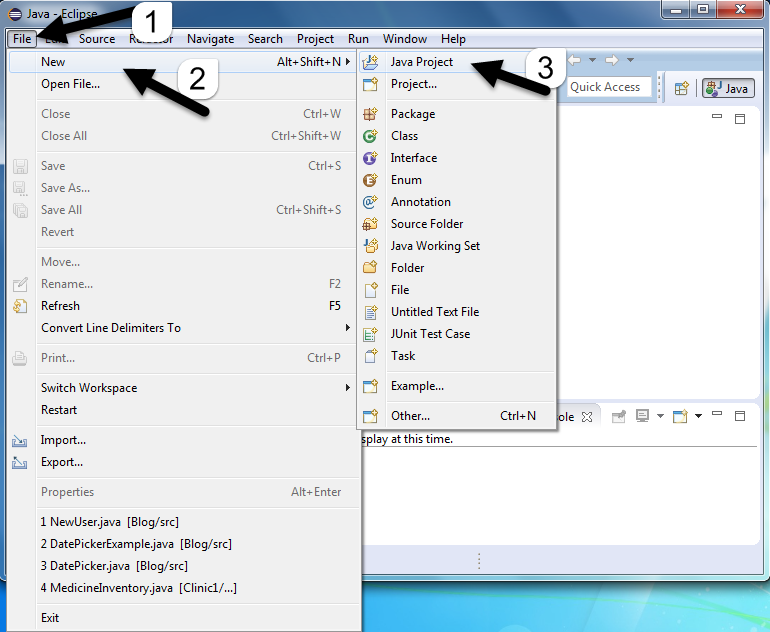
- Open Eclipse, Go to File-> New-> Java Project, you will get below view
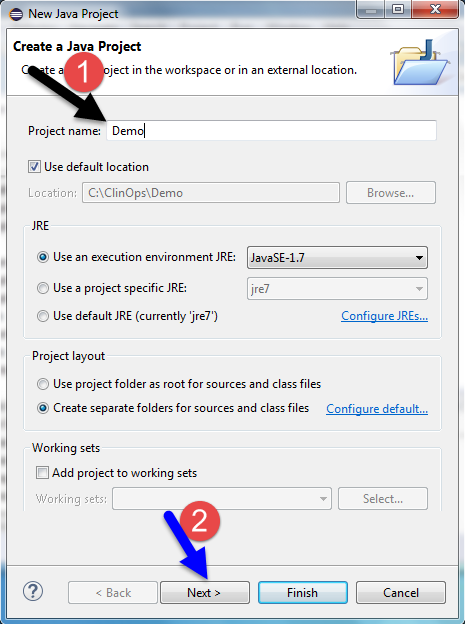
- A dialog box will pop up which will ask you to enter the project details.
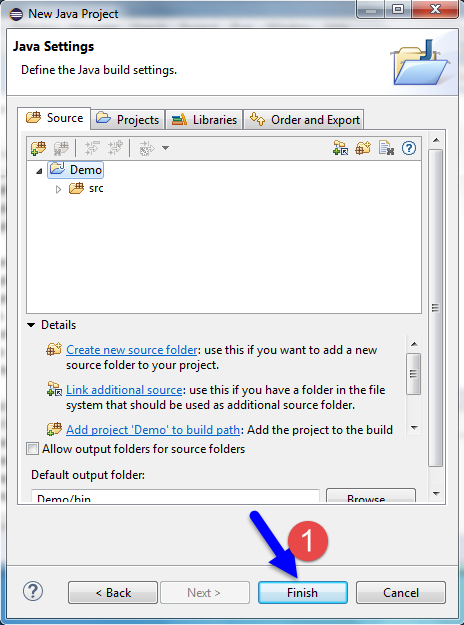
- Select your project, from the package explorer as shown below :
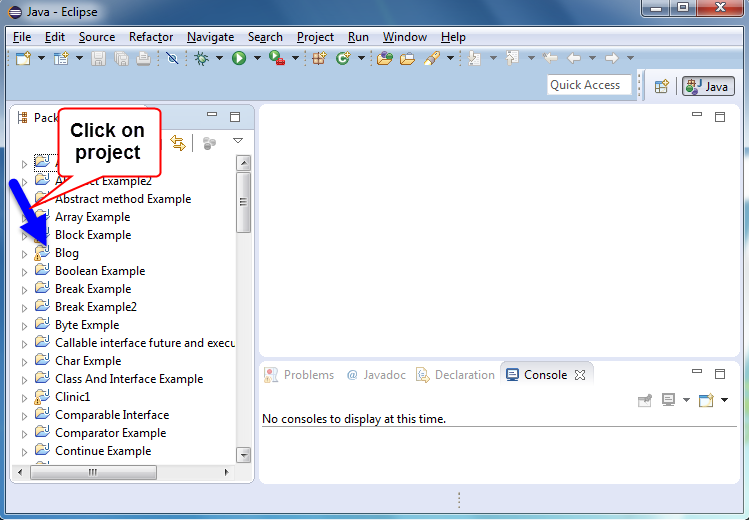
- Follow the below steps to create new class :
- Click on Project, right click on src -> New -> Class as shown below :

- A dialog box will appear where you will have to set your class name and then select Finish button.
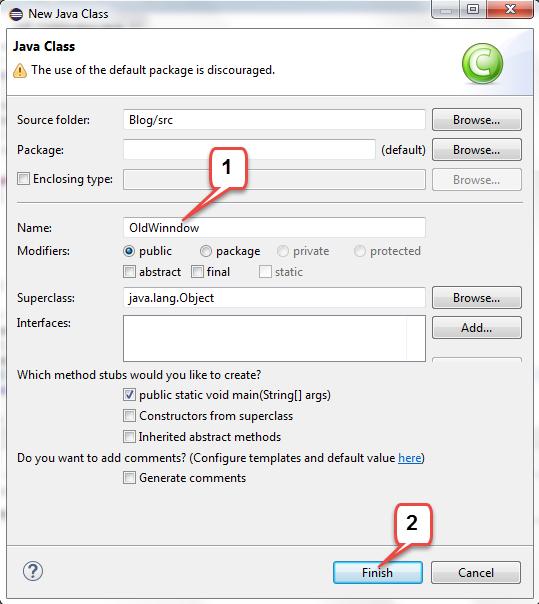
- Now create two classes one is OldWindow.java and second one is NewWindow.java .
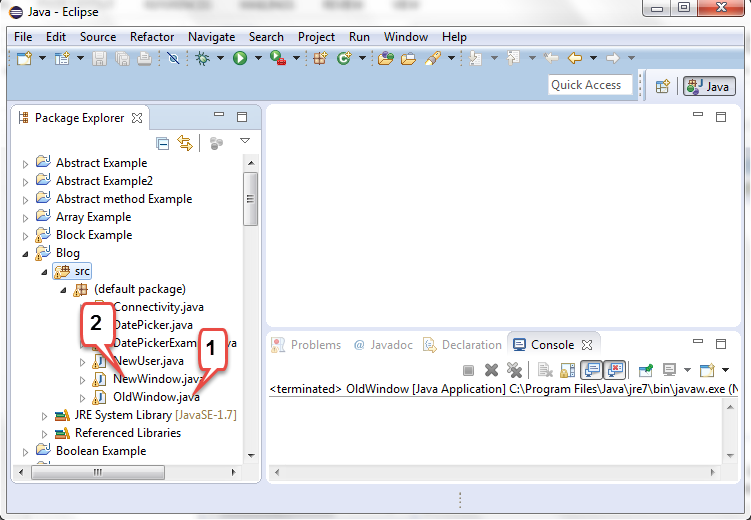
Example :
OldWindow.java
In this OldWindow.java write the actual logic code, in this class write the code which creates JFrame, add JButton for open New Frame.
//import statement
import java.awt.Color;
import java.awt.EventQueue;
import java.awt.Font;
import java.awt.event.ActionEvent;
import java.awt.event.ActionListener;
import javax.swing.JButton;
import javax.swing.JFrame;
import javax.swing.JLabel;
import javax.swing.JPanel;
import javax.swing.border.EmptyBorder;

//create class and extend with JFrame
public class OldWindow extends JFrame
{
	//declare variable
	private JPanel contentPane;

	/**
	 * Launch the application.
	 */
	//main method
	public static void main(String[] args)
	{
	  /* It posts an event (Runnable)at the end of Swings event list and is
		processed after all other GUI events are processed.*/
		EventQueue.invokeLater(new Runnable()
		{
			public void run()
			{
				//try - catch block
				try
				{
					//Create object of OldWindow
					OldWindow frame = new OldWindow();
					//set frame visible true
					frame.setVisible(true);
				}
				catch (Exception e)
				{
					e.printStackTrace();
				}
			}
		});
	}

	/**
	 * Create the frame.
	 */
	public OldWindow()//constructor
	{
		//set frame title
		setTitle("Old Frame");
		//set default close operation
		setDefaultCloseOperation(JFrame.DISPOSE_ON_CLOSE);
		//set bounds of the frame
		setBounds(100, 100, 450, 300);
		//create object of JPanel
		contentPane = new JPanel();
		//set border
		contentPane.setBorder(new EmptyBorder(5, 5, 5, 5));
		//set ContentPane
		setContentPane(contentPane);
		//set null
		contentPane.setLayout(null);

		//create object of JButton and set label on it
		JButton btnNewFrame = new JButton("New");
		//add actionListener
		btnNewFrame.addActionListener(new ActionListener()
		{
			public void actionPerformed(ActionEvent arg0)
			{
			//call the object of NewWindow and set visible true
				NewWindow frame = new NewWindow();
				frame.setVisible(true);
				//set default close operation
			setDefaultCloseOperation(JFrame.DISPOSE_ON_CLOSE);
			}
		});
		//set font of the Button
		btnNewFrame.setFont(new Font("Microsoft YaHei UI", Font.BOLD, 12));
		//set bounds of the Button
		btnNewFrame.setBounds(180, 195, 78, 25);
		//add Button into contentPane
		contentPane.add(btnNewFrame);

		//set Label in the frame
		JLabel lblThisIsOld = new JLabel("This is Old Frame");
		//set foreground color to the label
		lblThisIsOld.setForeground(Color.BLUE);
		//set font of that label
lblThisIsOld.setFont(new Font("Times New Roman", Font.BOLD | Font.ITALIC, 24));
		//set bound of the label
		lblThisIsOld.setBounds(127, 82, 239, 39);
		//add label to the contentPane
		contentPane.add(lblThisIsOld);
	}
}
Example :
NewWindow.java
In this class write the code which creates JFrame, add JLabel into the New Frame.
//import statement
import java.awt.Color;
import java.awt.EventQueue;
import java.awt.Font;
import javax.swing.JFrame;
import javax.swing.JLabel;
import javax.swing.JPanel;
import javax.swing.border.EmptyBorder;

//create class and extend with JFrame
public class NewWindow extends JFrame
{
	//declare variable
	private JPanel contentPane;
	/**
	 * Launch the application.
	 */
	//main method
	public static void main(String[] args)
	{
	/* It posts an event (Runnable)at the end of Swings event list and is
		processed after all other GUI events are processed.*/
		EventQueue.invokeLater(new Runnable()
		{
			public void run()
			{
				//try - catch block
				try
				{
					//Create object of NewWindow
					NewWindow frame = new NewWindow();
					//set frame visible true
					frame.setVisible(true);
				}
				catch (Exception e)
				{
					e.printStackTrace();
				}
			}
		});
	}

	/**
	 * Create the frame.
	 */
	public NewWindow() //constructor
	{
		//set frame title
		setTitle("New Frame");
		//set default close operation
		setDefaultCloseOperation(JFrame.DISPOSE_ON_CLOSE);
		//set bounds of the frame
		setBounds(100, 100, 450, 300);

		//create object of JPanel
		contentPane = new JPanel();
		//set border
		contentPane.setBorder(new EmptyBorder(5, 5, 5, 5));
		//set ContentPane
		setContentPane(contentPane);
		//set null
		contentPane.setLayout(null);

		//label in the frame
		JLabel lblWelcome = new JLabel("Welcome this is New Frame");
		//set fore ground color to the label
		lblWelcome.setForeground(Color.RED);
		//set font to the label
lblWelcome.setFont(new Font("Times New Roman", Font.BOLD | Font.ITALIC, 24));
		//set bounds of the label
		lblWelcome.setBounds(75, 100, 294, 32);
		//add label to the contentPane
		contentPane.add(lblWelcome);
	}
}
Output :
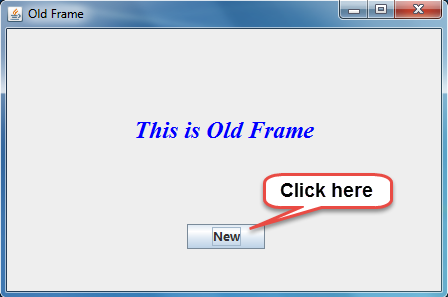
You will get below output :
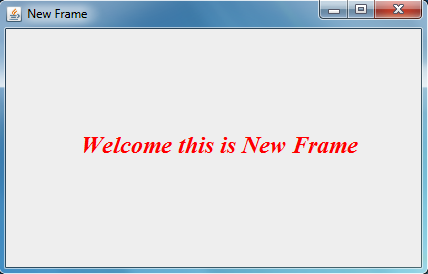
Simillarly, you can create multiple frames and navigate from one frame to another.
Thus, in this tutorial we successfully learnt how to create multiple frames in java.
About the Author