
We are now familiar with the conditional/decision making statement, if…else. Today we will learn a similar decision making statement called switch-case in this PHP Switch Statement tutorial.
- Switch-case statement:
- Switch-case is another statement which works similar to if…elseif…else statement.
- But in if…elseif…else there are many elseif statements used. If these statements are more in number, it becomes very difficult to trace out which block belongs to which elseif statement.
- On the other hand the same thing is organized in a very systematic way which is called as switch-case.
- Let us first see syntax of switch – case statement:
switch(variable or expression)
{
		case value1:
                             Statement(s);    //code to be executed
                             break;
		case value2:
                             Statement(s);    //code to be executed
                             break;
		case value3:
                             Statement(s);    //code to be executed
                             break;
		-
		-
		-
			        break;
		default:
                        Statement(s);    //code to be executed
                        break;

}
<html>
<head>
<title>switch-case statement</title>
</head>
<body>
<h2>Demonstration of switch-case statement</h2>
<?php
echo "Options for arithmetic operations are:<br>";
echo "1.Add 2.Subtract<br>3.Multiply 4.Divide<br><br>";
$num1=60;
$num2=40;
$op=1;
switch($op)
{
case 1: echo "You selected option <strong>Add</strong>.<br><br>";
$ans=$num1+$num2;
echo "<strong>".$num1." + ".$num2." = ".$ans."</strong>";
break;
case 2: $ans=$num1-$num2;
echo "<strong>".$num1." - ".$num2." = ".$ans."</strong>";
break;
case 3: $ans=$num1*$num2;
echo "<strong>".$num1." * ".$num2." = ".$ans."</strong>";
break;
case 4: $ans=$num1/$num2;
echo "<strong>".$num1." / ".$num2." = ".$ans."</strong>";
break;
default: echo "<strong>Have a good day.</strong>";
}
?>
</body>
</html>
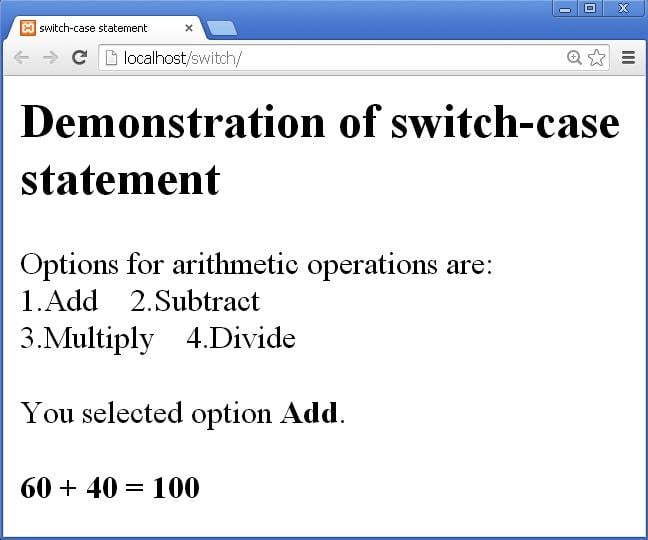
fig 1

fig 2
- We can also use strings as case values in switch-case statement:
- Let us see an example:
- Write the following code in index.php file:
<html>
<head>
<title>switch-case statement</title>
</head>
<body>
<h2>Demonstration of switch-case statement</h2>
<?php
echo "List of fruits is as follows:<br>";
echo "Which fruit do you like?<br>";
echo "A. Apple B. Banana M. Mango O. Orange<br><br>";
$op='M';
switch($op)
{
case 'A': echo "<strong>You like Apple.</strong>";
break;
case 'B': echo "<strong>You like Banana.</strong>";
break;
case 'M': echo "<strong>You like Mango.</strong>";
break;
case 'O': echo "<strong>You like Orange.</strong>";
break;
default: echo "<strong>You don't like any fruit specified above.</strong>";
break;
}
?>
</body>
</html>
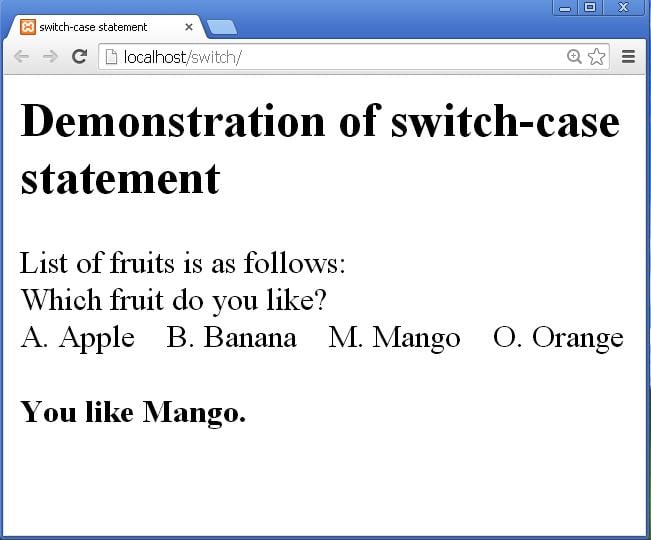
fig 3
- The break statement is very useful in switch-case statement.
- We can make its use in many different ways.
- When we don’t give break after a case and if that case is executed, it will execute the code of next case also along with it.
- Let us remove the break statement of case ‘A’ in the example of fruits above. The PHP code is shown below:
<?php
echo "List of fruits is as follows:<br>";
echo "Which fruit do you like?<br>";
echo "A. Apple B. Banana M. Mango O. Orange<br><br>";
$op='A';
switch($op)
{
case 'A': echo "<strong>You like Apple.</strong>";
//break;
case 'B': echo "<strong>You like Banana.</strong>";
break;
case 'M': echo "<strong>You like Mango.</strong>";
break;
case 'O': echo "<strong>You like Orange.</strong>";
break;
default: echo "<strong>You don't like any fruit specified above.</strong>";
break;
}
?>
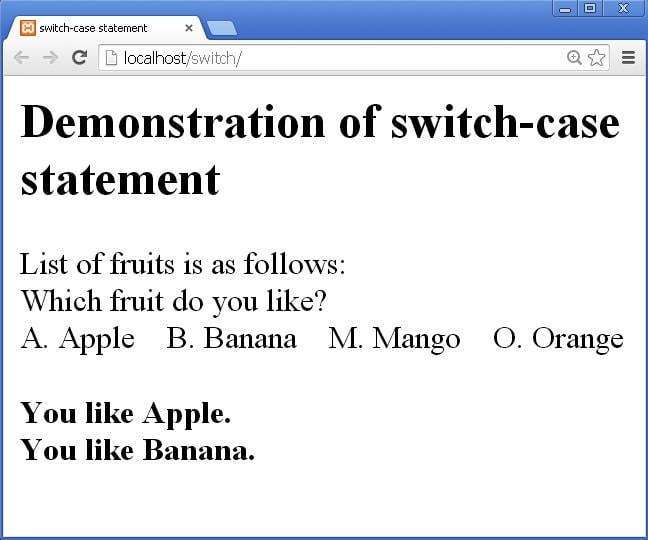
fig 4
html>
<head>
<title>switch-case statement</title>
</head>
<body>
<h2>Demonstration of switch-case statement</h2>
<?php
echo "List of fruits is as follows:<br>";
echo "Which fruit do you like?<br>";
echo "A. Apple B. Banana M. Mango O. Orange<br><br>";
$op='o';
switch($op)
{
case 'a':
case 'A': echo "<strong>You like Apple.</strong><br>";
break;
case 'b':
case 'B': echo "<strong>You like Banana.</strong><br>";
break;
case 'm':
case 'M': echo "<strong>You like Mango.</strong><br>";
break;
case 'o':
case 'O': echo "<strong>You like Orange.</strong><br>";
break;
default: echo "<strong>You don't like any fruit specified above.</strong>";
break;
}
?>
</body>
</html>

fig 5
- A switch case statement can contain another switch case statement.
- The inside switch statement is called inner switch statement and the switch statement containing it is called outer switch statement.
- Let us see an example:
- Write the following code in index.php file:
<html>
<head>
<title>switch-case statement</title>
</head>
<body>
<h4>Demonstration of switch-case statement</h4>
<?php
echo "List of Designations is as follows:<br>";
echo "Select any one designation to know its salary.<br>";
echo "M. Manager a. Accountant S. Salesperson<br><br>";
$op='M';
switch($op)
{
case 'm':
case 'M': echo "<strong>You selected Manager.</strong><br>";
echo "Select the field of Manager.<br>";
echo "1. Purchase Manager 2. Sales Manager<br><br>";
$man=2;
switch($man)
{
case 1:
echo "<strong>You selected Purchase Manager.</strong><br>";echo "Salary of Purchase Manager is Rs. 20000/-";
break;
case 2:
echo "<strong>You selected Sales Manager.</strong><br>";
echo "Salary of Sales Manager is Rs. 18000/-";
break;
}
break;
case 'a':
case 'A': echo "<strong>You like Banana.</strong><br>";
break;
case 's':
case 'S': echo "<strong>You like Mango.</strong><br>";
break;
default: echo "<strong>You selected an incorrect option.</strong>";
break;
}
?>
</body>
</html>

fig 6
Thus we finished learning the switch case statement along with its different forms in this PHP Switch Statement tutorial.
About the Author



1 thought on “PHP Switch Statement”