
Today we are going to learn a very interesting topic of sending a form data in an email from one email-id to another using PHP in this PHP Form Email tutorial.
- PHP provides a very easy way to send email using a mail() function.
- This mail() function takes 5 parameters:
- to: this parameter is mandatory. It specifies the recipient’s email address(s).
- subject: this parameter is mandatory. It specifies the subject of the email.
- message: this parameter is mandatory. It specifies the actual message body. In PHP the message should not exceed 70 characters.
- headers: this parameter is optional. It specifies additional headers like From, Content type, Cc, Bcc, etc. These headers should be separated with \r\n.
- parameters: this parameter is optional. It specifies the additional parameters.
- • Let us try sending a simple form data accepted by user in the email. For that we have to create a HTML form to take user input.
- Then we will send the message using mail() function of php.
- To demonstrate it, create a new folder named form_email in the htdocs folder in xampp folder. Open a new notepad++ document and save it as index.php in this newly created form_email folder.
- So let us first see the code for the form for sending email:
<html>
<head>
<title>Send Form Email</title>
<style>
	#design{
					border:magenta solid 5px;
			border-radius:20px;
			color:purple;
			font-weight:bold;
	}
	h1{
		color:purple;
		margin-left:40px;
		padding:10px;
	}
	label{
		margin-left:50px;
		margin-bottom:10px;
		display:inline-block;
		width:180px;
	}
	.style{
		margin-top:20px;
		padding:5px;
		margin-left:190px;
		color:purple;
		font-weight:bold;
		border:magenta solid 1px;
	}
	input{
		border:magenta solid 1px;
	}
	.error{
		color:red;
		margin-left:10px;
	}
	.sent{
		margin-left:40px;
		padding:20px;
		color:red;
		font-weight:bold;
	}
</style>
</head>
<body id="design">
<h1>Customer Contact Details</h1>
<?php
	if(!empty($errors))
	{
		foreach($errors as $err)
			echo $err;
	}
?>
<form method="post" action="<?php echo $_SERVER["PHP_SELF"];?>">

<label for="name">Your Name:</label>
<input type="text" name="name" value="<?php if(isset($_POST["name"])) echo $_POST["name"];?>"/>*<br>
<label for="addr">Your Address:</label>
<input type="text" name="addr" value="<?php if(isset($_POST["addr"])) echo $_POST["addr"];?>"/>*<br>
<label for="city">City:</label>
<input type="text" name="city" value="<?php if(isset($_POST["city"])) echo $_POST["city"];?>"/>*<br>
<label for="state">State:</label>
<input type="text" name="state" value="<?php if(isset($_POST["state"])) echo $_POST["state"];?>"/>*<br>
<label for="mob">Mobile Number:</label>
<input type="text" name="mob" value="<?php if(isset($_POST["mob"])) echo $_POST["mob"];?>"/>*
<br>
<label for="email">Email-ID:</label>
<input type="text" name="email" value="<?php if(isset($_POST["email"])) echo $_POST["email"];?>">*<br>
<input type="submit" name="send" value="SUBMIT" class="style"/>
</form>
</body>
</html>
<?php

function clear()
{
	$_POST["name"]="";
	$_POST["addr"]="";
	$_POST["city"]="";
	$_POST["state"]="";
	$_POST["mob"]="";
	$_POST["email"]="";
}
$satisfy=true;
if(isset($_POST["send"]))
{
	$name=$_POST["name"];
	$addr=$_POST["addr"];
	$city=$_POST["city"];
	$state=$_POST["state"];
	$mob=$_POST["mob"];
	$email=$_POST["email"];

	$errors=array();

	if(empty($name))
	{
		$errors[]='<p class="error">* Your name is compulsory.</p>';
		$satisfy=false;
	}
	else
	{
		if(is_string($name))
			$satisfy=true;
		else
		{
			$errors[]='<p class="error">* Name should be in string format.</p>';
			$satisfy=false;
		}
	}

	if(empty($addr))
	{
		$errors[]='<p class="error">* Address cannot be blank.</p>';
		$satisfy=false;
	}

	if(empty($city))
	{
		$errors[]='<p class="error">* City is compulsory.</p>';
		$satisfy=false;
	}
	else
	{
		if(is_string($city))
			$satisfy=true;
		else
		{
			$errors[]='<p class="error">* City should be in string format.</p>';
			$satisfy=false;
		}
	}

	if(empty($state))
	{
		$errors[]='<p class="error">* State is compulsory.</p>';
		$satisfy=false;
	}
	else
	{
		if(is_string($state))
			$satisfy=true;
		else
		{
			$errors[]='<p class="error">* State should be in string format.</p>';
			$satisfy=false;
		}
	}

	if(empty($mob))
	{
		$errors[]='<p class="error">* Mobile number is compulsory.</p>';
		$satisfy=false;
	}
	else
	{
		if(strlen($mob)==10 && is_numeric($mob))
			$satisfy=true;
		else
		{
			$errors[]='<p class="error">* Mobile number should contain a 10 digit number.</p>';
		}
	}

	if(empty($email))
	{
		$errors[]='<p class="error">* Email-id is compulsory.</p>';
		$satisfy=false;
	}
	else
	{
		if(!preg_match('/^[A-Za-z0-9._%-]+@[A-Za-z0-9.-]+\.[A-Za-z]{2,4}$/',$email))
		{
			$errors[]='<p class="error">* Email-id is not in proper format.</p>';
			$satisfy=false;
		}
	}

	if($satisfy==true)
	{
		//mail details
		$mail_to="[email protected]";
		$mail_from=$email;
		$mail_sub="Contact details of the customer";

		$mail_msg="Details of the customer who purchased a Google Android One handset is as follows:\n\n";
		$mail_msg.="Name: ".$name."  Address: ".$addr."  City: ".$city."  State: ".$state."  Mobile Number: ".$mob."  Email-ID: ".$email."\n\n";

		$mail_msg=wordwrap($mail_msg,70);

		$mail_header="From: ".$mail_from."\r\n";
		$mail_header.="Reply-to:".$mail_from."\r\n";
		//mail function
		mail($mail_to,$mail_sub,$mail_msg,$mail_header);
		echo '<p class="sent">** Your message has been sent successfully!</p>';
		clear();
	}

}
?>
if($satisfy==true)
	{
		//mail details
		$mail_to="[email protected]";
		$mail_from=$email;
		$mail_sub="Contact details of the customer";

		$mail_msg="Details of the customer who purchased a Google Android One handset is as follows:\n\n";
		$mail_msg.="Name: ".$name."  Address: ".$addr."  City: ".$city."  State: ".$state."  Mobile Number: ".$mob."  Email-ID: ".$email."\n\n";

		$mail_msg=wordwrap($mail_msg,70);

		$mail_header="From: ".$mail_from."\r\n";
		$mail_header.="Reply-to:".$mail_from."\r\n";
		//mail function
		mail($mail_to,$mail_sub,$mail_msg,$mail_header);
		echo '<p class="sent">** Your message has been sent successfully!</p>';
		clear();
	}
$mail_msg="Details of the customer who purchased a Google Android One handset is as follows:\n\n";
$mail_msg.="Name: ".$name."  Address: ".$addr."  City: ".$city."  State: ".$state."  Mobile Number: ".$mob."  Email-ID: ".$email."\n\n";
$mail_msg=wordwrap($_POST["msg"],70);
$mail_header="From: ".$mail_from."\r\n";
$mail_header.="Reply-to:".$mail_from."\r\n";
function clear()
{
	$_POST["name"]="";
	$_POST["addr"]="";
	$_POST["city"]="";
	$_POST["state"]="";
	$_POST["mob"]="";
	$_POST["email"]="";
}
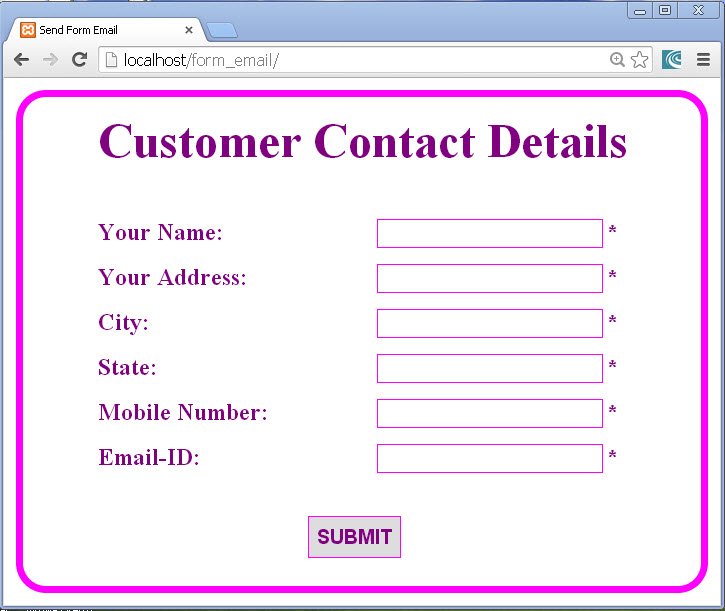
fig 1

fig 2
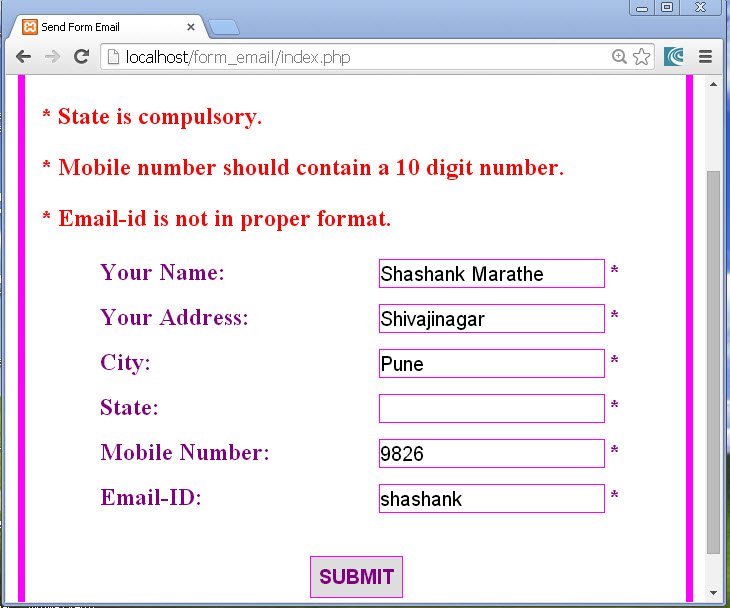
fig 3
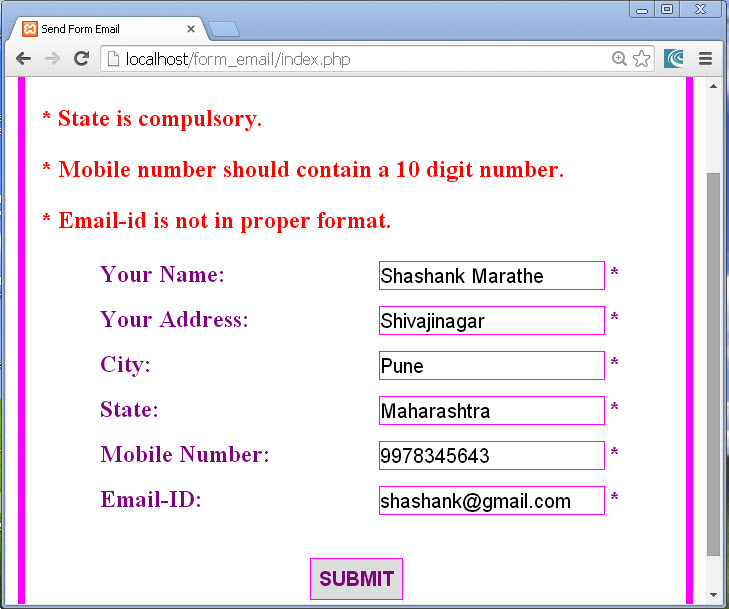
fig 4
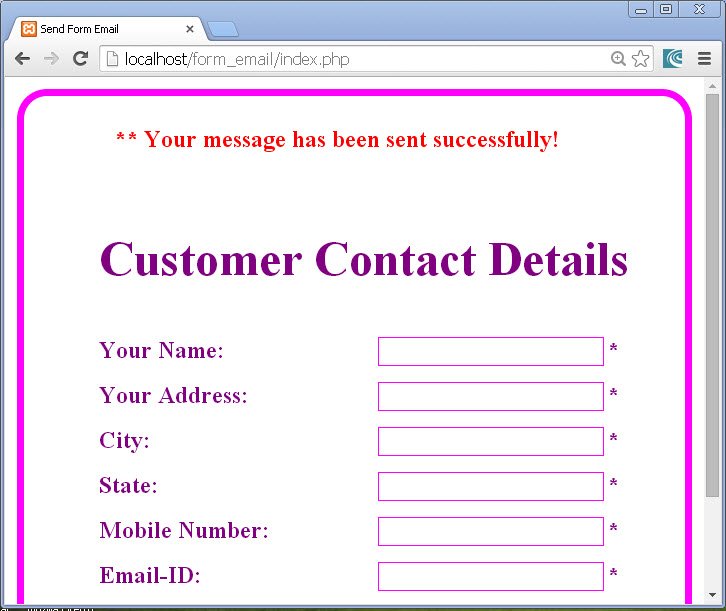
fig 5
Thus we studied how to send a form data in the email using PHP in this PHP Form Email tutorial.
About the Author