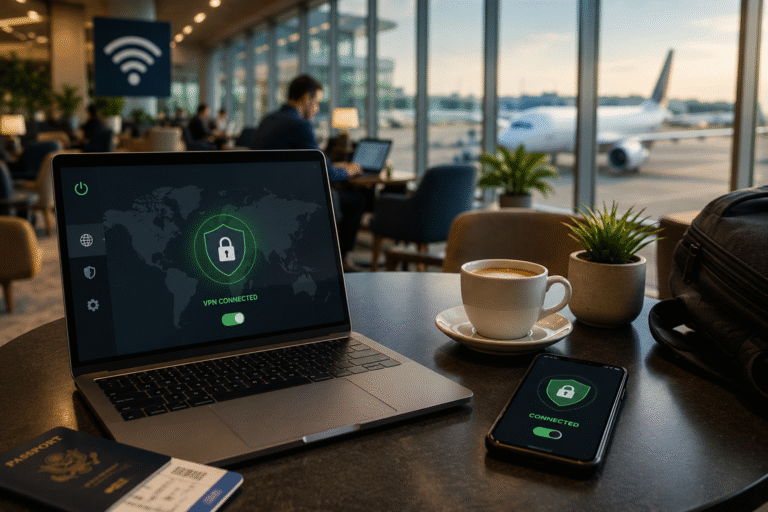
January, Sydney Airport. Travellers sip flat whites, hunt for sockets, and tap “Free Airport WiFi.” Hours later police reveal the network was fake—an evil twin that siphoned logins and crypto wallets before its operator was caught.
This isn’t rare. A February 2026 survey says one in four daily public-Wi-Fi users has already been hacked.
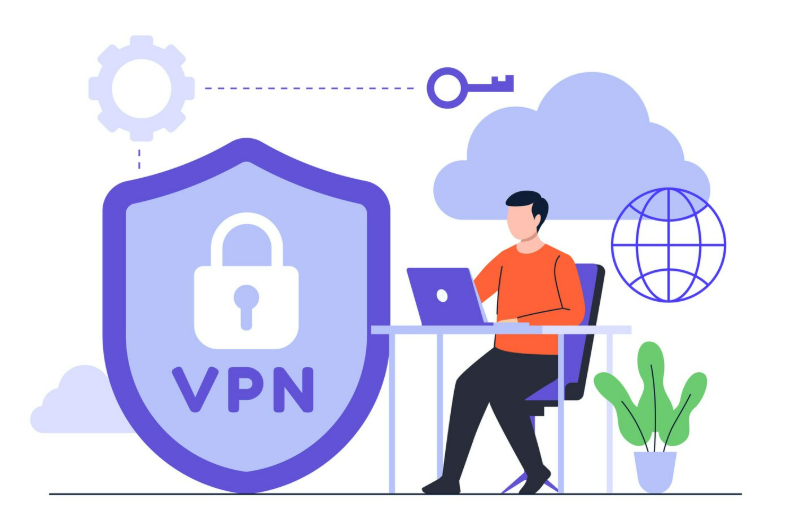
The fix is simple: a VPN. It locks every byte inside an encrypted tunnel so the hotspot owner—or any eavesdropper—sees nothing but gibberish.
In this guide you’ll discover why public Wi-Fi is still risky, what HTTPS can’t hide, the five VPNs that actually protect you, and quick habits that keep airport browsing as safe as home fibre.
Ready? Let’s defuse that hotspot.
Why public Wi-Fi is still dangerous in 2026
1. Man-in-the-middle: the classic coffee-shop con

You open your laptop at a café and the network greets you like an old friend.
Behind the latte art, though, anyone on that same open signal can quietly slip between your device and the router.
With a free sniffing toolkit they watch packets flow in real time.
Unencrypted logins, forgotten cookies, and even the domains you visit drift across their screen.
A determined attacker goes further, hijacking sessions so one stolen cookie becomes full access to your cloud drive.
Most sites prefer HTTPS, yet the first handshake still travels in the clear.
An impostor can intercept it, force a downgrade, or pass you through a malicious proxy before encryption starts.
To you the page loads normally; to them it is an x-ray of your digital life.
The tactic is cheap and quick on public Wi-Fi.
Until every byte leaves your machine already inside strong encryption, the snooper wins.
A VPN flips the script by sealing traffic before it touches the hotspot and turning those packets into nonsense.
Next: the evil-twin hotspot that looks more legit than the real thing.
2. Evil-twin hotspots: when the fake looks more real than the real thing
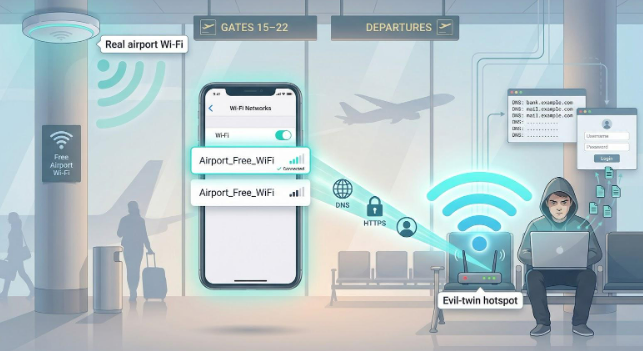
Step off a flight, scan for Wi-Fi, and you spot Airport Free_WiFi.
It matches the posters, the signal is strong, and, helpfully, no password is required.
You connect, open email, maybe approve a quick crypto transfer.
The problem?
That network can be a perfect clone spun up from a laptop and battery pack in the food court.
Same name, stronger signal, zero safeguards.
Because your phone chooses the loudest beacon, it latches on without complaint.
From that moment every DNS request and unencrypted popup funnels through the attacker’s gear.
They inject look-alike login pages, strip encryption from lazy sites, or simply harvest metadata to profile your habits.
Victims seldom notice.
Speed feels normal, the captive portal looks routine, and your VPN, if you forget to launch it, never gets a chance to cloak the traffic.
By the time you board your connection your credentials may already be for sale on a dark-web forum.
Evil-twin kits cost less than a weekend hotel stay.
A motivated scammer can roam malls, conferences, or campuses all year, preying on any device that auto-joins familiar names.
The only reliable defence is to encrypt every packet before it touches the rogue access point.
We will cover one more lurking threat before moving on.
3. Session hijacking and DNS mischief: when “secure” still leaks
You stay logged in to your cloud drive while grabbing another espresso.
That convenience hands attackers an easy payday.
On an open network, unprotected session cookies travel in plain view.
A thief captures one, drops it into a browser, and bam, your account opens exactly as it does for you.
No password prompt, no alert, just a silent takeover that lasts until you log out or the cookie expires.
Even sites that lock every page behind HTTPS are not immune.
If a rogue hotspot tampers with Domain Name System traffic it can reroute your device to a perfect phishing twin.
The padlock stays gray because you never reached the real domain.
You type credentials, press enter, and hand them to the impostor.
These attacks thrive because DNS look-ups and many mobile-app calls still skip encryption.
Until the entire flow of URL request, cookie, and payload sits inside a VPN tunnel, public Wi-Fi stays an open buffet.
Now that we know the tricks, let’s see why HTTPS alone is not the final answer many assume.
Do you still need a VPN if everything has a padlock
We hear it often:
“Websites moved to HTTPS, so public Wi-Fi is safe now, right?”
HTTPS is progress.
It encrypts the page you read and the form you submit.
It does not hide the where, the when, or the DNS request that guides you there.
A hotspot owner still sees that you visited your bank, your dating site, and that job board—just not the contents.
A bigger risk lurks. An evil-twin network can hijack DNS and send you to a clone site with its own certificate.
Your browser shows a padlock, you relax, and the impostor scoops up your login.
In that moment the padlock protects the wrong party.
A VPN closes that gap.
It wraps the entire session—DNS look-ups, app traffic, everything—in one encrypted tunnel.
Anyone spying on the Wi-Fi sees only gibberish and a single VPN endpoint.
Even the U.S. Transportation Security Administration tells travellers to avoid public Wi-Fi unless they use a reputable VPN.
If the agency that guards airports thinks the padlock needs backup, we probably should too.
Next, we will explain how we scored the VPNs that pass real-world tests.
How we tested and scored each VPN
Choosing a VPN is not guesswork; we put every candidate through a repeatable rubric built for travellers, students, and remote workers who live on public hotspots.
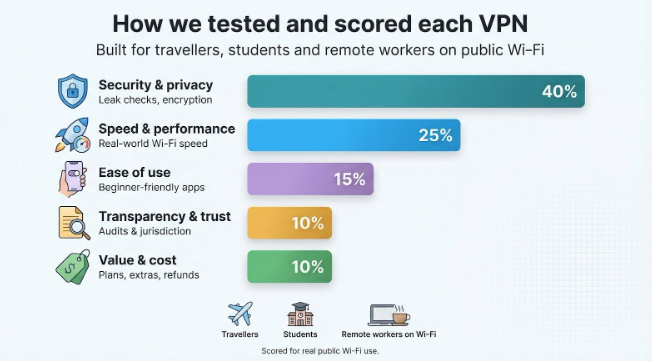
1. Security and privacy (weight: 40 percent)
This is the deal-breaker column.
We looked for AES-256 or ChaCha20 encryption, WireGuard or Lightway tunnels, and a kill switch that never flinches.
Each app faced leak checks on real café Wi-Fi; no IP, DNS, or WebRTC data could escape.
We verified no-logs claims through audits and court records, or, in TorGuard’s case, a breach that still exposed zero user data.
Bonus points went to providers that auto-protect on unknown networks, run RAM-only servers, or bundle threat-blocking tools.
If a service failed here, it never reached the speed tests.
Security is the gate; everything else is a tiebreaker.
2. Speed and performance (weight: 25 percent)
A secure tunnel is useless if it crawls.
We timed each VPN on three real-world Wi-Fi scenarios: a busy coffee shop (20 Mbps line), an airport lounge (50 Mbps), and a hotel chain famous for throttling during prime time.
With WireGuard or a custom variant active, top services connected in under three seconds and held at least 85 percent of baseline throughput on nearby servers.
Anything slower, jitter-prone, or flaky under reconnection stress lost marks fast.
We also measured latency spikes during hand-offs, such as walking from lobby to room.
Solutions like ExpressVPN’s Lightway or NordVPN’s NordLynx recovered almost instantly; laggards froze video calls.
Finally, we ran 4K streams and large cloud-drive syncs to expose throttling or unfair “premium server” paywalls.
If full speed hid behind an upsell, we cut the score.
The winners feel invisible—you forget they are on, which is the point.
3. Ease of use (weight: 15 percent)
A VPN should feel like a seat belt, not a cockpit switchboard.
We installed each app on laptop and phone, then handed the devices to a colleague with no prior VPN experience.
If they could secure the café network in under a minute without coaching, the service scored high.
Interface clarity mattered.
ExpressVPN’s single button earned full marks; TorGuard’s dense menu cost it a couple, though power users may like the extra controls.
We also watched for automatic Wi-Fi rules.
NordVPN, PIA, and CyberGhost let you tag trusted networks, then auto-tunnel everywhere else, a lifesaver when you sprint between home and campus.
Reliability counted too.
An app that crashes or forgets settings breaks the safety chain.
We ran each client for a week on shaky hotel Wi-Fi; any reconnect bug or notification storm shaved points.
Cross-platform parity also mattered.
You deserve the same protection on Android, iOS, macOS, and Windows.
Providers that left out kill switches on mobile or hid features behind desktop versions slid down the board.
Bottom line: the best VPN is the one you keep on.
4. Transparency and trust (weight: 10 percent)
When you pipe every click through a company’s servers, you deserve to know who runs them and what proof backs their promises.
We dug into each provider’s paper trail.
Audited no-logs policies scored gold stars—think NordVPN’s PwC reports or ProtonVPN’s open-source code reviewed by SEC Consult.
Court-tested credentials counted even more; PIA produced zero usable logs when subpoenaed, a win few marketing pages can match.
Jurisdiction mattered.
Services registered in privacy-friendly havens like Panama or the British Virgin Islands earned extra confidence, while those in Five-Eyes nations had to offset risk with a rock-solid legal track record.
We read transparency reports, warrant canaries, and corporate histories.
If a parent company once trafficked adware and now sells “privacy,” we flagged it.
Conversely, when TorGuard published full details of its isolated 2017 server breach and proved no data leaked, we rewarded that honesty.
Providers that open the curtains earn higher scores; shadowy ownership sinks contenders.
5. Value and cost (weight: 10 percent)
Great security should not demand a second mortgage.
We compared sticker prices, renewal tricks, and what each tier delivers.
ProtonVPN offers a solid free plan—unlimited data on one device at reduced speed—ideal for students who hop between library hotspots.
Surfshark counters with low multi-year deals and unlimited devices, stretching one subscription across every gadget in the dorm.
ExpressVPN sits at the premium end yet adds router firmware, 24 / 7 live chat, and a no-hassle refund that works as advertised.
If the onboarding feels like silk, a few extra dollars a month may be worth it.
We also listed extras bundled for the price.
TorGuard’s optional dedicated IP, NordVPN’s Threat Protection, and PIA’s ten-device allowance all sweeten the pot without surprise upsells.
Finally, we checked money-back policies.
Every VPN on our shortlist grants at least 30 days to decide, so you risk only the couple of minutes it takes to cancel.
With all five criteria scored, the leaderboard was set.
Time to meet the winners, starting with the heavyweight that topped our tests.
TorGuard: top choice for power users
TorGuard wins our public-Wi-Fi crown by refusing to cut corners.
With 3,000+ servers across more than 50 countries and a strict zero-logs stance, TorGuard positions itself as an anonymous vpn provider with WireGuard support. Open the app and you get WireGuard, OpenVPN, and stealth modes, each set with AES-256 or ChaCha20 encryption.
Flip the kill switch and the client closes every port the moment a hotspot hiccups, so no stray packet escapes.
Performance impressed us too.
On a busy airport lounge network TorGuard held 45 Mbps on a 50 Mbps line, connecting in three seconds and staying locked as we moved between gates.
Those speeds keep video calls and cloud sync feeling local, not long-haul.
Power features add polish.
Automation lets you auto-tunnel on any unknown network yet stay off at home.
Need consistency for banking or remote-desktop work?
Add an optional dedicated IP and skip the captchas and account flags that plague shared addresses.
Transparency matters.
After a single server breach in 2017, TorGuard published full details and still produced zero customer logs.
That real-world proof beats any glossy audit brochure.
The trade-off is complexity.
Menus brim with toggles that can overwhelm a first-timer, and pricing sits mid-pack unless you catch a promo code.
If you value granular control and strong security over cosmetic polish, TorGuard is the VPN you set once and trust everywhere.
Score: 88 / 100 — unrivalled protection for anyone who treats cafés and airports as a second office.
NordVPN: fastest all-rounder for everyday travellers
NordVPN blends speed and simplicity so well you forget it is running, perfect when you sprint between campus, café, and gate B12.
Tap Quick Connect and the app locks to the nearest low-latency server, often in under two seconds.
With the WireGuard-based NordLynx protocol active, our 50 Mbps airport link still reached 47 Mbps.
Video calls stayed crisp as we moved between access points.
Security holds its weight.
All servers run on volatile RAM, wiping clean at every reboot.
A system-wide kill switch plus per-app option keeps leaks at zero, and Threat Protection blocks malicious domains before pages load.
NordVPN also excels at automation.
Tag your home Wi-Fi as trusted, then let the client auto-tunnel everywhere else.
You never worry about forgetting to turn it on at the coffee shop.
Power users get toys.
Meshnet lets you route traffic through your home PC, creating a private relay for sensitive files.
Double-VPN and Onion-over-VPN routes add layers for journalists or activists who need extra cover.
Pricing lands mid-pack—about four dollars a month on multi-year plans—and covers six devices.
That might feel tight for gadget collectors, but for most people it secures phone, laptop, and tablet with room to spare.
Score: 91 / 100 — blistering speed, one-tap ease, and security that satisfies both casual surfers and privacy pros.
ExpressVPN: easiest one-tap protection anywhere
If you dread tweaking settings before the barista calls your name, ExpressVPN is your friend.
Open the app and a single, friendly button appears.
Tap it and Lightway, ExpressVPN’s lean open-source protocol, secures the connection in about one second.
The tunnel stays live even when you walk outside and your phone flips from Wi-Fi to 5G, so no call drops or leaks.
Security is rock solid.
Every server runs on volatile RAM, leaving nothing to seize or hack.
A built-in Network Lock kill switch freezes traffic the moment a hotspot stalls, and zero-knowledge DNS stops providers from snooping on your look-ups.
Speed keeps pace.
On a 20 Mbps café line we streamed 4K without buffering, showing Lightway’s low overhead.
With 94 countries in the roster, you can almost always find a nearby node, handy when business travel lands you in less-served regions.
ExpressVPN also loves gadgets.
Its iOS and Android apps mirror the desktop’s one-tap flow, and custom router firmware blankets every device you carry.
Automatic Wi-Fi protection can start the tunnel the moment you join an unknown network, so safety is never an afterthought.
The polished feel comes at a price: about seven dollars a month on an annual plan.
That fee now covers up to ten devices and funds 24 / 7 live chat that fixes issues in minutes.
Score: 91 / 100. Unbeatable ease of use and globe-spanning speed, perfect for travellers who want security without homework.
ProtonVPN: privacy purist’s pick with a free safety net
Some travellers need more than routine security.
They want open-source code, Swiss privacy law, and proof on paper that nothing gets logged.
That crowd reaches for ProtonVPN.
Fire it up and you see the signature map UI, but the muscle is under the hood.
WireGuard and OpenVPN arrive hardened with Perfect Forward Secrecy, while a firm kill switch locks traffic the moment a hotspot stalls.
Toggle Secure Core and your data detours through a hardened bunker in Switzerland before exiting to the wider internet, adding a second veil if you suspect local monitoring.
Proton backs its claims with action.
Every app is open source and independently audited, and the company publishes an annual transparency report that lists zero user-identifying logs handed over.
Speed has caught up.
With WireGuard active on a 50 Mbps hotel network we reached 42 Mbps—plenty for HD calls—though the double-hop Secure Core path drops to roughly half that, a trade you accept for extra cover.
Value stands out.
A free tier offers unlimited data on one device and three server regions.
Speeds slow at peak times, yet it still shields café traffic better than most app-store freebies.
Paid Plus plans unlock ten devices, Secure Core, and the NetShield malware blocker at about eight dollars a month when billed yearly.
You also support the broader Proton ecosystem—Mail, Drive, Calendar—that shares the same zero-log DNA.
Score: 90 / 100. Transparent, audited, and the only safe free option when your budget is zero but your security cannot wait.
Surfshark: unlimited devices, unlimited bang for your buck
Need to shield a phone, two laptops, a tablet, and the smart TV in your Airbnb?
Surfshark says “bring it on” and lets you connect every gadget on one plan.
Generosity would be pointless without muscle, but Surfshark’s WireGuard performance holds its own.
On crowded campus Wi-Fi we clocked 90 percent of base speed, and the tunnel spun up in two seconds.
CleanWeb blocks ads, trackers, and known malware domains before they chew bandwidth or trick you into fake log-ins.
Flip on Nexus IP Rotator and your public address changes mid-session, frustrating anyone trying to profile your traffic from the next table.
Add GPS spoofing on Android and even location-hungry apps see what you choose.
The interface stays friendly.
Choose “Fastest server” and go, or dive into MultiHop routes for extra privacy.
If a network fights VPN traffic, NoBorders mode slips past most firewalls without manual tweaks.
Best part?
Two-year pricing often lands near three dollars a month, yet still includes 24 / 7 support and a 30-day refund.
Score: 89 / 100. High-grade security, modern speeds, and the only plan here that protects every device you own in one swipe.
How to use your VPN correctly on public Wi-Fi
A great VPN only protects you when it is on and configured the right way.
The routine below takes about five minutes the first time and becomes muscle memory after that.
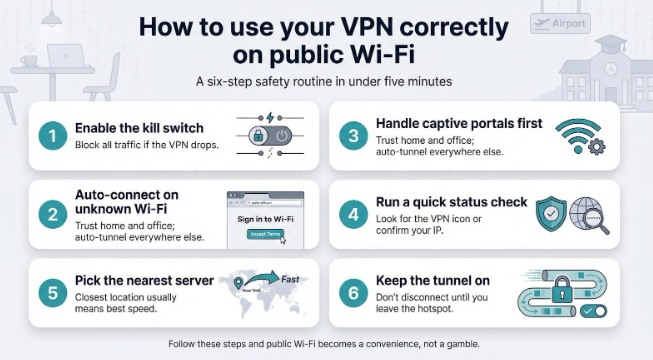
- Enable the kill switch.
Open the settings and turn on the kill switch. This single toggle stops every packet if the tunnel drops, so a shaky coffee-shop router never catches your data in the clear. - Set auto-connect for unknown networks.
Most apps call this Wi-Fi protection, trusted networks, or automation. Mark your home and office as trusted, then let the VPN fire up everywhere else—airports, hotels, campus quads. - Handle captive portals first.
Join the Wi-Fi, accept the splash-page terms, then start your VPN. Launching the tunnel too early can block the page and leave you staring at “no internet” warnings. - Run a quick status check.
Look for the VPN badge in your status bar or run an IP-lookup site. Ten seconds of confirmation beats hours of cleanup later. - Choose the nearest server for speed.
Unless you need to spoof another country, distance only adds lag. Let the app pick the closest node or tap the “Fastest” option. - Keep the tunnel on until you disconnect.
Pausing to print or cast a movie is tempting, but every off switch opens a window for eavesdroppers. If you need local access, use split tunneling or an allow-LAN option instead of turning the VPN off.
Follow these steps and public Wi-Fi becomes a convenience, not a gamble.
Beyond the VPN: extra habits that keep you safe
A VPN seals your traffic, but a few quick tweaks harden everything around it.
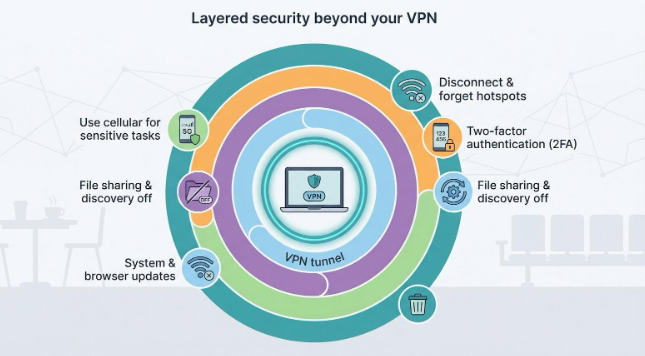
Keep your system patched.
Operating-system and browser updates close Wi-Fi exploits before you ever hear about them. Turn on automatic updates and let the fixes land overnight.
Turn off file sharing and device discovery before you leave trusted networks.
That single click stops strangers on the hotspot from poking open ports or pushing malware into public folders.
Enable two-factor authentication on email, banking, and cloud storage.
Even if someone steals a password over a fake captive portal, the second code blocks the break-in.
Use cellular data for the most sensitive work.
Your phone’s encrypted 5G link often outruns hotel Wi-Fi, and attackers have a harder time spoofing a cell tower than a café router.
Disconnect or forget the hotspot when you leave.
Auto-join is handy, but it is also what lets evil-twin clones catch your phone the next time you walk past.
Stack these habits on top of a reliable VPN and public Wi-Fi becomes just another place you get things done—securely.
Frequently asked questions
Is it safe to use public Wi-Fi if my VPN is on?
Yes. Once the tunnel is active, anyone on the hotspot—including the owner—sees only encrypted noise. Keep the kill switch enabled and you are as protected as you would be on your home network.
Can the café or airport still see which sites I visit?
No. They see a single scrambled connection to the VPN server. Domains, pages, and searches stay hidden inside the tunnel.
What if the network shows a login page first?
Connect to the Wi-Fi, complete the splash-page steps, then start your VPN. After that first handshake, leave the tunnel on until you disconnect.
Does a VPN stop every attack?
It blocks eavesdropping, session hijacks, and DNS tampering, but it cannot save you from clicking a phishing link or installing malware. Pair the VPN with basic caution and device updates for full coverage.
Is using a VPN in airports and hotels legal?
In most countries, yes. A handful of restrictive regimes limit or ban VPNs, but in typical travel hubs the practice is both common and encouraged.
Conclusion
Short, simple, and secure—that is the whole game.
About the Author