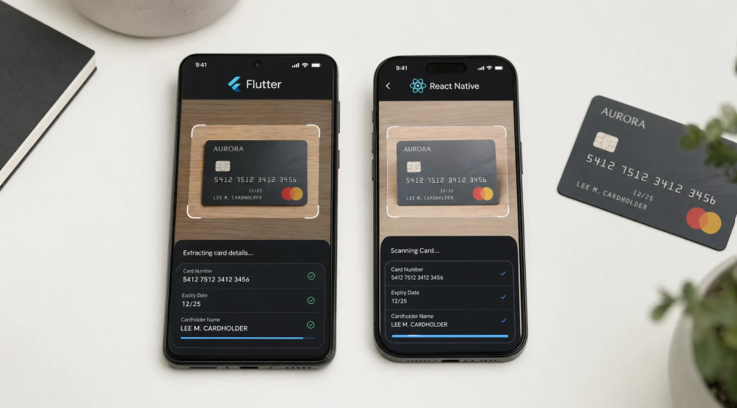
Cross-platform mobile development has become the standard approach for teams that need to ship payment-enabled apps on both iOS and Android without maintaining two separate codebases. Flutter and React Native together power a large share of the mobile commerce applications in production today. However, these frameworks introduce a specific integration challenge when it comes to hardware-adjacent features such as camera-based payment data capture.
Adding a credit card scan capability to a Flutter or React Native app requires bridging native SDKs, which are written in Swift, Kotlin, Java, or Objective-C, into the Dart or JavaScript layer that drives the cross-platform UI. This is not an insurmountable problem, but it requires understanding how the bridging layer works, what each framework demands, and how to maintain performance and compliance through the integration.
This article explains the core concepts, outlines where each framework excels and where it needs extra attention, and provides practical guidance for teams implementing card scanning in a cross-platform codebase.
What Is a Credit Card Scanning SDK?
A credit card scanning SDK is a software development kit that provides OCR (optical character recognition) and computer vision functionality specifically optimized for reading payment card data from a device camera. In other words, it handles the full pipeline from camera frame capture to returning structured card fields, including the card number, cardholder name, and expiry date, as a result object that the application can consume directly.
These SDKs are designed to run the recognition process entirely on-device, without transmitting card images to external servers. This architecture is essential for PCI DSS compliance, the set of security standards governing payment card data handling, because it ensures that card data never travels over a network during the capture phase.
What is also important here is that a card scanning SDK is distinct from a generic OCR library. It is trained specifically on the visual characteristics of payment cards, including embossed digit fonts, flat-printed digit layouts, card background patterns, and the specific field positions used by major card networks. This specialization produces significantly higher accuracy than applying a general-purpose OCR engine to card images.
How Cross-Platform Bridging Works
Understanding the integration architecture requires a brief explanation of how Flutter and React Native interact with native platform code. Both frameworks run application logic in a managed runtime, Dart for Flutter and JavaScript for React Native. When an app needs to call native device capabilities, it uses a bridge mechanism to pass instructions and data between the managed runtime and the native layer.
Flutter Platform Channels
Flutter uses Platform Channels to communicate between Dart code and native iOS or Android modules. A channel is a named, bidirectional communication pipe. The Dart side calls a method by name, passes arguments as a map, and awaits a result. On the native side, a handler registered for that channel name receives the call, executes the native SDK code, and returns the result.
For card scanning, this means the native SDK runs entirely in Swift or Kotlin, with full access to the device camera and GPU acceleration. The Dart layer only sends a trigger call and receives the structured result. Thanks to this separation, the OCR performance is identical to a fully native app, since the recognition itself runs in the native layer.
React Native Native Modules
React Native uses Native Modules, also called Turbo Modules in the newer architecture, to expose native functionality to JavaScript. A native module is a class registered with the React Native bridge that exposes specific methods callable from JavaScript. The card scanning SDK is wrapped in a native module that exposes a scan method, which triggers the native camera session and recognition pipeline, and resolves a JavaScript Promise with the result object.
The newer React Native architecture, introduced with version 0.71 and above, uses JSI (JavaScript Interface) for synchronous native calls where needed, which reduces bridge overhead. For card scanning, where the operation is inherently asynchronous, the standard Promise-based module pattern remains the most widely used option.
When to Use an SDK vs. a Pre-Built Plugin
Teams integrating card scanning have two broad paths: using a pre-built community plugin that wraps a specific SDK, or writing the native bridge themselves against a chosen SDK. The right choice depends on the team’s requirements and constraints.
Pre-Built Plugins
Pre-built plugins for both Flutter and React Native exist for several popular card scanning libraries. These plugins handle the bridging code and provide a ready-to-use Dart or JavaScript API. Here is when a pre-built plugin can enter the game: the team needs to ship quickly, the chosen SDK has a maintained plugin for the target framework, and the plugin’s feature set covers the required use cases.
The downside is limited control. Pre-built plugins may lag behind SDK updates, expose only a subset of the SDK’s configuration options, or introduce dependencies that conflict with other packages in the project. You should attentively analyze the plugin’s maintenance history and last update date before committing to it.
Custom Native Bridge
Writing a custom bridge is the better choice when precise control over the camera session, recognition parameters, or result handling is needed. It is also necessary when the chosen SDK does not have a maintained community plugin for the target framework. The effort is higher upfront but produces a cleaner, more maintainable integration that is not dependent on a third-party wrapper.
What a Reliable Card Scanning SDK Should Have for Cross-Platform Use
Not all card scanning SDKs are equally suited to cross-platform integration. When evaluating options for a Flutter or React Native project, development teams should look for the following characteristics.
- Native iOS and Android SDKs with stable APIs. The SDK’s native interface should be stable across versions. Frequent breaking changes in the native API create ongoing maintenance work in the bridge layer. Pay attention to the vendor’s versioning policy and changelog.
- Well-documented bridging examples. The most highly demanded options are SDKs that provide official or well-maintained sample projects demonstrating Flutter channel or React Native module integration. These examples drastically reduce time-to-market for the bridge implementation.
- On-device processing with no network requirement. Card recognition should complete entirely on-device. We recommend verifying this in the SDK’s technical documentation, not only in marketing materials.
- Support for both embossed and flat-printed cards. Digital bank cards and prepaid cards increasingly use flat print rather than embossed digits. The SDK should handle both formats reliably.
- Configurable UI overlay or headless mode. Cross-platform apps often have custom design systems. The SDK should offer either a configurable camera overlay that can be styled to match the app’s visual language, or a headless mode that returns raw recognition results so the app can render its own UI entirely.
- PCI DSS compliance documentation. The vendor should provide documentation confirming that the SDK’s data handling practices support PCI DSS compliance, including confirmation that card images are not stored or transmitted during recognition.
How to Integrate a Card Scanning SDK in Flutter or React Native
The following steps apply to both frameworks, with framework-specific notes where the approach differs.
- Add the native SDK to each platform target. For Flutter, add the iOS SDK via CocoaPods in the ios/Podfile and the Android SDK via a Gradle dependency in android/build.gradle. For React Native, the same platform-level additions apply. It will be helpful to verify that the SDK version requirements are compatible with your minimum supported OS versions before adding the dependency.
- Declare camera permissions. On iOS, add NSCameraUsageDescription to Info.plist with a clear explanation of why the app needs camera access. On Android, add the CAMERA permission to AndroidManifest.xml. Both platforms require the permission to be requested at runtime before initiating a scan session.
- Implement the native bridge. In Flutter, create a MethodChannel with a unique name and register a handler in AppDelegate (iOS) and MainActivity (Android). In React Native, create a NativeModule class on each platform that exposes a scan method returning a Promise. The native implementation should instantiate the SDK’s scanning view controller or activity, present it, and resolve the Promise or channel call with the result map when recognition completes.
- Consume the result in the cross-platform layer. The result object should provide card number, expiry date, and cardholder name as separate fields. Map these directly to the payment form’s state variables. Handle the case where recognition succeeds but certain fields are not detected, and prompt the user to complete only the missing fields manually.
- Test on physical devices across the target range. Card scanning performance may vary significantly between device models and iOS or Android versions. Testing on physical devices, including mid-range Android hardware, is essential. Simulator and emulator testing cannot replicate real camera behavior and should not be used as the primary validation method.
Conclusion
Integrating a credit card scanning SDK into a Flutter or React Native app requires a native bridge, but the architecture is well-established and the implementation is manageable for teams with cross-platform development experience. The core pattern is the same across both frameworks: a native module or platform channel wraps the SDK’s camera session and recognition logic, and returns structured card data to the cross-platform layer as a Promise or method channel result.
Selecting an SDK with stable native APIs, clear bridging documentation, and confirmed on-device processing will significantly reduce integration effort and ongoing maintenance. Thanks to a well-implemented integration, cross-platform apps can deliver a card scanning experience that is indistinguishable from a fully native implementation, with the same recognition speed, accuracy, and security characteristics.
About the Author