Picture commanding your day like a starship captain, with AI agents as your crew, automating tasks and propelling your productivity to new galaxies. In 2025, AI agents are revolutionizing workflows, handling everything from scheduling to content creation faster than a meteor streak. Whether you’re a student, freelancer, or professional, this guide reveals why AI agents are essential, how to build one with Python, the best tools to try, and practical steps to integrate them into your routine. Ready to launch a stellar workflow? Let’s navigate the cosmos of AI! #EduonixLearning
Table of Contents
- Why AI Agents Are Your 2025 Game-Changer
- Build Your Own AI Agent with Python
- Top AI Agent Tools for 2025
- How to Integrate AI Agents into Your Workflow
- Avoid These Common AI Agent Mistakes
- Get Started with Eduonix
Why AI Agents Are Your 2025 Game-Changer
AI agents are smart tools that automate repetitive tasks, adapt to your needs, and optimize your workflow. By 2026, 80% of professionals will use AI daily (Gartner), and 2025’s advancements in natural language processing (NLP) make agents more intuitive than ever. Key benefits include:
- Time Savings: Automate emails or task tracking to save 2–3 hours daily.
- Smarter Prioritization: AI organizes tasks like a mission control center.
- Effortless Scaling: Manage multiple projects, ideal for freelancers or students.
For tech learners, AI agents free up time for skill-building, making 2025 your most productive year yet.
Build Your Own AI Agent with Python
Let’s create a Python-based AI agent to automate task reminders, styled as a “stellar log” for your space-themed workflow. This example sends email notifications to keep you on track.
import schedule
import time
import datetime
import smtplib
from email.mime.text import MIMEText
# Email setup (use your email credentials)
def send_email(task, recipient=’[email protected]’):
msg = MIMEText(f”Stellar Log {datetime.datetime.now()}: {task} completed!”)
msg[‘Subject’] = ‘Your 2025 Productivity Alert’
msg[‘From’] = ‘[email protected]’
msg[‘To’] = recipient
try:
with smtplib.SMTP(‘smtp.gmail.com’, 587) as server:
server.starttls()
server.login(‘[email protected]’, ‘your_app_password’)
server.send_message(msg)
print(f”Email sent: {task}”)
except Exception as e:
print(f”Email failed: {e}”)
# Schedule a task
def log_mission(task=”Complete Stellar Report”):
print(f”Stellar Log {datetime.datetime.now()}: {task}”)
send_email(task)
# Run every 3 hours
schedule.every(3).hours.do(log_mission, task=”Submit Project Beta”)
# Keep the scheduler running
while True:
schedule.run_pending()
time.sleep(60)
How It Works:
- Install the schedule library: pip install schedule.
- Replace [email protected] and your_app_password with your email credentials (use an app-specific password for Gmail).
- The script logs a task and emails a reminder every 3 hours, like a spaceship’s status update.
- Next Steps: Extend it to post to Slack or sync with Google Calendar.
Follow the flowchart below to build your AI agent, guiding you through four steps: installing the library, coding the agent, testing it, and integrating it into your workflow.
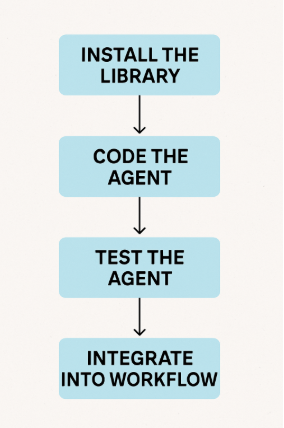
Build Your AI Agent – A Stellar Guide! #EduonixLearning
Top AI Agent Tools for 2025
Explore these tools to supercharge your workflow, each with a space-themed use case:
- ChatGPT: Draft emails or ideas faster than a comet. Example: Generate a client pitch in seconds.
- Zapier: Automate workflows like syncing tasks to your “mission control” (e.g., Trello + Google Calendar). Example: Auto-create tasks from emails.
- Notion AI: Organize notes like a starship’s logs. Example: Summarize study notes into action items.
- ClickUp AI: Prioritize tasks like navigating an asteroid field. Example: Suggest deadlines based on workload.
- Microsoft Copilot: Enhance Office apps for students. Example: Auto-format reports.
Check out the infographic below, highlighting five AI agent features: automation, NLP, integration, prioritization, and scalability, set against a cosmic backdrop.
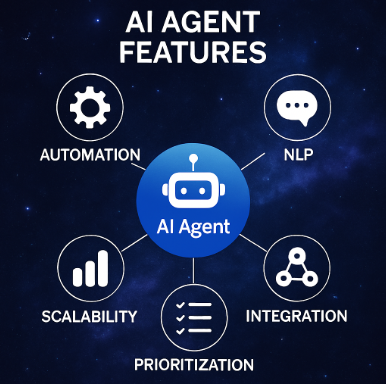
Explore AI Agent Features for 2025 – Perfect for Your Stellar Workflow! #EduonixLearning
How to Integrate AI Agents into Your Workflow
Follow these steps to make AI agents your 2025 co-pilot:
- Identify Time-Wasters: Pinpoint tasks like manual scheduling or data entry.
- Choose a Tool: Start with Zapier for automation or Notion AI for organization.
- Test Small: Try one automation (e.g., auto-scheduling meetings) and track time saved.
- Combine Tools: Use ChatGPT for drafting and Zapier for delivery, like a synchronized space mission.
- Upskill: Learn to customize agents with Eduonix’s AI courses.
Case Study: A freelancer used Zapier to automate client follow-ups and Notion AI for project tracking, saving 12 hours weekly and landing two new clients in 2025.
Avoid These Common AI Agent Mistakes
- Overcomplicating: Start simple to avoid setup frustration.
- Skipping Security: Use strong passwords and 2FA for your AI tools.
- Not Experimenting: Test multiple tools to find the best fit.
Get Started with Eduonix
Ready to boost your workflow to stellar heights? Enroll in our AI Automation Course to build custom AI agents and transform your productivity. Sign up for our newsletter at Eduonix.com to get our exclusive 2025 AI Productivity Checklist! What’s your favorite AI productivity hack? Share in the comments and join our #EduonixLearning community to blast off into 2025!
About the Author