
Modern websites contain thousands of pages, and collecting data one request at a time quickly becomes slow and inefficient. This tutorial shows you how to use Python Asyncio to build a fast, reliable, and production-ready web scraper from scratch. Instead of waiting for each request to finish before sending the next, you will use asynchrony and concurrent computing with Aiohttp to fetch multiple pages simultaneously while keeping your code clean and efficient.
By the end of this guide, you will build a complete python web scraping project that combines Beautiful Soup for HTML parsing, asyncio.create_task() for concurrent execution, asyncio.Semaphore for rate limiting, automatic retries with exponential backoff, CSV export, and production-minded safeguards such as timeout handling, error recovery, and respectful request throttling. You will also learn where tools like Scrapy, selenium python web scraping, selenium beautifulsoup, asyncio.to_thread(), Concurrent.futures, and modern python web scraping libraries fit into real-world projects, and when each approach is the better choice. Every major concept is explained with practical examples, reusable code, and clear workflows so you can confidently build scalable scrapers using today’s latest Python Asyncio techniques.
Workflow You’ll Build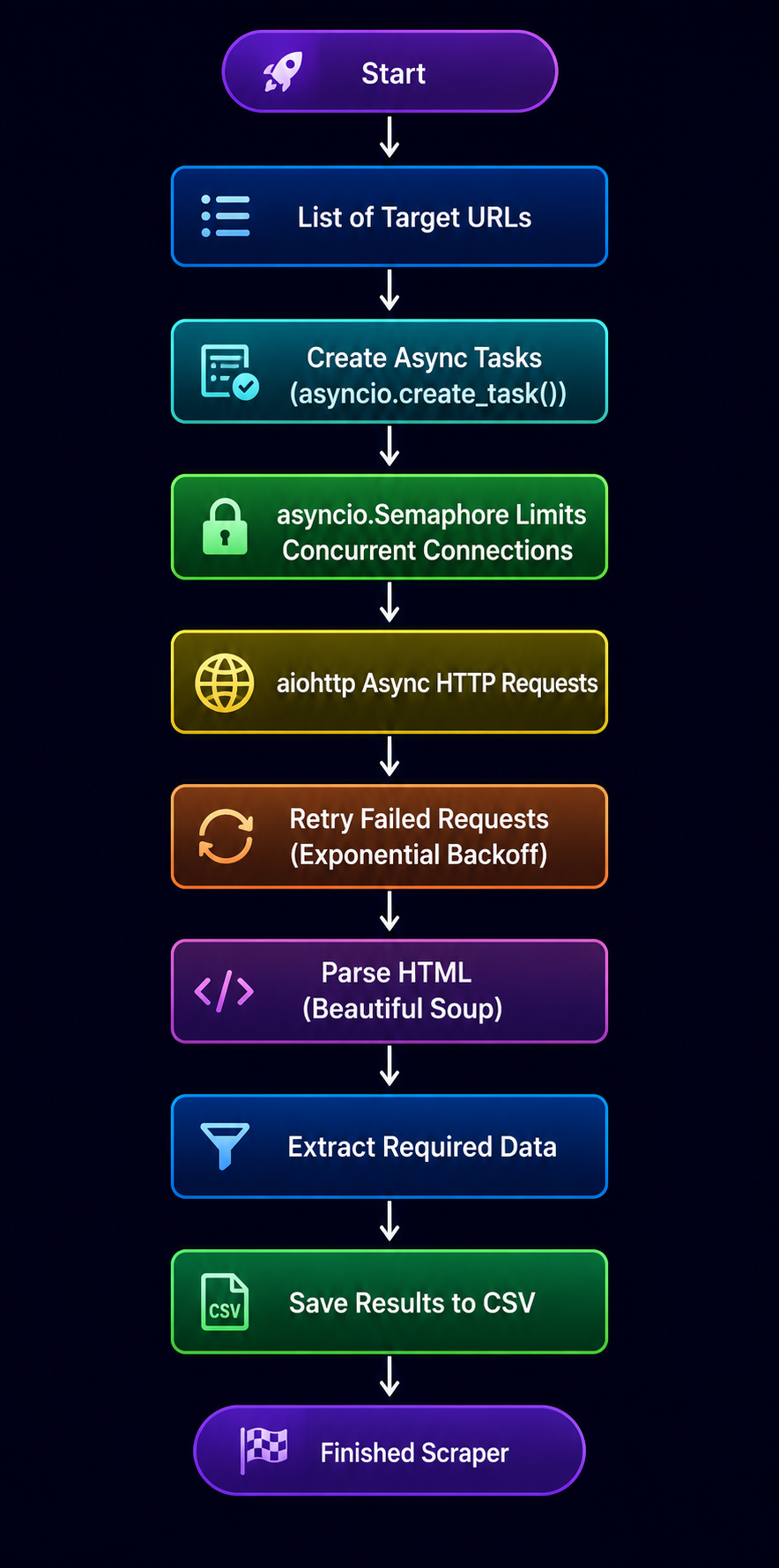
Project Preview
import asyncio

import aiohttp

from bs4 import BeautifulSoup

HEADERS = {
    "User-Agent": (
        "Mozilla/5.0 (Windows NT 10.0; Win64; x64) "
        "AppleWebKit/537.36 (KHTML, like Gecko) "
        "Chrome/138.0.0.0 Safari/537.36"
    )
}

TIMEOUT = aiohttp.ClientTimeout(total=15)

async def fetch(url: str, session: aiohttp.ClientSession):
    try:
        async with session.get(url) as response:
            response.raise_for_status()
= await response.text()

    except aiohttp.ClientError as exc:

        return {

            "url": url,

            "error": str(exc),

        }


    soup = BeautifulSoup(html, "lxml")

    return {

        "url": url,
        "title": (

            soup.title.get_text(strip=True)
            if soup.title
            else "No Title"

        ),

    }

async def main():

    urls = [
        "https://example.com",
        "https://example.org",

    ]

    async with aiohttp.ClientSession(
        headers=HEADERS,
        timeout=TIMEOUT,

    ) as session:

        tasks = [

            asyncio.create_task(fetch(url, session))
            for url in urls

        ]

        results = await asyncio.gather(*tasks)

    for page in results:

        print(page)

if __name__ == "__main__":

    asyncio.run(main())
This preview intentionally keeps the scraper small while following good practices such as reusing a single ClientSession, applying a timeout to the entire session, and reporting request failures without crashing the program. Throughout the rest of this guide, you’ll gradually extend this foundation with concurrency limits, retries, structured logging, CSV export, and production-ready architecture.
Expected output
{'url': 'https://example.com', 'title': 'Example Domain'}

{'url': 'https://example.org', 'title': 'Example Domain'}
Your output will vary depending on the pages you scrape. The important point is that multiple URLs are downloaded concurrently and returned as structured Python dictionaries.
This simple preview demonstrates the core idea behind Python Asyncio. Throughout the rest of the tutorial, you’ll evolve this into a production-quality scraper with concurrency control, retries, structured logging, CSV export, timeout handling, and scalable architecture suitable for large-scale data collection.
Introduction: Why Python Asyncio Matters For Modern Web Scraping
Traditional web scrapers often download one page, wait for the response, and only then move to the next request. That approach works for a handful of URLs, but it quickly becomes inefficient when scraping hundreds or thousands of pages because the program spends most of its time waiting for network responses instead of doing useful work.
Python’s asyncio, introduced through PEP 492, solves this problem by allowing many I/O operations to remain in progress simultaneously. Combined with aiohttp, it lets a single program fetch multiple pages concurrently without creating dozens of threads, making it an excellent choice for modern web scraping workloads.
As Yury Selivanov, one of the primary contributors to Python’s asynchronous programming model, explained, “async/await makes asynchronous programming as close to synchronous programming as possible.” Throughout this tutorial, you’ll apply that idea to build a scraper that is fast, reliable, and structured like a production application rather than a simple demonstration script.
What Readers Will Build By The End
A copy-paste-ready scraper using asyncio.create_task(), Beautiful Soup, asyncio.Semaphore, retries, logging, CSV export, and polite rate limiting that remains reliable under concurrent execution.
URLs ───► aiohttp Requests ───► asyncio.create_task() ───► asyncio.Semaphore ───► Beautiful Soup ───► CSV + Logs
Who This Python Asyncio Guide Is For
This tutorial is designed for beginner and intermediate Python developers who want to build faster web scrapers without learning an entire crawling framework first. It’s also useful for automation engineers, backend developers, data analysts, and anyone comparing asynchronous scraping with tools such as Requests, Scrapy, or Selenium. A basic understanding of Python functions and loops is enough to follow along.
What Makes This Tutorial Different
Many Asyncio tutorials stop after demonstrating async and await. This guide goes much further by showing how those concepts fit into a complete scraping workflow. Instead of building one large script, you’ll create reusable components for downloading pages, parsing HTML, retrying temporary failures, limiting concurrency, exporting structured data, and debugging problems. Along the way, you’ll also learn where tools such as asyncio.to_thread(), TaskGroup, Beautiful Soup, Scrapy, and Selenium fit into real projects so you can choose the right approach for different situations.
Python Asyncio In Plain English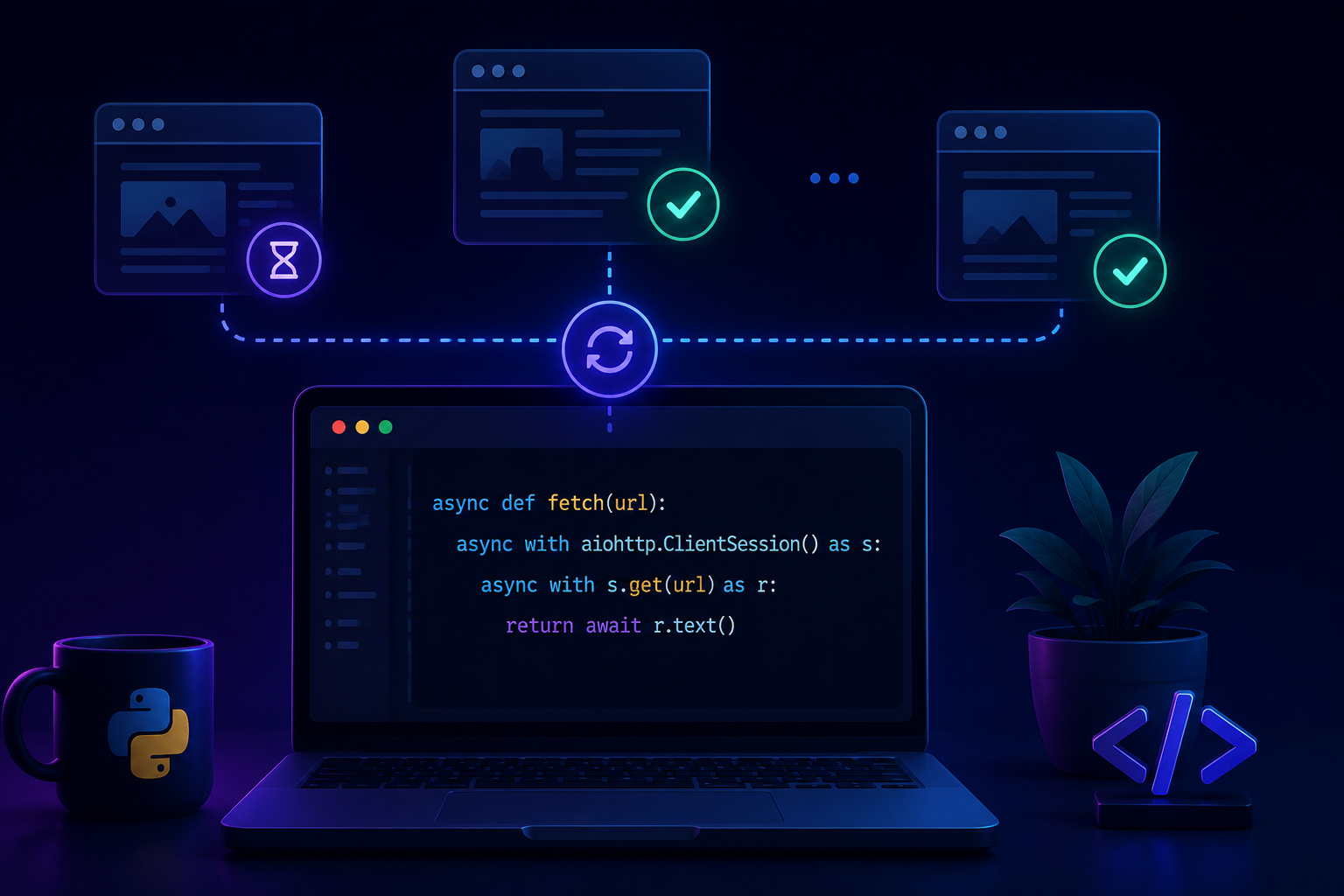
Think of placing online orders. If you order one item and wait for delivery before buying the next, the process is slow. With Python Asyncio, you place several orders, continue with other work, and respond as each delivery arrives. This is asynchrony. During python web scraping, your program does the same by sending multiple HTTP requests with Aiohttp instead of waiting for each website to respond.
Asynchrony Vs Concurrent Computing Vs Parallelism
These three terms are often used interchangeably, but they describe different ideas. Asynchrony focuses on avoiding idle waiting during operations such as network requests. Concurrency is about managing multiple tasks so they can make progress during the same period, even if only one task is actively running at any instant. Parallelism executes work on multiple CPU cores at the same time, making it suitable for CPU-intensive workloads rather than network-bound scraping.
| Concept | Best For | Python Tool | Web Scraping Use |
| Asynchrony | Waiting on I/O | asyncio, aiohttp | Fetch many pages |
| Concurrent computing | Managing many tasks | asyncio.create_task(), TaskGroup | Run many requests |
| Parallelism | CPU-heavy work | multiprocessing, concurrent.futures | Heavy parsing or ML |
| Threads | Blocking I/O wrappers | asyncio.to_thread() | Legacy blocking code |
Important: asyncio does not make your code faster by using multiple CPU cores. Instead, it improves efficiency by allowing the event loop to switch to another task whenever one task is waiting for network or file I/O. For CPU-intensive work such as image processing or machine learning, use multiprocessing, ProcessPoolExecutor, or another parallel processing approach instead.
The Event Loop Explained Without Jargon
The event loop acts like a smart coordinator. Whenever a coroutine reaches await, it temporarily pauses and immediately switches to another ready task, keeping the program productive instead of idle.
import asyncio

urls = [

    "Page-1",
    "Page-2",
    "Page-3",

]

async def fetch(page):

    print(f"Starting {page}")
    await asyncio.sleep(1)
    print(f"Finished {page}")

async def main():

    async with asyncio.TaskGroup() as tg:

        for page in urls:

            tg.create_task(fetch(page))

asyncio.run(main())
Why Web Scraping Is A Perfect Asyncio Use Case
Most scraping time is spent waiting for DNS lookups, TLS handshakes, redirects, downloads, and server responses, not CPU work. That makes Python Asyncio, Beautiful Soup, and Aiohttp an excellent combination for fast, scalable, and efficient concurrent execution.
Project Preview: The Concurrent Web Scraper Architecture
Before writing code, it’s helpful to understand how every component connects. This Python Asyncio project uses Aiohttp for asynchronous requests, Beautiful Soup with lxml for HTML parsing, validation to clean extracted data, retries for temporary failures, and CSV export for analysis. A clear architecture makes the scraper easier to maintain, test, and extend than a single large script.
Scraper Flow From URL List To CSV Output
Workflow: URLs → aiohttp session → concurrent fetch → Beautiful Soup parsing → field validation → retry failed requests → CSV export. This design keeps the scraper fast, reliable, and respectful of target websites.
urls.txt ───► aiohttp ClientSession ───► fetch_html() ───► fetch_with_retry() ───► Beautiful Soup ───► Validate Data ───► ScrapedPage ───► output.csv
Folder Structure For The Copy-Ready Project
async-scraper/
├── scraper.py
├── urls.txt
├── output.csv
├── requirements.txt
├── README.md
├── logs/
└── cache/
The logs directory can store runtime logs, while cache is useful for temporarily saving downloaded pages or processed URLs. These folders are optional for small tutorials but become valuable as scraping projects grow.
-
Dependencies Needed For The Tutorial
- This tutorial targets Python 3.11 or newer because it uses asyncio.TaskGroup, introduced in Python 3.11. If you’re using Python 3.10 or earlier, replace TaskGroup examples with asyncio.gather().
- Install the required packages:
- pip install aiohttp beautifulsoup4 lxml aiofiles
- Package overview
| Package | Purpose |
| aiohttp | Asynchronous HTTP client |
| beautifulsoup4 | HTML parsing |
| lxml | High-performance HTML/XML parser |
| aiofiles | Non-blocking file operations when needed |
Python Asyncio Basics Before We Scrape
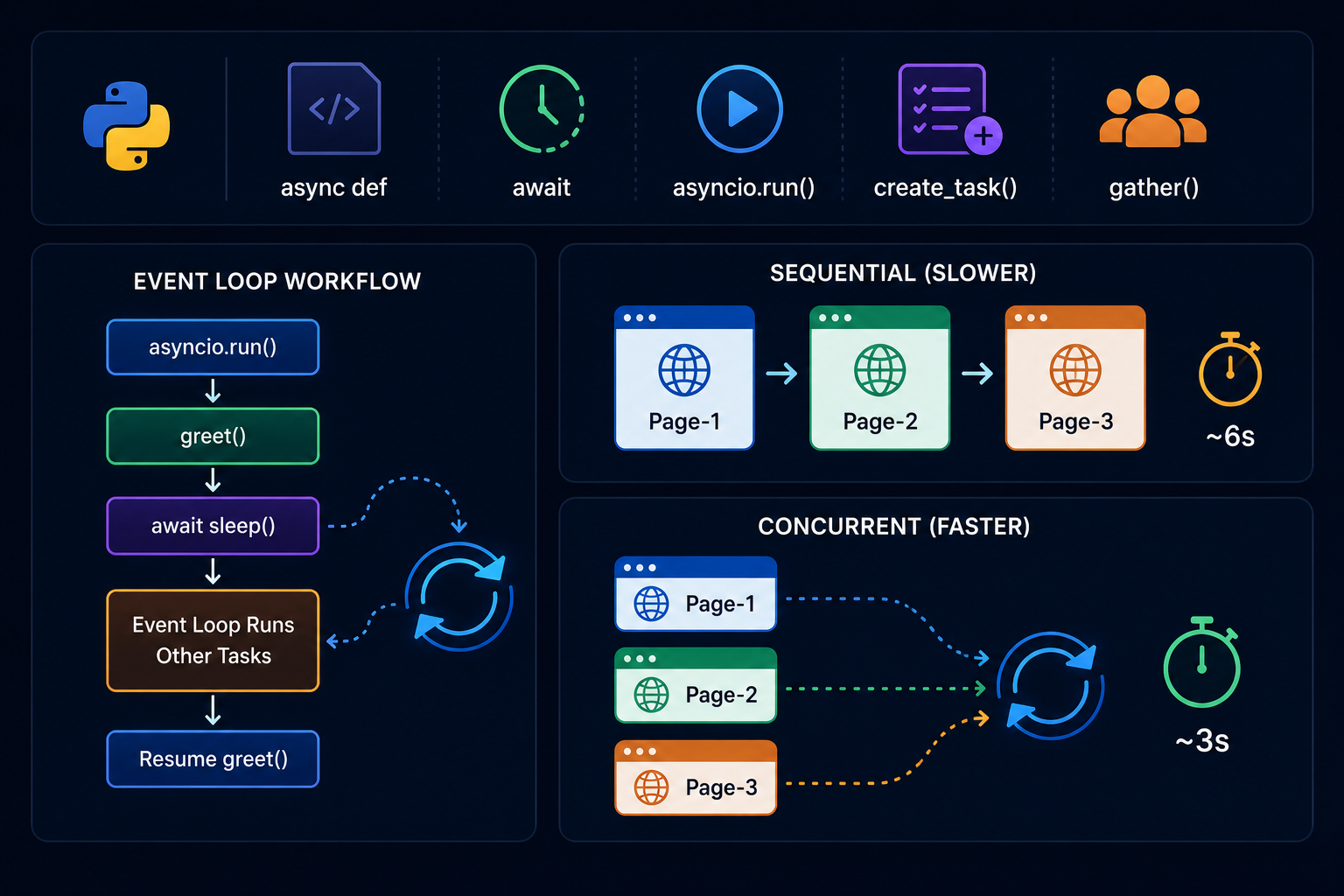
You only need a few Python Asyncio concepts to build an efficient scraper. The core ideas are coroutines, await, asyncio.run(), asyncio.create_task(), and structured concurrency. These let your program handle many network requests without blocking, making python web scraping with Aiohttp far faster than sequential code.
Your First Coroutine With async And await
import asyncio

async def greet():

    print("Starting...")
    await asyncio.sleep(1)
    print("Finished!")

asyncio.run(greet())
A coroutine is an asynchronous function defined with async def. Calling it does not immediately execute its code. Instead, Python creates a coroutine object that must either be awaited or scheduled by the event loop.
When execution reaches an await expression, only the current coroutine pauses. The event loop immediately switches to another task that is ready to run, allowing your program to keep making progress instead of waiting idly for network or file operations to finish.
asyncio.run() creates the event loop, runs the top-level coroutine until completion, and then closes the loop automatically. In most standalone applications, it should be called only once at the program’s entry point.
Workflow
asyncio.run() ───► greet() ───► await sleep() ───► Event Loop Runs Other Tasks ───► Resume greet()
Running Work Concurrently With asyncio.create_task()
asyncio.create_task() schedules a coroutine to run as an independent task managed by the event loop. Instead of waiting for one coroutine to finish before starting the next, you can schedule multiple tasks first and then wait for all of them together. This allows network requests to overlap, making it one of the most important building blocks for asynchronous web scraping.
Sequential execution (slower)
import asyncio

async def fetch(name, delay):

    print(f"Starting {name}")
    await asyncio.sleep(delay)
    print(f"Finished {name}")

async def main():

    await fetch("Page-1", 2)

    await fetch("Page-2", 1)

    await fetch("Page-3", 3)

asyncio.run(main())
Every request waits for the previous one to finish, so the total runtime is approximately six seconds.
Concurrent execution (faster)
import asyncio

async def fetch(name, delay):

    print(f"Starting {name}")

    await asyncio.sleep(delay)

    print(f"Finished {name}")

async def main():

    tasks = [

        asyncio.create_task(fetch("Page-1", 2)),
        asyncio.create_task(fetch("Page-2", 1)),
        asyncio.create_task(fetch("Page-3", 3)),

    ]

    await asyncio.gather(*tasks)

asyncio.run(main())
Because all three tasks are scheduled immediately, the event loop can switch between them whenever one is waiting for I/O. As a result, the overall runtime is usually close to the slowest individual request rather than the sum of every request. This improvement comes from overlapping waiting time, not from using multiple CPU cores.
gather Vs TaskGroup For Concurrent Execution
Both asyncio.gather() and asyncio.TaskGroup run multiple coroutines concurrently, but they have different goals. gather() is simple and works well when tasks are largely independent and you mainly want to collect their results. TaskGroup, introduced in Python 3.11, follows structured concurrency principles by treating related tasks as a single unit of work. If one task fails unexpectedly, the remaining tasks are cancelled automatically and the exception is reported as an ExceptionGroup, making failures easier to manage in larger applications.
| Feature | asyncio.gather() | asyncio.TaskGroup |
| Introduced | Earlier Asyncio versions | Python 3.11 |
| Easy for beginners | ✅ Yes | Moderate |
| Structured concurrency | ❌ No | ✅ Yes |
| Error handling | Can continue other tasks | Cancels sibling tasks |
Modern TaskGroup example
import asyncio

async def fetch(page):

    await asyncio.sleep(1)
    print(f"Fetched {page}")

async def main():

    async with asyncio.TaskGroup() as tg:

        for page in range(1, 4):

            tg.create_task(fetch(page))

asyncio.run(main())
Recommendation: If you’re targeting Python 3.11 or newer, prefer TaskGroup for new projects because it provides safer task management and predictable error handling. Use asyncio.gather() when you need to collect results from largely independent tasks, support older Python versions, or intentionally continue processing by using return_exceptions=True.
Building The First Python Asyncio Web Scraper
Now it’s time to build a working Python Asyncio scraper. We’ll start by fetching web pages asynchronously with Aiohttp, then scale to multiple URLs. Keeping the fetch layer separate makes it easy to later add Beautiful Soup, retries, rate limiting, logging, and CSV export without rewriting the entire scraper.
Create A Single Async Fetch Function With aiohttp
import aiohttp

TIMEOUT = aiohttp.ClientTimeout(total=15)

async def fetch_html(

    session: aiohttp.ClientSession,
    url: str,

) -> tuple[int, str]:

    async with session.get(url) as response:

        response.raise_for_status()
        html = await response.text()

    return response.status, html
This function focuses on a single responsibility: downloading a page and returning both the HTTP status code and HTML content. It intentionally allows network and HTTP errors to propagate to the caller so a separate retry layer can decide whether the request should be attempted again. Keeping downloading, retry logic, and HTML parsing independent makes the scraper easier to test, debug, and extend.
Fetch Multiple Pages Concurrently
Instead of waiting for one page before requesting the next, create all tasks together and collect the results with asyncio.gather().
import asyncio

import aiohttp

async def scrape_urls(urls):

    async with aiohttp.ClientSession() as session:

        tasks = [

            asyncio.create_task(

                fetch_html(session, url)

            )

            for url in urls

        ]

        return await asyncio.gather(

            *tasks,
            return_exceptions=True,

        )

urls = [

    "https://example.com",
    "https://example.org",

]

pages = asyncio.run(

    scrape_urls(urls)

)
Workflow
URL List ───► ClientSession ───► create_task() ───► asyncio.gather() ───► HTML Pages
Add Realistic Headers And Timeouts
Websites often expect browser-like requests. Supplying a User-Agent, Accept headers, and sensible timeouts improves compatibility and avoids hanging connections.
import aiohttp

HEADERS = {

    "User-Agent": (

        "Mozilla/5.0 (Windows NT 10.0; Win64; x64) "
        "AppleWebKit/537.36 (KHTML, like Gecko) "
        "Chrome/138.0.0.0 Safari/537.36"

    ),

    "Accept": (

        "text/html,"
        "application/xhtml+xml,"
        "application/xml;q=0.9,*/*;q=0.8"

    ),

    "Accept-Language": "en-US,en;q=0.9",

}

TIMEOUT = aiohttp.ClientTimeout(

    total=20,
    connect=5,
    sock_read=10,

)

async with aiohttp.ClientSession(

    headers=HEADERS,

    timeout=TIMEOUT,

) as session:

    ...
Many websites expect requests that resemble those made by a browser. Providing a descriptive User-Agent, appropriate Accept headers, and sensible timeout values improves compatibility while preventing requests from hanging indefinitely. Applying these settings when creating the ClientSession ensures every request shares the same configuration and the underlying connections are reused efficiently throughout the scraping session.
Parsing HTML With Beautiful Soup
Fetching a page is only the first step. Once the HTML has been downloaded, you need to extract the information that actually matters. This tutorial keeps downloading and parsing as separate responsibilities by using aiohttp for network requests and Beautiful Soup for HTML extraction. That separation makes the scraper easier to test, maintain, and extend as projects become more complex.
Beautiful Soup Parser Choices: html.parser Vs lxml Vs html5lib
| Parser | Strength | Weakness | Best For |
| html.parser | Built in | Less forgiving | Simple pages |
| lxml | Fast | Extra install | Most scraping projects |
| html5lib | Browser-like parsing | Slower | Broken HTML |
Each parser has its strengths. html.parser is included with Python and is perfectly adequate for simple pages or quick experiments. lxml is usually the fastest option and handles most real-world HTML reliably, making it the preferred choice for production scrapers. html5lib follows browser parsing rules more closely and can recover from severely malformed HTML, although it is noticeably slower.
Throughout this tutorial, all code examples use lxml for consistency because it provides excellent performance, handles real-world HTML reliably, and is already included in the project’s dependencies. If you prefer not to install an additional parser, you can replace “lxml” with “html.parser” in every BeautifulSoup() call.
Extract Titles, Links, Prices, And Metadata
Use CSS selectors to keep extraction readable and maintainable.
from bs4 import BeautifulSoup

def extract_data(html: str) -> dict:

    soup = BeautifulSoup(html, "lxml")

    title = soup.select_one("h1")

    price = soup.select_one(".price")

    description = soup.select_one(

        'meta[name="description"]'

    )

    return {

        "title": (

            title.get_text(strip=True)
            if title
            else None

        ),

        "price": (

            price.get_text(strip=True)
            if price
            else None

        ),

        "links": [

            link.get("href")
            for link in soup.select("a[href]")
            if link.get("href")

        ],

        "description": (

            description.get("content", "")
            if description
            else ""

        ),

    }
CSS selectors keep extraction code concise and easy to maintain. Because production websites frequently change their HTML, it’s a good practice to treat every field as optional unless you know it is guaranteed to exist. Returning None or an empty string for missing values helps prevent unexpected parsing failures and makes downstream processing much simpler.
Handle Missing Fields Safely
Real websites change frequently. Titles disappear, CSS classes are renamed, and HTML may be incomplete. Defensive extraction prevents a single missing element from crashing the entire scraper.
from bs4.element import Tag

def text_or_none(element: Tag | None) -> str | None:

    return (

        element.get_text(strip=True)
        if element
        else None

    )

def attr_or_none(

    element: Tag | None,

    attribute: str,

) -> str | None:

    return (

        element.get(attribute)
        if element
        else None

    )

title = text_or_none(

    soup.select_one("h1")

)

price = text_or_none(

    soup.select_one(".price")

)

category = text_or_none(

    soup.select_one(".category")

)

thumbnail = attr_or_none(

    soup.select_one("img.product"),
    "src",

)

result = {

    "title": title,
    "price": price,
    "category": category,
    "thumbnail": thumbnail,

}
Real websites evolve over time. Elements may disappear, CSS classes may be renamed, and some pages may contain incomplete data. Small helper functions like these keep the extraction logic consistent, reduce repetitive checks, and make the scraper much more resilient to layout changes.
Controlling Speed With asyncio Semaphore
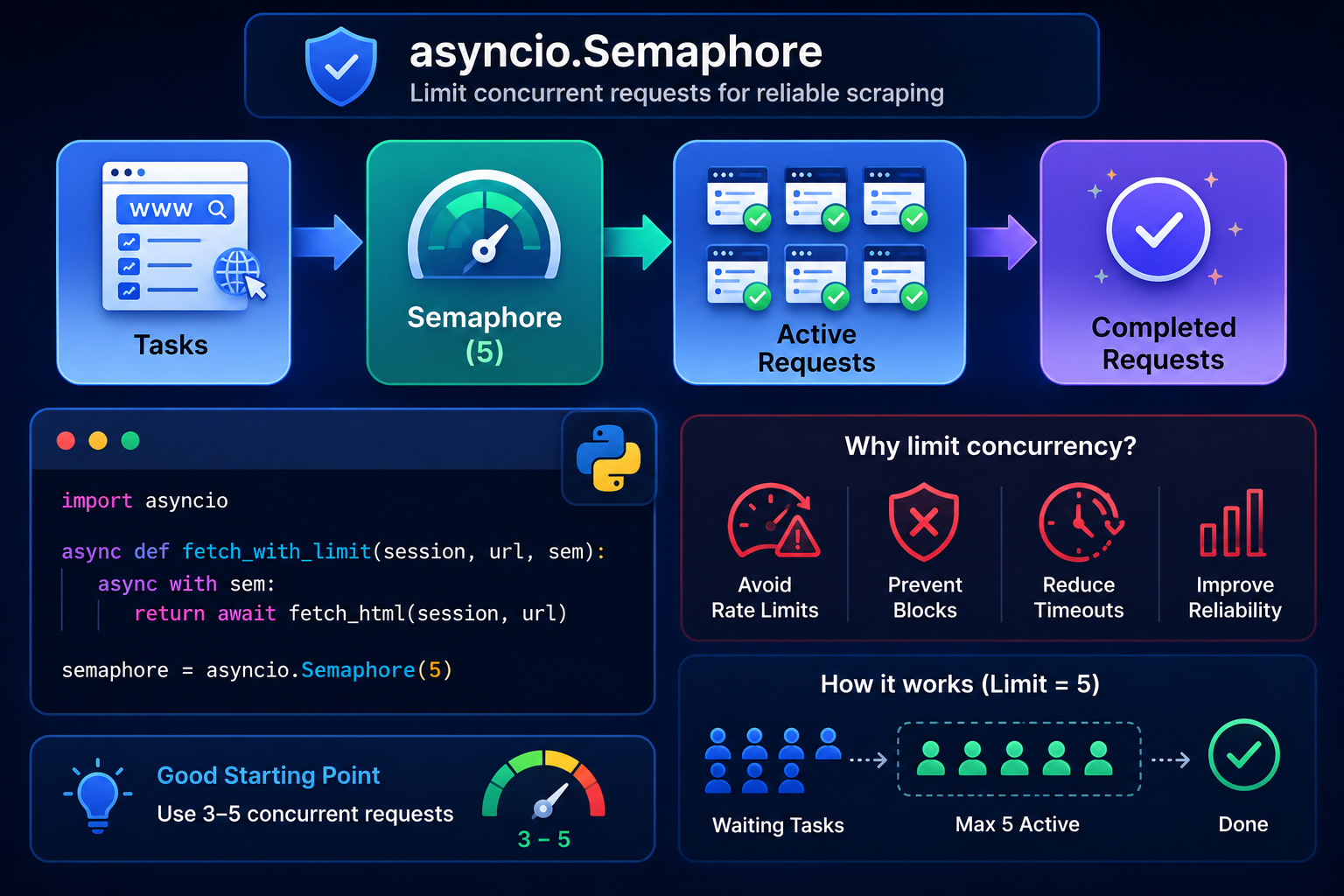
High concurrency may appear faster, but it often reduces reliability. An asyncio.Semaphore limits how many coroutines are allowed to perform network requests simultaneously, helping prevent connection spikes, rate limits, and unnecessary failures. This complements connection limits configured through aiohttp.TCPConnector, which controls how many TCP connections a session can maintain.
Why Unlimited Requests Can Break Your Scraper
Sending hundreds of requests at once can exhaust local connections, trigger 429 Too Many Requests responses, cause temporary IP bans, increase failed DNS lookups, and flood logs with avoidable errors.
Add semaphore Python Logic To Limit Concurrent Requests
Wrap each request with asyncio.Semaphore so only a fixed number of coroutines access the network at the same time.
import asyncio

async def fetch_with_limit(

    session,
    url,
    semaphore,

):

    async with semaphore:

        return await fetch_html(session, url)

semaphore = asyncio.Semaphore(5)
Passing the semaphore into the function instead of relying on a global variable makes the code easier to test, reuse, and configure. The semaphore simply limits how many coroutines are allowed to perform network requests at the same time.
Workflow
Tasks ───► Semaphore (5) ───► Active Requests ───► Completed Requests
Choosing A Safe Concurrency Limit
There is no universal concurrency limit because every website and network environment behaves differently. As a practical starting point, use 3 to 5 concurrent requests when scraping an unfamiliar website. Public websites that respond quickly often handle 10 to 20 concurrent requests comfortably, while APIs you control may support much higher values.
Rather than choosing a number once and forgetting it, increase concurrency gradually while monitoring:
- response times
- HTTP 429 responses
- timeout frequency
- memory usage
- successful request rate
If higher concurrency increases errors without significantly improving throughput, reduce the limit. The fastest scraper is the one that finishes reliably rather than the one that generates the most simultaneous requests.
Adding Retries, Backoff, And Error Handling
Even the best Python Asyncio scraper will encounter temporary failures. Networks fluctuate, servers become busy, and connections time out. A production-ready scraper should recover automatically instead of stopping after the first error.
Retry 429, 500, 502, 503, And Timeout Errors
Not every failed request should be treated the same way. Temporary failures such as 429 (Too Many Requests), 500 (Internal Server Error), 502 (Bad Gateway), 503 (Service Unavailable), and 504 (Gateway Timeout) often succeed if you retry after a short delay.
In contrast, client-side errors such as 400 (Bad Request), 401 (Unauthorized), 403 (Forbidden), and 404 (Not Found) usually indicate a problem that another request will not solve. Retrying these responses repeatedly only wastes bandwidth and increases unnecessary traffic. A good retry strategy focuses on failures that are likely to recover automatically.
Exponential Backoff With Jitter
Exponential backoff increases the delay after each failure, while jitter adds a small random wait. This reduces retry storms when many tasks fail together.
import asyncio

import random

import aiohttp

RETRY_STATUS = {

    429,
    500,
    502,
    503,
    504,

}

async def fetch_with_retry(

    session: aiohttp.ClientSession,
    url: str,
    retries: int = 3,

):

    delay = 1

    for attempt in range(retries):

        try:

            status, html = await fetch_html(

                session,
                url,

            )


            return status, html

        except aiohttp.ClientResponseError as exc:

            if (

                exc.status not in RETRY_STATUS
                or attempt == retries - 1

            ):

                raise

        except (

            aiohttp.ClientConnectionError,
            asyncio.TimeoutError,

        ):

            if attempt == retries - 1:

                raise

        wait = delay + random.uniform(0, 0.5)

        await asyncio.sleep(wait)

        delay *= 2
This retry wrapper separates temporary failures from permanent ones. Network interruptions, connection problems, timeouts, and selected server-side HTTP errors are retried automatically using exponential backoff with a small amount of random jitter. Errors that are unlikely to succeed on another attempt are immediately raised to the caller instead of generating unnecessary requests.
Tip: Always set a maximum retry count and record failed URLs for later inspection. Unlimited retries can generate excessive traffic, delay the completion of your scraper, and make debugging much harder when a website experiences prolonged outages.
Store Failed URLs For Later Re-Runs
failed_urls = []

try:

    status, html = await fetch_with_retry(
        session,
        url,

    )

except (

    aiohttp.ClientError,
    asyncio.TimeoutError,

):

    failed_urls.append(url)
Recording failed URLs makes recovery much easier because you only need to retry the pages that actually failed instead of repeating the entire scraping job. This approach reduces bandwidth usage and is especially valuable when processing thousands of pages.
Avoid Blocking The Event Loop
A common Python Asyncio mistake is calling blocking code inside async functions. When one coroutine blocks the event loop, every other task waits too, reducing the benefits of asynchrony and concurrent computing.
Why requests.get And time.sleep Break Asynchrony
Functions such as requests.get() and time.sleep() block the thread that is running the event loop. While they execute, every other coroutine must wait, eliminating most of the performance benefits of asynchronous programming. By contrast, aiohttp and await asyncio.sleep() suspend only the current coroutine, allowing the event loop to continue running other tasks while waiting for network or timer operations to complete.
# ❌ Wrong
import requests, time

requests.get("https://example.com")

time.sleep(2)
# ✅ Correct
import asyncio

import aiohttp

async def fetch():

    async with aiohttp.ClientSession() as session:

        async with session.get(

            "https://example.com"

        ) as response:

            return await response.text()

async def main():

    await fetch()
    await asyncio.sleep(2)

asyncio.run(main())
When To Use asyncio.to_thread
Use asyncio.to_thread() when you need to call a blocking function that cannot easily be replaced with an asynchronous alternative. Common examples include legacy libraries, file processing, PDF parsing, image manipulation, compression, and other blocking operations.
It is generally not needed for ordinary Beautiful Soup parsing because HTML parsing is usually much faster than network requests. If profiling shows that parsing has become a performance bottleneck, moving that work to another thread can help keep the event loop responsive.
import asyncio

def parse_large_file(path):

    with open(path, "r", encoding="utf-8") as f:

        return f.read()

contents = await asyncio.to_thread(

    parse_large_file,

    "large.html",

)
When concurrent.futures Still Makes Sense
concurrent.futures is useful when asynchronous programming alone is no longer sufficient. ThreadPoolExecutor works well for blocking I/O libraries that cannot be replaced with asynchronous alternatives, while ProcessPoolExecutor is better suited for CPU-intensive tasks such as image processing, machine learning, or expensive HTML transformations. Choose the executor that matches the type of work rather than using threads for every performance problem.
Saving Scraped Data Cleanly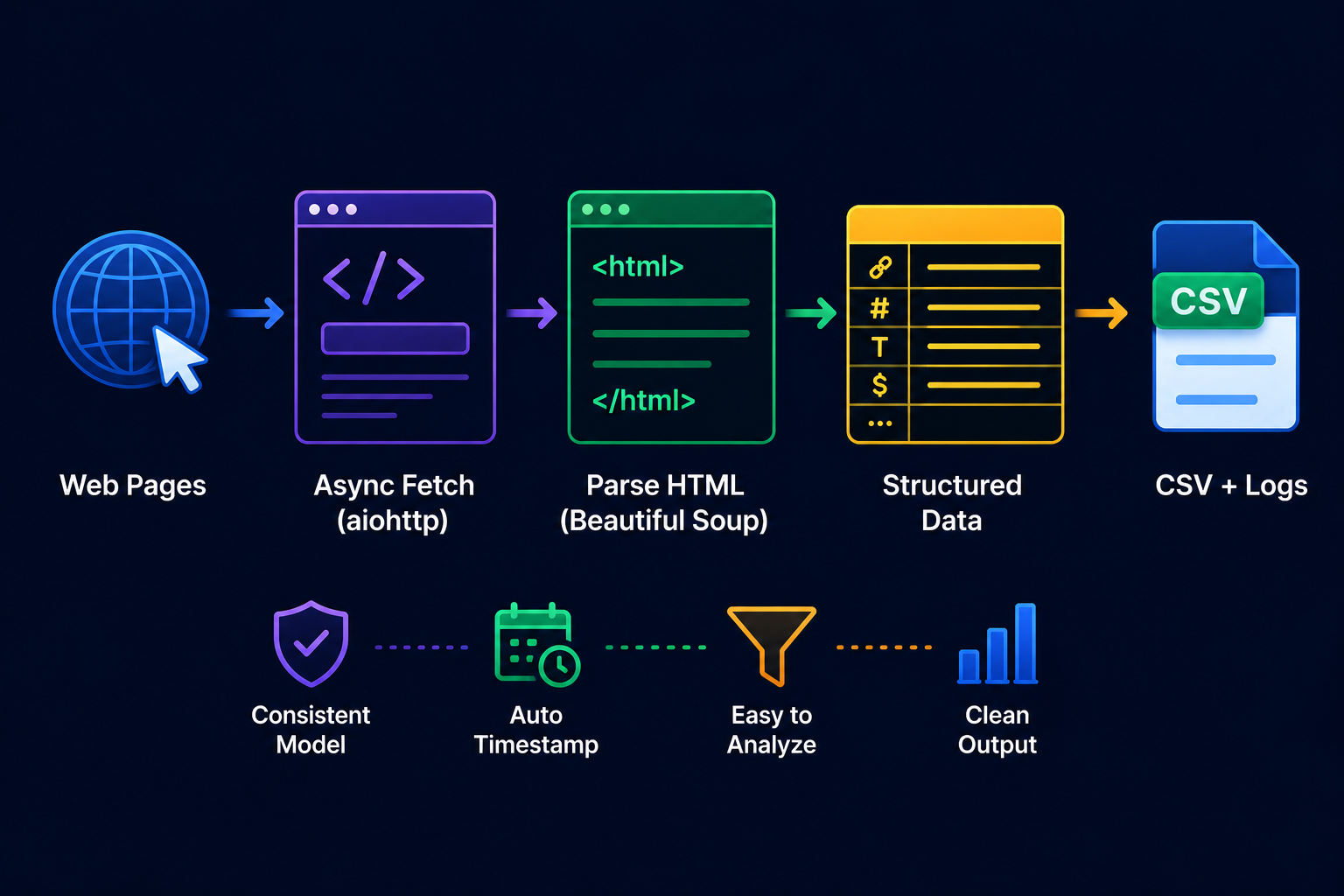
After Python Asyncio finishes fetching pages and Beautiful Soup extracts data, organize everything into a consistent structure before saving. Clean output makes filtering, analysis, and future automation much easier.
Create A Data Model For Scraped Results
Use a dataclass to keep every scraped record consistent.
from dataclasses import dataclass, field

from datetime import datetime

@dataclass(slots=True)

class ScrapedPage:

    url: str
    status: int
    title: str | None = None
    price: str | None = None
    links: list[str] = field(default_factory=list)
    error: str | None = None
    timestamp: str = field(

        default_factory=lambda: datetime.utcnow().isoformat()

    )
Using a dataclass ensures every scraped record follows the same structure. Automatically generating a timestamp also makes it easier to debug scraping runs, compare historical data, and track when individual pages were collected without requiring extra code elsewhere in the project.
Export Results To CSV
Once all asynchronous tasks finish, write the collected records to a CSV file.
import csv

from dataclasses import asdict

with open(

    "output.csv",
    "w",
    newline="",
    encoding="utf-8",

) as file:

    writer = csv.DictWriter(

        file,

        fieldnames=[

            "url",
            "status",
            "title",
            "price",
            "links",
            "error",
            "timestamp",

        ],

    )

    writer.writeheader()

    for page in results:

        row = asdict(page)
        row["links"] = ", ".join(page.links)
        writer.writerow(row)
Converting the list of extracted links into a comma-separated string produces cleaner CSV output that can be opened directly in spreadsheet applications. If your scraper collects more complex data, formats such as JSON or SQLite may be better choices because they preserve nested structures more naturally.
Optional Async File Writing With aiofiles
For most scrapers, normal file writing is perfectly adequate because data is usually written only once after all requests have completed. aiofiles becomes useful when writing files repeatedly during execution or when file operations would otherwise block the event loop. Choose it because it keeps your application responsive, not because it is inherently faster.
Building The Complete Copy-Paste Python Asyncio Scraper
Rather than introducing entirely new concepts, this section shows how the individual components you’ve already built fit together into a single scraper. In a real project, each function would typically live in its own module, but combining them into one file makes the overall architecture easier to understand. The complete workflow follows this sequence:
fetch_html() → fetch_with_retry() → extract_data() → scrape_page() → asyncio.gather() → export_results()
Each function has a single responsibility, making the scraper easier to test, debug, and extend than placing every operation inside one large coroutine.
Full requirements.txt
aiohttp>=3.9
beautifulsoup4>=4.12
lxml>=5.0
aiofiles>=23.0
How The Complete Scraper Is Organized
# scraper.py
fetch_html() ───► fetch_with_retry() ───► extract_data() ───► scrape_page() ───► asyncio.gather() ───► export_results()
The complete implementation intentionally reuses the helper functions developed throughout this tutorial instead of duplicating code. Keeping fetching, retries, parsing, exporting, and orchestration as separate units makes the scraper easier to maintain and allows each component to be tested independently. As your projects grow, you can move these functions into separate modules without changing the overall workflow.
How To Run The Scraper
mkdir async-scraper

cd async-scraper

echo "https://example.com" > urls.txt

echo "https://example.org" >> urls.txt

pip install -r requirements.txt

python scraper.py
If you run into problems
- Verify you’re using Python 3.11 or newer.
- Install dependencies from requirements.txt.
- Check your internet connection.
- Confirm that the target website is reachable.
- Make sure your CSS selectors match the current HTML.
After execution, the scraper reads urls.txt, performs concurrent requests, extracts data with Beautiful Soup, retries temporary failures, and writes the final structured results to output.csv.
Python Web Scraping Libraries Compared
These libraries solve different parts of the scraping workflow rather than competing directly with one another. A typical scraper often combines multiple tools. For example, aiohttp downloads pages, Beautiful Soup extracts data from the HTML, and Selenium is used only when JavaScript rendering is required. Choosing the right combination depends on the website and your project’s requirements.
Beautiful Soup Vs Scrapy Vs Selenium Vs Aiohttp
| Tool | Primary Role | Async Support | Best Used For |
| aiohttp | HTTP client | ✅ Native | Fast concurrent downloads |
| Beautiful Soup | HTML parser | Uses synchronous parsing | Extracting structured data |
| Scrapy | Crawling framework | ✅ Supports asyncio integration | Large crawling projects |
| Selenium | Browser automation | ❌ Not naturally async | JavaScript-heavy websites |
| Requests | HTTP client | ❌ No | Small synchronous scripts |
python web scraping selenium: When Browser Automation Is Needed
Choose Selenium when pages rely on JavaScript rendering, user logins, infinite scrolling, or complex UI interactions. It is much slower than direct HTTP requests because it controls a real browser, making it best reserved for sites that cannot be scraped with Aiohttp alone.
When Scrapy Is Better Than A Custom Python Asyncio Scraper
Scrapy is a better choice when you’re building large crawlers that need features such as URL scheduling, duplicate filtering, pipelines, middleware, auto-throttling, and distributed crawling. A custom asyncio scraper offers greater flexibility for smaller projects, APIs, automation tasks, and situations where you want complete control over the code. The two approaches complement each other rather than compete directly.
Ethical And Legal Web Scraping Basics
If a server responds with HTTP 429 (Too Many Requests), reduce your request rate instead of immediately increasing retries or concurrency. A 429 response indicates that the server is asking clients to slow down, and respecting that signal improves both reliability and responsible scraping practices.
Check robots.txt, Terms, And API Options First
Review robots.txt, site terms, and official API documentation before scraping. If an API provides the data you need, prefer it over HTML scraping with Aiohttp and Beautiful Soup.
Use Rate Limits And Identify Your Scraper Responsibly
Limit concurrency with asyncio.Semaphore, use reasonable delays, and send a descriptive User-Agent when appropriate. Polite request rates lower the chance of errors, temporary blocks, and service disruption.
Avoid Personal Data And Sensitive Content Collection
Even when pages are publicly accessible, avoid collecting unnecessary personal or sensitive information. Keep only the data required for your project, respect privacy expectations, and follow applicable rules for storage, sharing, and retention.
Debugging And Testing Your Async Scraper
Reliable Python Asyncio scrapers make failures visible through logs instead of relying on guesswork. Tracking requests, retries, and parsing results helps you quickly identify network issues, selector changes, or concurrency problems.
Add Logging For Status Codes, Retries, And Failures
Logging provides visibility into what your scraper is doing while it runs. Recording successful requests, retries, warnings, and failures makes it much easier to diagnose networking issues, changing page structures, or unexpected rate limits. For larger scraping jobs, structured logs are often more valuable than print statements because they can be filtered, searched, and archived for later analysis.
import logging

logging.basicConfig(

    level=logging.INFO,
    format="%(asctime)s %(levelname)s %(message)s"

)

logger = logging.getLogger("scraper")

logger.info(

    "Fetched %s (%d)",
    url,
    response.status,

)

logger.warning(

    "Retry %d for %s",
    attempt + 1,
    url,

)

logger.error(

    "Failed to scrape %s",
    url,

)
Avoid excessive logging inside high-concurrency loops, especially at the DEBUG level. Large scraping jobs can generate thousands of log messages, making important warnings harder to spot and increasing I/O overhead.
Test With httpbin Or A Local HTML Page
urls = [

    "https://httpbin.org/html",
    "https://httpbin.org/status/500",
    "https://httpbin.org/delay/2",

]
Controlled test environments allow you to verify retries, timeout handling, parser behavior, and error recovery without depending on unpredictable external websites. Once these scenarios behave correctly, you can move to production targets with much greater confidence.
Common Python Asyncio Errors And Fixes
| Problem | Likely Cause | Fix |
| Coroutine never awaited | Missing await | Await the coroutine or create a task |
| Too many open connections | Concurrency too high | Add asyncio.Semaphore and client limits |
| Empty extracted fields | Selector changed | Inspect HTML and update selectors |
| Slow scraper | Blocking code | Use async libraries or asyncio.to_thread() |
| 429 responses | Rate limited | Reduce concurrency and add exponential backoff |
A small investment in logging and testing makes Python Asyncio applications easier to maintain and far more dependable in production.
Performance Tuning Without Being Reckless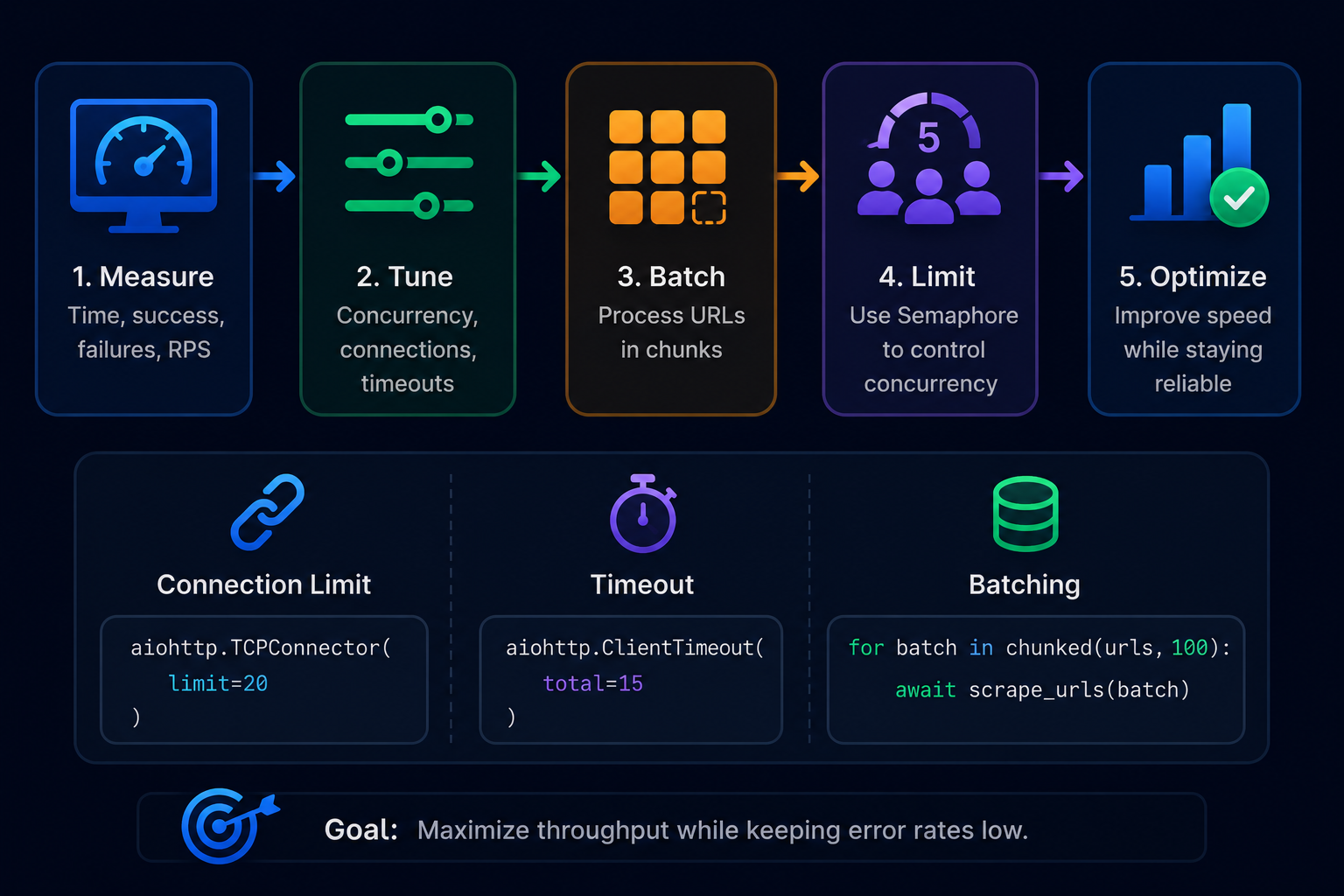
Optimize Python Asyncio by measuring first, then adjusting concurrency, connection limits, and batching. Responsible tuning improves speed without overwhelming your system or target websites.
Measure Before Changing Concurrency
Faster execution is only useful if the scraper remains reliable. Measure elapsed time together with successful requests, failed requests, and average throughput before increasing concurrency. Optimizing blindly often increases error rates without providing meaningful performance gains.
from time import perf_counter

start = perf_counter()

# await scrape_urls(urls)

elapsed = perf_counter() - start

print(

    f"Completed in {elapsed:.2f} seconds"

)
While elapsed time is useful, it shouldn’t be your only performance metric. Track successful requests, failed requests, and requests processed per second to understand whether higher concurrency is actually improving throughput.
Tune Connection Limits, Timeouts, And Batch Size
Use
connector = aiohttp.TCPConnector(

    limit=20,

)

async with aiohttp.ClientSession(

    connector=connector,
    timeout=TIMEOUT,
    headers=HEADERS,

) as session:

    ...
TCPConnector limits the number of simultaneous TCP connections managed by a ClientSession. Combined with sensible timeout values and batching, it helps prevent excessive resource usage while maintaining stable throughput.
Build A Concurrent Chunk Management Engine
Process large URL lists in batches to keep memory stable and simplify retries.
def chunked(items, size):

    for i in range(0, len(items), size):

        yield items[i:i + size]

for batch in chunked(urls, 100):

    await scrape_urls(batch)
A simple concurrent chunk management engine scales python web scraping projects while keeping Aiohttp, Beautiful Soup, and asyncio.Semaphore efficient and manageable.
Advanced Improvements For A More Complete Scraper
Once your Python Asyncio scraper is reliable, you can extend it into a reusable internal tool with smarter rate limiting, caching, structured data extraction, and optional proxy support.
Add Per-Domain Rate Limits
When scraping multiple websites, a single global semaphore may cause one busy domain to slow down requests to every other site. A better approach is to maintain a separate concurrency limit for each domain so every website is treated independently.
from collections import defaultdict

import asyncio

from urllib.parse import urlparse

domain_limits = defaultdict(

    lambda: asyncio.Semaphore(5)

)

async def fetch_with_domain_limit(

    session,

    url,

):

    domain = urlparse(url).netloc

    async with domain_limits[domain]:

        return await fetch_with_retry(

            session,
            url,

        )
Add Caching To Avoid Re-Scraping The Same URL
Store completed URLs in a local file, SQLite database, or by hashing each URL. Skipping previously processed pages reduces bandwidth, speeds repeated runs, and avoids unnecessary requests.
Add JSON-LD Extraction For Product And Article Pages
import json

script = soup.select_one(

    'script[type="application/ld+json"]'

)

if script:

    try:

        structured_data = json.loads(

            script.string

        )

    except json.JSONDecodeError:

        structured_data = None
Many e-commerce sites, blogs, and news websites expose structured information through JSON-LD. Extracting this data is often more reliable than depending entirely on CSS selectors because schema markup tends to change less frequently than the page layout.
Add Proxy Support Carefully
Use proxies only for legitimate needs such as load balancing, testing from different regions, or accessing your own distributed systems. Avoid using proxies to bypass website access controls, rate limits, or other restrictions, and always respect published usage policies.
Common Mistakes To Understand In Python Asyncio
Small mistakes can make a Python Asyncio scraper slow or unreliable. The fixes below help keep Aiohttp, Beautiful Soup, and concurrent execution working as intended.
1. Creating Coroutines But Never Awaiting Them
Calling an async function only creates a coroutine. It won’t run until you await it or schedule it.
# ❌ Wrong
fetch_html(session, url)
# ✅ Correct
await fetch_html(session, url)

# or

task = asyncio.create_task(fetch_html(session, url))

await task
2. Using Blocking Libraries Inside Async Code
Replace requests.get() with Aiohttp and time.sleep() with await asyncio.sleep() to avoid blocking the event loop.
# ❌ time.sleep(2)

# ✅ await asyncio.sleep(2)
3. Creating Too Many Tasks At Once
# ❌ Creates thousands of tasks immediately
tasks = [

    asyncio.create_task(fetch(url))
    for url in urls

]
Better:
# ✅ Process large URL lists in batches
for batch in chunked(urls, 100):

    await scrape_urls(batch)
Creating tens of thousands of tasks simultaneously increases memory usage and makes error handling more difficult. Processing work in manageable batches keeps the scraper responsive and easier to monitor.
4. Thinking More Concurrency Always Means Faster Scraping
| Concurrency Level | What Usually Happens | Best Use |
| 1-3 | Slow but gentle | Testing selectors |
| 5-10 | Balanced and safer | Most small projects |
| 10-30 | Faster but needs monitoring | Friendly sites or APIs |
| 50+ | Risky without controls | Owned systems only |
5. Forgetting asyncio Semaphore
Limit request pressure with a semaphore.
async with semaphore:

    await fetch_html(session, url)
6. Parsing HTML Before Checking Response Status
Skip parsing failed responses such as 403, 404, 429, or 500. Validate the status code first.
7. Confusing Asyncio With Multithreading
Python Asyncio handles waiting-heavy tasks efficiently. Use asyncio.to_thread() or concurrent.futures for blocking or CPU-intensive work.
8. Not Handling Changed Selectors
Websites change HTML. Use fallback selectors, missing-field checks, and logging to keep your scraper resilient.
9. Ignoring robots.txt, Terms, And Rate Limits
Reliable scraping combines good engineering with responsible request rates, respect for published rules, and ethical data collection.
Tricky Things About Python Asyncio Web Scraping You Should Know
1. await Does Not Mean “Run Later”
In Python Asyncio, await does not postpone work. It pauses only the current coroutine while the event loop switches to other ready tasks. When the awaited operation finishes, execution resumes exactly where it stopped.
2. asyncio.create_task Starts Work Earlier Than You May Expect
asyncio.create_task() schedules a coroutine immediately. The task can begin running before your final await, so exceptions or log messages may appear earlier than expected.
3. gather Error Handling Can Surprise Beginners
By default, asyncio.gather() raises the first exception it encounters, which can interrupt batch processing. Use return_exceptions=True when you want to collect results and errors together for later inspection.
4. Beautiful Soup Is Not Async
Beautiful Soup parses HTML synchronously after Aiohttp finishes downloading it. For CPU-heavy parsing, move the work off the event loop with await asyncio.to_thread(parse_html, html).
5. Fast Scraping Still Needs Polite Delays
Even with Python Asyncio, responsible scraping matters. Combine asyncio.Semaphore, short delays, exponential backoff, and per-domain limits to reduce server load, improve stability, and achieve better long-term scraping success.
FAQ About Python Asyncio Web Scraping
What Is Python Asyncio Used For In Web Scraping?
Python Asyncio lets a scraper handle many network requests while waiting for responses, making python web scraping much more efficient for I/O-bound workloads.
Is Python Asyncio Faster Than Requests?
Usually yes for many URLs because requests run concurrently. For downloading a single page, the speed difference is often small.
Should I Use aiohttp Or Requests For python web scraping?
Use Aiohttp for asynchronous, concurrent scraping. Choose Requests for simple one-off scripts with only a few pages.
Can I Use Beautiful Soup With Python Asyncio?
Yes. Beautiful Soup parses HTML after Aiohttp downloads it. Parsing remains synchronous but integrates well with asynchronous fetching.
Is Scrapy Better Than Python Asyncio From Scratch?
Scrapy suits large crawler projects with pipelines and middleware. A custom Python Asyncio scraper is ideal for learning, flexibility, and lightweight tools.
When Should I Use Selenium For Web Scraping?
Use Selenium when pages require JavaScript rendering, button clicks, scrolling, authentication, or other browser interactions.
What Is asyncio semaphore In Python?
An asyncio.Semaphore limits how many asynchronous tasks can enter a protected section simultaneously, helping control request rates.
What Does asyncio to_thread Do?
asyncio.to_thread() runs blocking functions in a separate thread, allowing the event loop to continue processing other coroutines.
Is Web Scraping Legal?
It depends on the website, the type of data, applicable laws, the site’s terms, privacy considerations, and how your scraper behaves. Always review published rules and prefer official APIs when available.
Read more: WebAssembly (WASM) in 2026: Building High-Performance Web Applications Beyond JavaScript
Conclusion: Build Faster, Safer Scrapers With Python Asyncio
Python’s asyncio makes web scraping more efficient by allowing network requests to overlap instead of waiting for one page to finish before starting the next. Combined with aiohttp, Beautiful Soup, sensible concurrency limits, retries, structured data models, and responsible rate limiting, it provides a solid foundation for building reliable scrapers.
Start with a small project, measure its performance, and improve it gradually rather than optimizing everything at once. As your requirements grow, you can introduce features such as caching, structured logging, proxy support, scheduling, or even move to frameworks like Scrapy for large crawling workloads. Focusing on correctness, maintainability, and respectful scraping practices will help you build tools that remain useful long after the first version is complete.
About the Author