If you’ve ever waited for a slow docker pull, watched a CI/CD pipeline spend minutes downloading container layers, or experienced delayed Kubernetes rollouts, your Docker image size is likely contributing to the problem. Large container images take longer to build, transfer, and deploy. They also consume more registry storage, increase bandwidth usage, and slow down scaling when new containers need to start.
A Docker image often contains far more than an application actually needs to run. Development tools, package managers, temporary files, caches, and build dependencies frequently end up inside production images, making them larger and less secure than necessary.
One of the most effective ways to solve this problem is with Docker multi-stage builds. Instead of shipping everything from the build environment, multi-stage builds separate the build process from the runtime image so only the files required to run your application are included in production. The result is a smaller image, a reduced attack surface, and easier maintenance.
The Docker documentation recommends multi-stage builds as a best practice for creating production-ready images because they improve efficiency without making development more complicated.
# View local Docker images and their sizes

docker image ls
Whether you’re using Alpine Linux, Python Slim, Distroless images, publishing to Docker Hub, or deploying applications on Kubernetes, reducing image size can improve build times, deployment speed, and resource usage throughout your delivery pipeline.
Typical Workflow
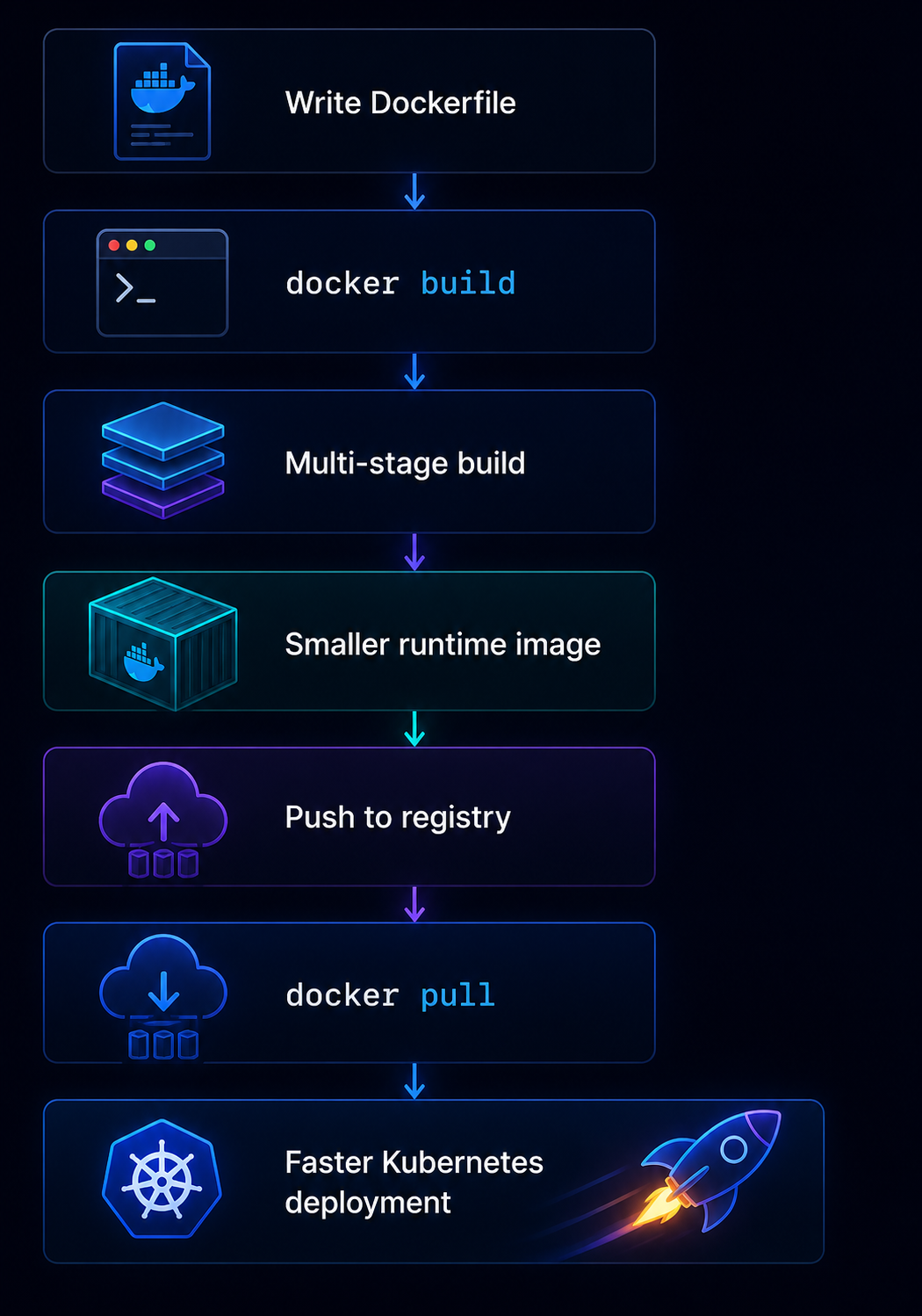
Throughout this guide, you’ll learn what Docker images are, why image size matters, how Docker multi-stage builds work, when to choose Alpine or Distroless images, and how to optimize container images with practical, copy-paste examples that you can apply to your own projects.
What Is a Docker Image and Why Does Size Matter?
Think of a Docker image as a packed travel bag. Instead of clothes, it contains your app, libraries, runtime, settings, and dependencies. When you run a container, Docker opens that packed bag and starts the application. You can download images from Docker Hub with docker pull. A smaller docker image size downloads faster, uses less storage, speeds CI/CD, and improves kubernetes deployment.
# Download the latest Alpine image

docker pull alpine:latest

# View local images and their sizes

docker image ls
Workflow
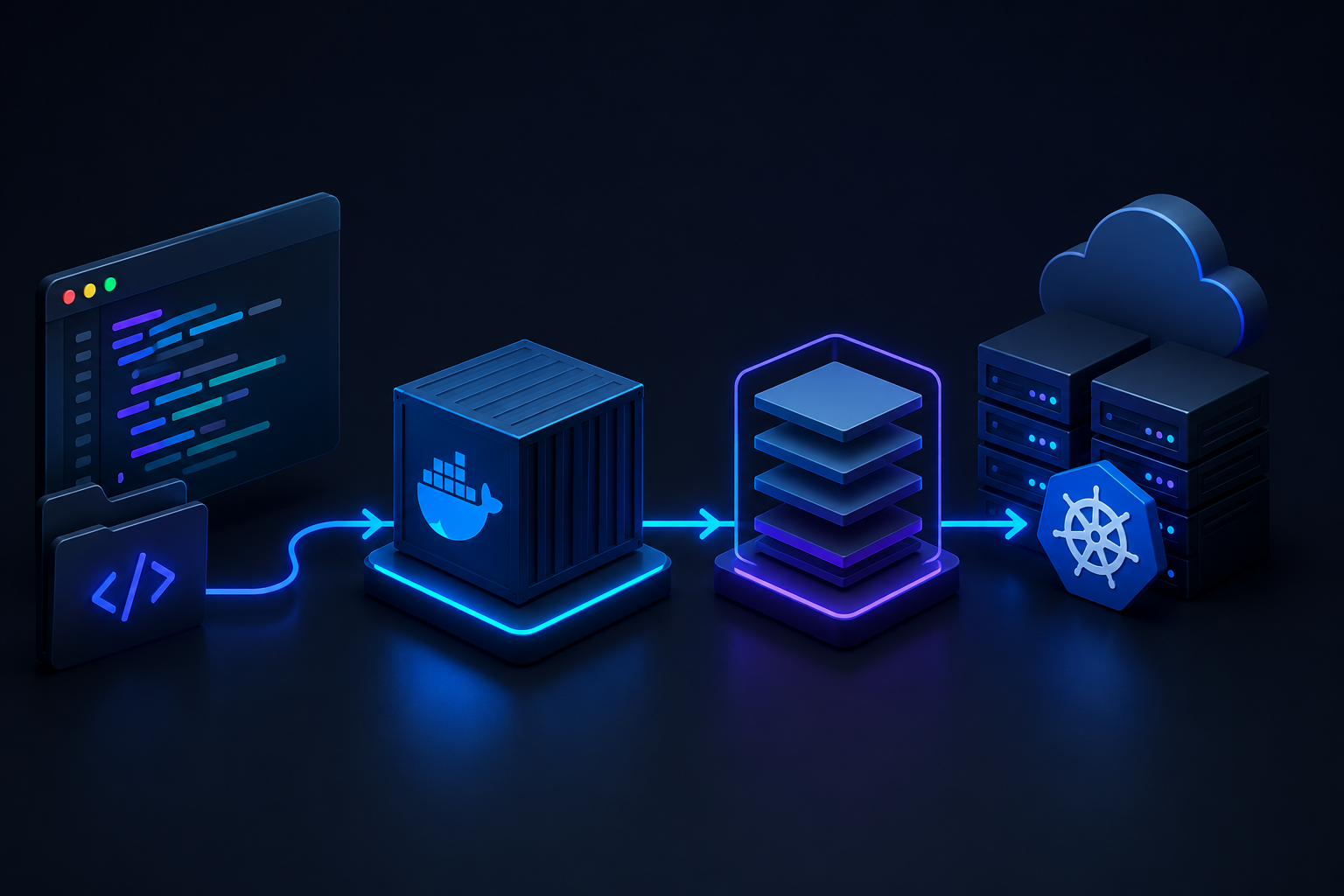
Code → Build Image → Docker Hub → docker pull → Kubernetes Deployment
Docker Image Size Problems Beginners Usually Miss
Large images slow builds, increase docker pull time, waste CI minutes, consume more bandwidth, and delay kubernetes orchestration during scaling or recovery. They also increase the attack surface because unnecessary tools and libraries remain inside the image. Using docker multi-stage build, alpine linux docker, or Docker Distroless improves container image optimization. When comparing distroless vs alpine docker, Alpine provides minimal alpine packages, while Distroless removes even more runtime components.
Industry Fact: Bloated Dockerfiles Are Measurable
A research study on Dockerfile smells found that image bloat increased image size by an average of 48.06 MB, with some cases reaching 89% larger images. These results show that unused packages, temporary files, and poor layer management have measurable costs. Simple cleanup habits such as removing build dependencies, combining commands, and choosing smaller base images produce faster, leaner Docker images and more reliable Kubernetes workloads.
What Is a Docker Multi-Stage Build?
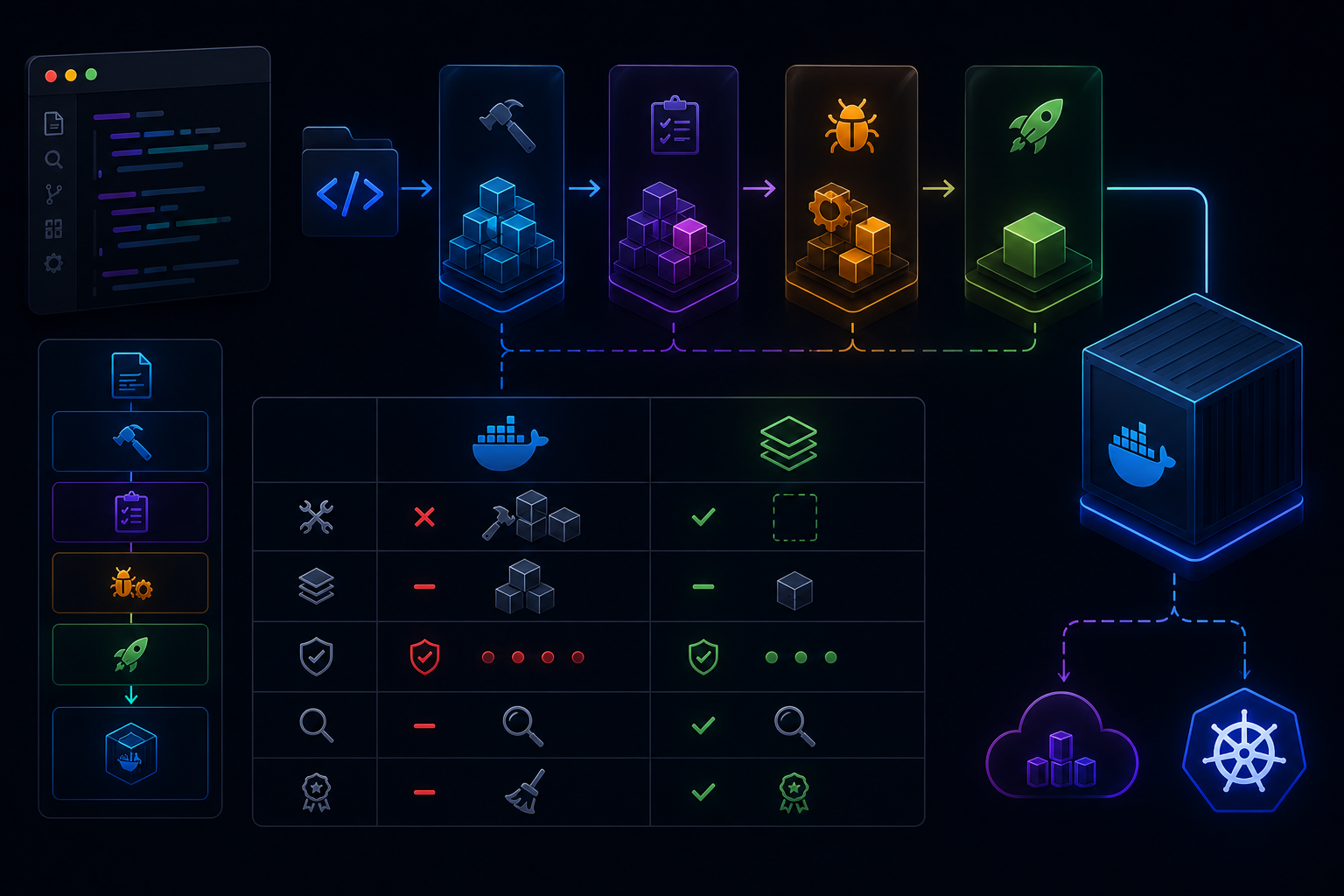
A Docker multi-stage build lets one Dockerfile contain multiple stages, each with a different purpose. For example, a build stage compiles the application, a test stage runs tests, a debug stage includes troubleshooting tools, and the production stage copies only the files needed to run the app. Everything else stays behind, reducing docker image size and improving container image optimization for kubernetes deployment.
# Stage 1: Build
FROM golang:1.24 AS builder

WORKDIR /app

COPY go.mod go.sum ./

RUN go mod download

COPY . .

RUN CGO_ENABLED=0 GOOS=linux go build -o app .
# Stage 2: Runtime
FROM alpine:3.22

WORKDIR /app

COPY --from=builder /app/app .

EXPOSE 8080

CMD ["./app"]
Workflow
Source Code → Build Stage → Test Stage → Debug Stage → Production Stage → Smaller Docker Image
Single-Stage vs Multi-Stage Dockerfile
| Feature | Single-Stage Dockerfile | Docker Multi-Stage Build |
| Build tools in final image | Often included | Left behind |
| Final image size | Usually larger | Usually smaller |
| Security exposure | Higher | Lower |
| Debugging | Simple but messy | Cleaner with named stages |
| Production readiness | Needs cleanup | Designed for release |
Why 80% Reduction Is Realistic in Many Apps
An 80% reduction is realistic when replacing full SDK or runtime images with lightweight runtime images such as alpine linux docker, Docker Distroless, or scratch. This removes compilers, package managers, caches, and unused alpine packages from the final image. Results vary depending on language, frameworks, and dependencies, but moving from development images to production-focused runtime images consistently produces smaller images, faster docker pull, lower storage costs on Docker Hub, and quicker kubernetes orchestration rollouts.
Install Docker and Prepare a Test Project
Before exploring Docker multi-stage build, install Docker, verify the installation, and create a small project. This sample app will later be optimized for smaller docker image size and better container image optimization during kubernetes deployment.
# Install Docker (Linux)

curl -fsSL https://get.docker.com | sh

# Verify installation

docker --version

docker info

# Create project

mkdir docker-demo

cd docker-demo
Workflow
Install Docker → Verify Docker → Create Project → Write App → Build Docker Image
Copy-Paste Folder Structure
docker-demo/
├── app.py
├── requirements.txt
└── Dockerfile
Minimal App File for Testing Docker Builds
from http.server import BaseHTTPRequestHandler, HTTPServer

class App(BaseHTTPRequestHandler):

    def do_GET(self):
        self.send_response(200)
        self.send_header("Content-Type", "text/plain")
        self.end_headers()
        self.wfile.write(b"Hello from Docker!")

server = HTTPServer(("0.0.0.0", 8000), App)

print("Server running on port 8000...")

server.serve_forever()
This lightweight project is perfect for learning docker image install, docker pull, Docker Hub, alpine linux docker, Docker Distroless, and later comparing distroless vs alpine docker in production-ready examples.
The Bad Dockerfile: A Common Image Size Mistake
Many beginners create a working Docker image that is much larger than necessary. They install compilers, keep package caches, and copy the entire source code into the final image. Although the application runs, the large docker image size slows docker pull, wastes storage on Docker Hub, and reduces container image optimization for kubernetes deployment.
FROM python:3.12-slim

WORKDIR /app

RUN apt-get update && \
    apt-get install -y build-essential gcc && \
    rm -rf /var/lib/apt/lists/*

COPY requirements.txt .

RUN pip install --no-cache-dir -r requirements.txt

COPY . .

CMD ["python", "app.py"]=
Workflow
Source Code → Large Dockerfile → Build Tools + Source + Cache → Large Docker Image
Build and Check the Docker Image Size
Measure the baseline before converting to a docker multi-stage build.
docker build -t bad-image .

docker images

docker history bad-image

docker run --rm bad-image
The docker history command reveals which layers consume the most space. Later, replacing this with alpine linux docker or Docker Distroless and separating build and runtime stages can significantly reduce image size. Comparing distroless vs alpine docker also helps choose the best runtime image for your application’s dependencies.
The Better Dockerfile: Docker Multi-Stage Build Example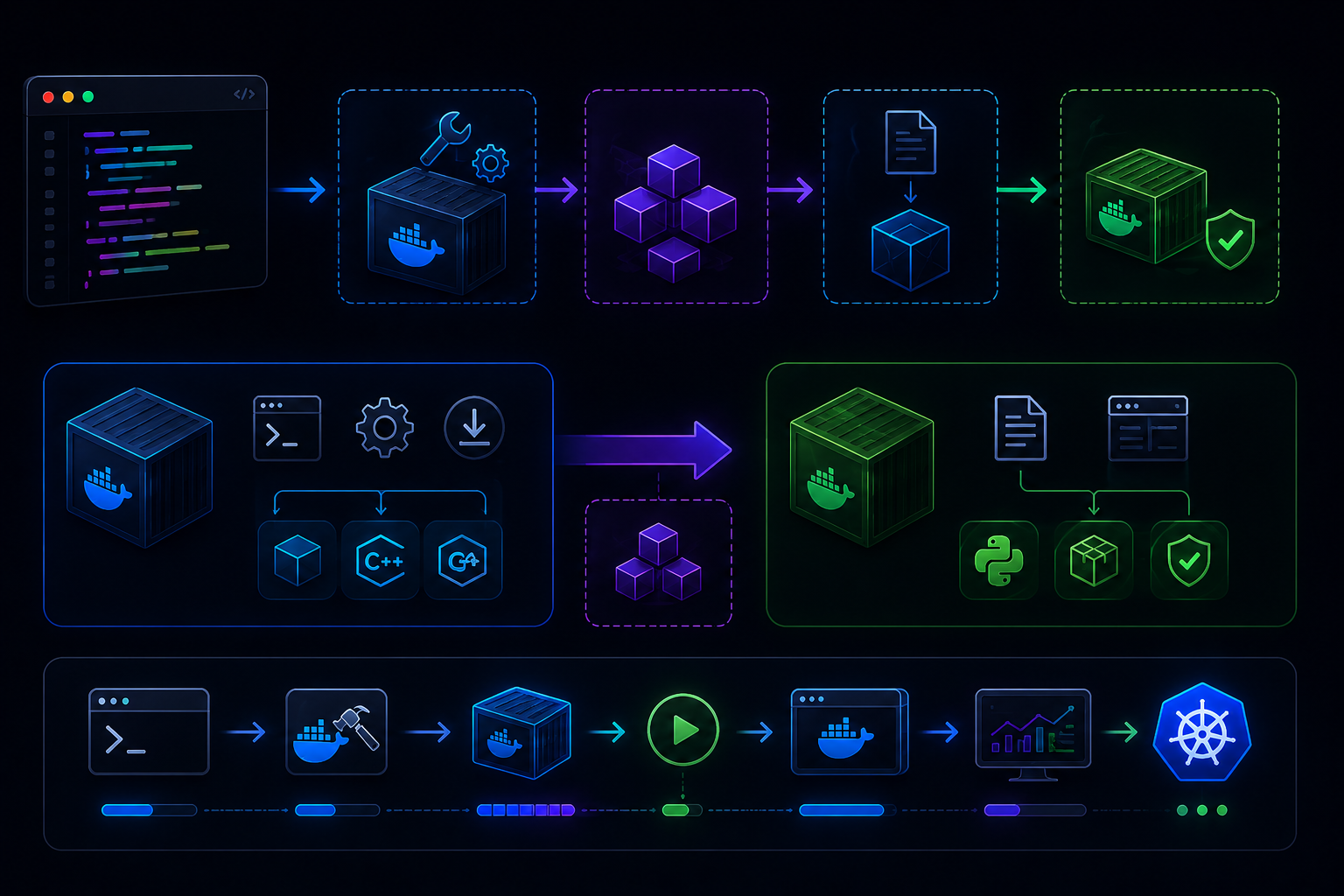 A Docker multi-stage build separates compiling from runtime. The builder stage contains tools and dependencies, while the final stage keeps only the application. This reduces docker image size, improves container image optimization, speeds docker pull, and benefits kubernetes deployment.
# ———- Stage 1: Builder ———-
FROM python:3.12-slim AS builder

WORKDIR /build

# Install build tools only for compilation

RUN apt-get update && \
    apt-get install -y --no-install-recommends \
        build-essential \
        gcc && \

    rm -rf /var/lib/apt/lists/*

# Copy dependency list first to improve layer caching

COPY requirements.txt .

# Build dependency wheels

RUN pip wheel --no-cache-dir \
    --wheel-dir=/wheels \
    -r requirements.txt

# Copy application source

COPY . .
# ———- Stage 2: Runtime ———-
FROM python:3.12-slim

WORKDIR /app

# Copy pre-built wheels

COPY --from=builder /wheels /wheels

# Copy application files

COPY --from=builder /build .

# Install dependencies from local wheels only

RUN pip install \
    --no-cache-dir \
    --no-index \
    --find-links=/wheels \
    -r requirements.txt && \
    rm -rf /wheels

EXPOSE 8000

CMD ["python", "app.py"]
Workflow
Code → Builder Stage → Compile + Build Wheels → COPY –from=builder → Small Runtime Image
Stage 1: Builder Image
The builder stage installs compilers, downloads dependencies, builds Python wheels, and compiles packages. It can be large because it includes development tools that are needed only during the build process, not in production.
Stage 2: Production Runtime Image
COPY –from=builder copies only the application and generated artifacts into the lightweight runtime image. Build tools, caches, and temporary files remain in the builder stage, making the final image smaller. You can also replace alpine linux docker with Docker Distroless depending on your runtime needs and compare distroless vs alpine docker.
Build, Run, and Compare Results
docker build -t app-single -f Dockerfile.single .

docker build -t app-multi -f Dockerfile .

docker run --rm -p 8000:8000 app-multi

docker images

docker history app-single

docker history app-multi
Compare image sizes and layer history to see the improvement. Smaller images upload faster to Docker Hub, reduce bandwidth, and speed kubernetes orchestration rollouts.
Alpine Linux Docker Images: Small but Not Always Simple
Alpine Linux Docker images are popular because they are lightweight, helping reduce docker image size, speed docker pull, and improve container image optimization for kubernetes deployment. However, Alpine uses the musl C library instead of glibc, so some applications and third party packages may require extra configuration or recompilation.
Alpine Linux vs Slim vs Distroless
| Base Image | Best For | Strength | Trade-Off |
| alpine linux | Small general apps | Very small size | Some alpine packages may need extra fixes |
| python:slim | Most Python apps | Good compatibility | Larger than Alpine |
| Docker Distroless | Production services | Minimal attack surface | Harder debugging |
| scratch | Static binaries | Tiny final image | Requires fully static app |
Alpine Packages and Common Fixes
Install only the packages required during the build process, then keep them out of the final runtime image by using a docker multi-stage build.
FROM alpine:latest AS builder

RUN apk add --no-cache \
    build-base \
    gcc \
    musl-dev \
    libffi-dev \
    openssl-dev \
    python3 \
    py3-pip

WORKDIR /app

COPY . .
Workflow
Builder Stage → apk add Packages → Compile App → COPY –from → Small Runtime Image
For many Python projects, python:slim offers better compatibility, while Docker Distroless provides stronger production security. When comparing distroless vs alpine docker, choose the base image that best balances size, compatibility, and debugging needs.
Distroless Docker Images for Secure Production Builds
Docker Distroless images contain only the files required to run an application. They remove shells, package managers, and unnecessary operating system utilities, reducing docker image size and the attack surface. Combined with a docker multi-stage build, they improve container image optimization for secure kubernetes deployment.
Distroless vs Alpine
Distroless vs alpine docker is a trade-off. Alpine Linux Docker includes a minimal shell and alpine packages, making debugging easier and compatibility better. Docker Distroless removes those tools, providing stronger production security but making troubleshooting inside a running container more difficult. Alpine suits development and lightweight services, while Distroless is often the preferred production runtime.
Copy-Paste Distroless Dockerfile Example
# Builder

FROM python:3.12-slim AS builder

WORKDIR /app

COPY requirements.txt .

RUN pip install --no-cache-dir \
    --target=/packages \
    -r requirements.txt

COPY . .

# Production

FROM gcr.io/distroless/python3

WORKDIR /app

COPY --from=builder /packages /packages

COPY --from=builder /app /app

ENV PYTHONPATH=/packages

CMD ["app.py"]
Workflow
Source → Builder → COPY –from → Distroless Runtime → Secure Kubernetes Deployment
This approach produces smaller images, faster docker pull, lower Docker Hub storage usage, and secure production containers.
Container Image Optimization Checklist
Use this quick checklist to improve Docker performance, reduce docker image size, and strengthen container image optimization for kubernetes deployment.
- Use docker multi-stage build.
- Choose alpine linux docker, python:slim, or Docker Distroless where appropriate.
- Keep runtime images small.
- Remove temporary files and caches.
- Scan images and rebuild regularly.
Use .dockerignore Correctly
Exclude files that are unnecessary during image builds.
.git
tests/
__pycache__/
*.pyc
.env
.env.*
*.log
docs/
.vscode/
.idea/
Avoid Unnecessary Packages
Do not keep text editors, compilers, package caches, or test tools inside the production image. Install them only in the builder stage, then copy the required application files with COPY –from. This reduces docker image size, speeds docker pull, and lowers the attack surface for kubernetes orchestration.
Pin Base Images Without Ignoring Updates
Prefer versioned tags such as python:3.12-slim over floating tags like latest. For maximum reproducibility, pin images by digest.
FROM python:3.12-slim@sha256:<image-digest>
Workflow
Pin Image → Build → Test → Push to Docker Hub → Rebuild Regularly
Pinned images produce consistent builds, while scheduled rebuilds ensure you receive upstream security patches and dependency updates without sacrificing deployment reliability.
Docker BuildKit, Cache Mounts, and Faster CI Builds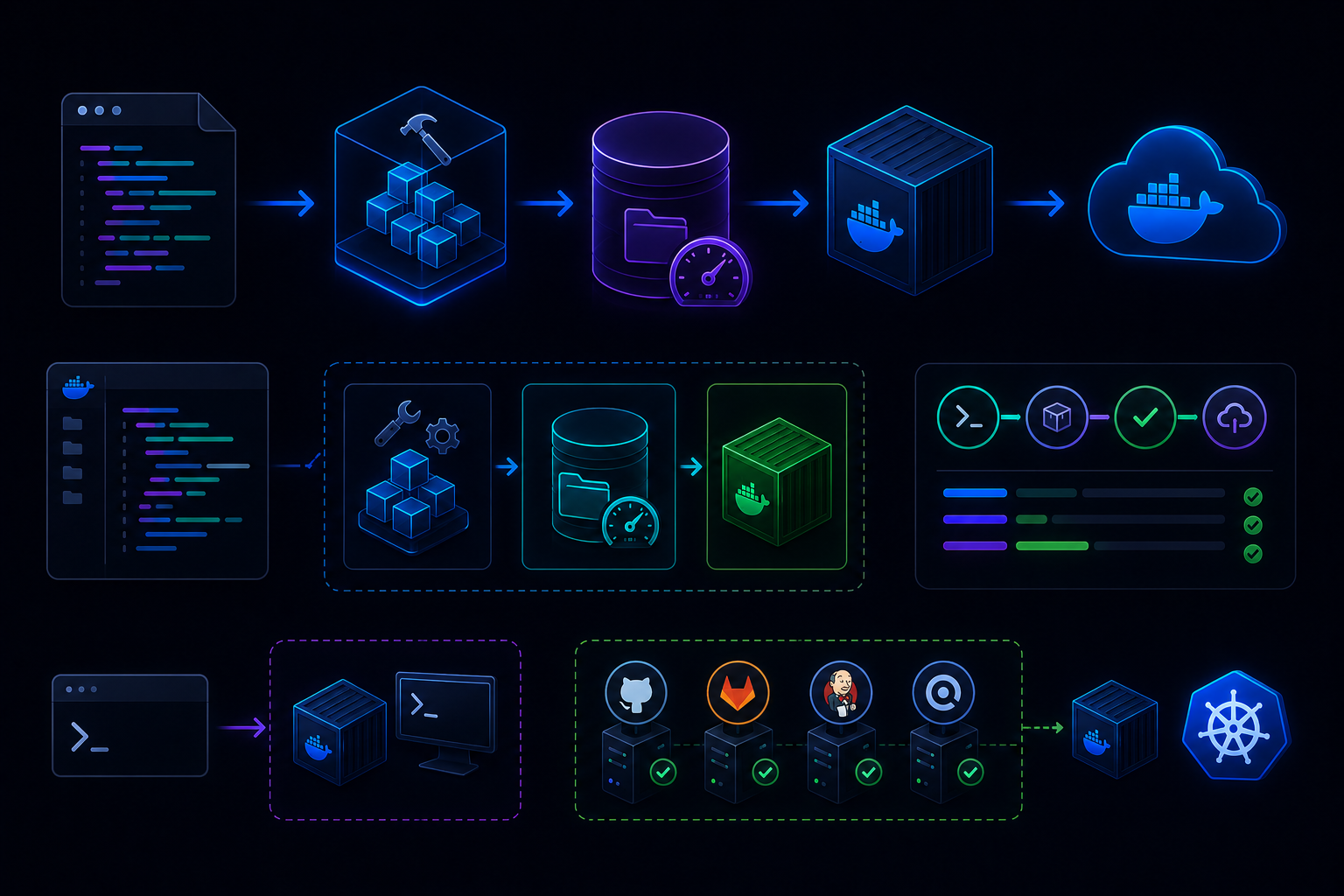
Docker BuildKit is a modern build engine that speeds image creation by caching dependencies and executing build steps more efficiently. Instead of downloading the same packages every build, cache mounts reuse previously downloaded files, reducing build time and improving container image optimization for CI pipelines and kubernetes deployment.
Copy-Paste BuildKit Dockerfile Snippet
# syntax=docker/dockerfile:1.7

FROM python:3.12 AS builder

WORKDIR /app

COPY requirements.txt .

RUN --mount=type=cache,target=/root/.cache/pip \
    pip install --cache-dir=/root/.cache/pip \
    -r requirements.txt

COPY . .
Debugging With Named Build Targets
Named stages let you stop the build at a specific stage for inspection before creating the final Docker image.
DOCKER_BUILDKIT=1 docker build --target builder -t app-builder .

docker run --rm -it app-builder sh
Workflow
Source → Builder Target → Cache Mount → Final Image → Docker Hub
Using BuildKit with docker multi-stage build produces smaller docker image size, faster rebuilds, quicker docker pull, and more efficient kubernetes orchestration while keeping production images clean.
Docker Image Size Optimization for Kubernetes
A smaller Docker image improves kubernetes orchestration because nodes spend less time on docker pull operations. Faster downloads accelerate rolling updates, autoscaling, new node provisioning, and failed pod recovery. Optimizing docker image size with docker multi-stage build and container image optimization also reduces bandwidth usage and storage on Docker Hub.
Kubernetes Deployment Example With Optimized Docker Image
apiVersion: apps/v1

kind: Deployment

metadata:
  name: docker-demo

spec:
  replicas: 2
  selector:
    matchLabels:
      app: docker-demo
  template:
    metadata:
      labels:
        app: docker-demo
    spec:
      containers:
      - name: app
        image: myrepo/docker-demo:1.0
        imagePullPolicy: IfNotPresent
        ports:
        - containerPort: 8000
Kubernetes Helm Values Example
image:

  repository: myrepo/docker-demo
  tag: "1.0"
  pullPolicy: IfNotPresent

resources
  requests:
    cpu: 100m
    memory: 128Mi

securityContext:

  runAsNonRoot: true
  readOnlyRootFilesystem: true
Workflow
Build → Push to Docker Hub → docker pull → Kubernetes Deployment → Rolling Update
Using alpine linux docker or Docker Distroless further reduces image size, while choosing between distroless vs alpine docker depends on your application’s compatibility and debugging requirements.
Security Benefits of Smaller Docker Images
Smaller Docker images usually contain fewer packages, reducing vulnerabilities, patching effort, and the overall attack surface. Using docker multi-stage build, Docker Distroless, or alpine linux docker removes unnecessary tools while improving container image optimization for secure kubernetes deployment.
Add a Non-Root User
FROM python:3.12-alpine

RUN addgroup -S app && adduser -S app -G app

WORKDIR /app

COPY . .

USER app

CMD ["python","app.py"]
Scan the Docker Image
Regular scans help identify outdated packages and known CVEs before deployment.
docker scout quickview my-app:latest

docker scout cves my-app:latest

docker scan my-app:latest
Workflow
Build → Scan → Fix Issues → Push to Docker Hub → Kubernetes Deployment
Combining non-root containers with smaller docker image size results in safer images, faster docker pull, and more secure production deployments.
Complete Copy-Paste Project: First Python MCP Server With Docker Multi-Stage Builds
This example combines a simple Python MCP-style server with a Docker multi-stage build to create a production-ready image. It demonstrates container image optimization, reduces docker image size, and prepares the project for kubernetes deployment.
Project Files
mcp-demo/
├── app.py # Simple HTTP service
├── requirements.txt # Python dependencies
└── Dockerfile # Multi-stage Docker build
app.py

from flask import Flask

app = Flask(__name__)

@app.get("/")

def home():
    return {"message": "Hello MCP"}

app.run(host="0.0.0.0", port=8000)

requirements.txt

flask==3.1.0

Complete Dockerfile

# Builder

FROM python:3.12-slim AS builder

WORKDIR /build

COPY requirements.txt .

RUN pip wheel --wheel-dir=/wheels -r requirements.txt

COPY . .

# Production

FROM python:3.12-alpine

WORKDIR /app

COPY --from=builder /wheels /wheels

COPY --from=builder /build .

RUN pip install --no-index \
    --find-links=/wheels \
    -r requirements.txt

EXPOSE 8000

USER nobody

CMD ["python","app.py"]
Build, Run, Test, and Push to Docker Hub
docker build -t mcp-demo .

docker run -d -p 8000:8000 --name mcp-demo mcp-demo

curl http://localhost:8000

docker tag mcp-demo your-dockerhub-user/mcp-demo:1.0

docker login

docker push your-dockerhub-user/mcp-demo:1.0
Workflow
Code → Docker Build → Run → Test → Push to Docker Hub → Kubernetes Deployment
This project is an excellent starting point for experimenting with Docker Distroless, alpine linux docker, and comparing distroless vs alpine docker while building efficient production containers.
Common Docker Multi-Stage Build Mistakes
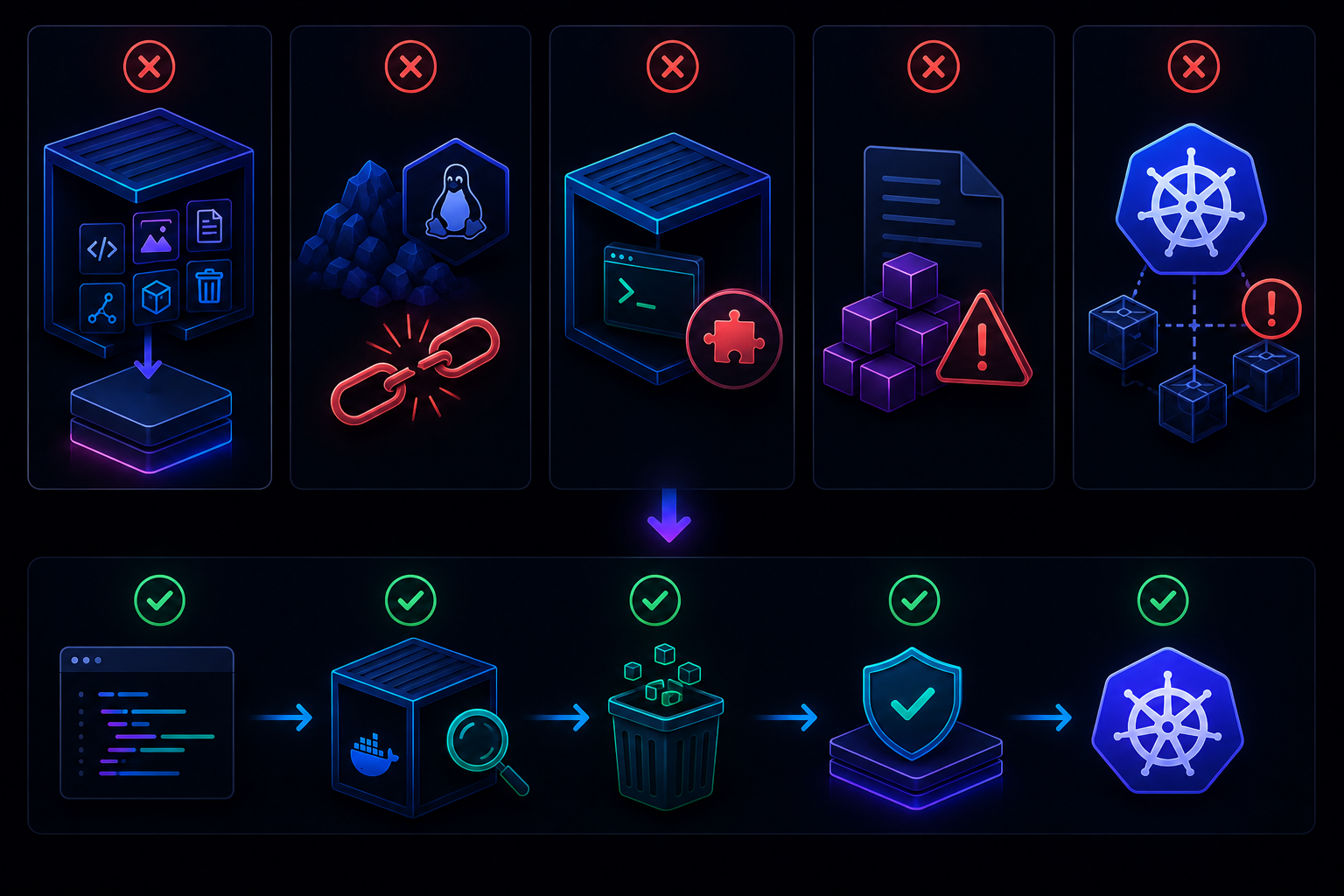
Avoid these common Docker mistakes to improve docker image size and container image optimization.
- Copy only required files with COPY –from.
- Remove caches and temporary files.
- Test the runtime image before pushing to Docker Hub.
- Choose the correct base image for your application.
- Verify libraries required for kubernetes deployment.
Copying the Whole Builder Stage
Copying /app blindly may include caches, source maps, tests, logs, and build artifacts, making the final image larger.
COPY --from=builder /app/app.py .

COPY --from=builder /app/dist ./dist
Using Alpine When Compatibility Matters More Than Size
Alpine Linux Docker is compact, but some native Python packages expect glibc. For better compatibility, python:slim is often a safer choice than Alpine. Compare distroless vs alpine docker only after verifying dependency support.
Forgetting Runtime Libraries
Applications may build successfully but fail at runtime if shared libraries are missing from the final image.
docker run --rm my-app

docker logs <container-id>
Finding these issues early produces reliable docker multi-stage build images with faster docker pull and smoother production deployments.
FAQ: Docker Multi-Stage Builds and Image Optimization
What is Docker?
Docker is a platform that packages applications with their dependencies into portable containers. It helps developers build, test, and deploy software consistently across local machines, servers, and cloud environments.
What is a Docker image?
If you’re asking what is a docker image, it is a read-only package containing application code, libraries, runtime, and configuration files used to create containers.
What is a Docker multi-stage build?
A docker multi-stage build uses multiple build stages in one Dockerfile. Early stages compile the application, while the final runtime stage copies only the required files into a smaller production image.
How can I reduce docker image size?
Use multi-stage builds, a .dockerignore file, alpine linux or Docker Distroless, remove unnecessary packages, and clean package caches.
Is Distroless better than Alpine?
Docker Distroless is ideal for secure production images. Alpine is easier to debug and offers better flexibility with alpine packages.
Can Docker multi-stage builds help Kubernetes deployments?
Yes. Smaller images reduce docker pull time, speed rolling updates, lower node storage usage, and improve kubernetes deployment performance.
Should I use Docker Hub for production images?
Yes, especially private repositories with version tags, image scanning, verified images, and proper access control.
Do I need to install Docker before using Kubernetes?
For local development, yes. Use Docker to build images, then deploy them to Kubernetes, which handles container orchestration.
docker build -t my-app .

docker push myrepo/my-app:1.0

kubectl apply -f deployment.yaml
Conclusion: Build Smaller Docker Images Without Making Development Harder
Building efficient Docker images is about removing unnecessary complexity, not sacrificing developer productivity. Start with a docker multi-stage build, measure docker image size, and optimize only after your application works correctly on your local machine. Small improvements in container image optimization lead to faster docker pull, lower Docker Hub storage costs, and smoother kubernetes deployment.
Choose alpine linux docker when your application is compatible and you want a lightweight runtime. Select Docker Distroless for production services that prioritize security and a minimal attack surface. The best choice in distroless vs alpine docker depends on your application’s dependencies, debugging needs, and deployment environment.
docker build -t my-app .

docker images

docker run --rm -p 8000:8000 my-app

docker push your-dockerhub-user/my-app:1.0
Workflow
Develop → Test Locally → Multi-Stage Build → Measure Image Size → Push to Docker Hub → Kubernetes Deployment
Build for correctness first, optimize second, and let smaller, cleaner images make production deployments faster, safer, and easier to maintain.
About the Author