Kubernetes ConfigMaps vs Secrets is a key comparison every Kubernetes user should understand when managing application configuration and sensitive information. As applications move across development, staging, and production environments, hardcoding configuration values or credentials inside container images becomes both impractical and insecure. Kubernetes addresses this challenge with two native resources: ConfigMaps and Secrets.
Although they appear similar—they both store key-value pairs and can be injected into Pods—their purposes are fundamentally different. ConfigMaps are designed for non-sensitive configuration, while Secrets are intended for confidential data such as passwords, API keys, certificates, and authentication tokens.
Choosing the wrong resource can expose sensitive information, complicate deployments, and even violate security and compliance requirements. This article explores the technical differences between ConfigMaps and Secrets, demonstrates how to use them in real Kubernetes workloads, and discusses production-ready security practices.
Understanding Kubernetes ConfigMaps
A ConfigMap is a Kubernetes API object that stores non-confidential configuration data separately from application code. This separation allows developers to use the same container image across multiple environments while changing only the configuration.
Common use cases include:
- Application environment variables
- Service endpoints
- Feature flags
- Logging levels
- Database hostnames
- Application configuration files
For example, instead of hardcoding a PostgreSQL host inside your application, you can store it in a ConfigMap and inject it during deployment.
Creating a ConfigMap Using YAML
The following example creates a ConfigMap containing application configuration values.
apiVersion: v1

kind: ConfigMap

metadata:

  name: app-config

data:

  APP_ENV: production

  LOG_LEVEL: info

  DATABASE_HOST: postgres-service

  DATABASE_PORT: "5432"
Apply it using:
kubectl apply -f configmap.yaml
Verify that it was created successfully:
kubectl get configmaps


kubectl describe configmap app-config


kubectl get configmap app-config -o yaml
Creating ConfigMaps with kubectl
Instead of writing YAML, ConfigMaps can be created directly from the command line.
kubectl create configmap app-config \

  --from-literal=APP_ENV=production \

  --from-literal=LOG_LEVEL=info \

  --from-literal=DATABASE_HOST=postgres-service
You can also create a ConfigMap from an existing configuration file.
kubectl create configmap nginx-config \

  --from-file=nginx.conf
This approach is commonly used in CI/CD pipelines where configuration files are generated dynamically.
Benefits of ConfigMaps
- Separates configuration from application code
- Enables environment-specific deployments
- Allows configuration reuse across multiple Pods
- Supports GitOps and Infrastructure as Code workflows
- Reduces the need to rebuild container images for configuration changes
Important: ConfigMaps are stored as plain text inside the Kubernetes cluster. They should never contain passwords, API keys, private certificates, or other sensitive information.
Understanding Kubernetes Secrets
While ConfigMaps manage application configuration, Secrets are designed to store confidential information securely.
Typical examples include:
- Database passwords
- API keys
- OAuth tokens
- SSH keys
- TLS certificates
- Cloud credentials
Although Secrets are stored as Base64-encoded values, Base64 is simply an encoding mechanism—not encryption. Anyone with permission to read the Secret can easily decode its contents. For production environments, Kubernetes recommends enabling Encryption at Rest and implementing strict Role-Based Access Control (RBAC).
Creating a Secret Using YAML
First, encode your values.
echo -n "admin" | base64
Output:
YWRtaW4=
Encode the password:
echo -n "StrongPassword123" | base64
Output:
U3Ryb25nUGFzc3dvcmQxMjM=
Create the Secret.
apiVersion: v1

kind: Secret

metadata:

  name: postgres-secret

type: Opaque

data:

  username: YWRtaW4=

  password: U3Ryb25nUGFzc3dvcmQxMjM=
Apply it.
kubectl apply -f secret.yaml
Verify it.
kubectl get secrets


kubectl describe secret postgres-secret
Creating Secrets with kubectl
In practice, most engineers use kubectl rather than manually Base64-encoding values.
kubectl create secret generic postgres-secret \

  --from-literal=username=admin \

  --from-literal=password=StrongPassword123
Kubernetes automatically encodes the values before storing them.
Viewing and Decoding Secret Values
To inspect a Secret:
kubectl get secret postgres-secret -o yaml
To retrieve only the password:
kubectl get secret postgres-secret \

-o jsonpath="{.data.password}"
You’ll receive a Base64-encoded string.
To decode it:
kubectl get secret postgres-secret \

-o jsonpath="{.data.password}" \

| base64 --decode
Output:
StrongPassword123
This example highlights a common misconception: Base64 encoding does not provide security. Proper protection relies on RBAC, encryption at rest, and external secret management solutions rather than Base64 encoding alone.
ConfigMaps vs Secrets: Technical Comparison

| Feature | ConfigMap | Secret |
| Primary Purpose | Store application configuration | Store confidential information |
| Data Type | Non-sensitive | Sensitive |
| Storage Format | Plain text | Base64-encoded |
| Encryption by Default | ❌ No | ❌ No (requires Encryption at Rest) |
| Suitable for Git | Yes | Not recommended (unless encrypted) |
| Environment Variable Support | ✅ Yes | ✅ Yes |
| Volume Mount Support | ✅ Yes | ✅ Yes |
| File Permissions | Standard | Can be restricted |
| Typical Examples | URLs, ports, feature flags | Passwords, API keys, certificates |
| Production Recommendation | Store application configuration | Store credentials with RBAC and encryption |
When Should You Use Each?
Use a ConfigMap when the information is safe to expose within your cluster, such as:
- Application URLs
- Logging configuration
- Feature flags
- Environment names
- Database hostnames
Use a Secret whenever unauthorized access could compromise your application or infrastructure, including:
- Database credentials
- JWT signing keys
- Cloud provider credentials
- TLS certificates
- SSH private keys
- API tokens
Keeping configuration and confidential data separate improves security, simplifies application management, and aligns with Kubernetes best practices.
Injecting ConfigMaps and Secrets into Pods
After creating ConfigMaps and Secrets, the next step is making them available to your applications. Kubernetes supports multiple methods for injecting configuration and sensitive data into containers. The most common approaches are:
- Environment variables
- Mounted volumes
- Command-line arguments
The right choice depends on your application’s requirements. Environment variables are simple and widely supported, while mounted volumes are often preferred for certificates, configuration files, and other sensitive data that may change over time.
Injecting ConfigMaps as Environment Variables
A ConfigMap can expose its values as environment variables inside a container.
apiVersion: apps/v1

kind: Deployment

metadata:

  name: web-app

spec:

  replicas: 2

  selector:

    matchLabels:

      app: web

  template:

    metadata:

      labels:

        app: web

    spec:

      containers:

      - name: web

        image: nginx:latest

        env:

        - name: APP_ENV

          valueFrom:

            configMapKeyRef:

              name: app-config

              key: APP_ENV


        - name: LOG_LEVEL

          valueFrom:

            configMapKeyRef:

              name: app-config

              key: LOG_LEVEL
Once the Pod starts, the application can access:
APP_ENV=production
LOG_LEVEL=info
This method is ideal for small configuration values that remain relatively static during the Pod’s lifetime.
Injecting Secrets as Environment Variables
Secrets can be injected in exactly the same way.
env:

- name: DB_USERNAME

  valueFrom:

    secretKeyRef:

      name: postgres-secret

      key: username


- name: DB_PASSWORD

  valueFrom:

    secretKeyRef:

      name: postgres-secret

      key: password
Although this approach is straightforward, keep in mind that environment variables may be exposed through debugging tools, process dumps, or accidental application logging. For highly sensitive information, mounting Secrets as files is generally the safer option.
Mounting ConfigMaps as Volumes
Instead of individual environment variables, ConfigMaps can be mounted as files inside the container.
apiVersion: v1

kind: Pod

metadata:

  name: configmap-volume-demo

spec:

  containers:

  - name: app

    image: nginx

    volumeMounts:

    - name: config-volume

      mountPath: /etc/config


  volumes:

  - name: config-volume

    configMap:

      name: app-config
Inside the container, Kubernetes automatically creates files such as:
/etc/config/APP_ENV
/etc/config/LOG_LEVEL
/etc/config/DATABASE_HOST
Applications that read configuration files instead of environment variables commonly use this approach.
Mounting Secrets as Volumes
Secrets can also be mounted as files.
apiVersion: v1

kind: Pod

metadata:

  name: secret-volume-demo

spec:

  containers:

  - name: app

    image: nginx

    volumeMounts:

    - name: secret-volume

      mountPath: /etc/secrets

      readOnly: true


  volumes:

  - name: secret-volume

    secret:

      secretName: postgres-secret
The mounted directory contains:
/etc/secrets/username
/etc/secrets/password
Many production applications read credentials directly from these files, reducing the likelihood of accidental exposure through environment variables.
Using ConfigMaps and Secrets Together
In real-world Kubernetes deployments, ConfigMaps and Secrets are almost always used together. Consider a web application connected to a PostgreSQL database:
- Database hostname → ConfigMap
- Database port → ConfigMap
- Username → Secret
- Password → Secret
A Deployment might look like this:
apiVersion: apps/v1

kind: Deployment

metadata:

  name: ecommerce-app


spec:

  replicas: 2


  selector:

    matchLabels:

      app: ecommerce


  template:


    metadata:

      labels:

        app: ecommerce


    spec:


      containers:


      - name: ecommerce


        image: mycompany/ecommerce:v1


        env:


        - name: DATABASE_HOST

          valueFrom:

            configMapKeyRef:

              name: app-config

              key: DATABASE_HOST


        - name: DATABASE_PORT

          valueFrom:

            configMapKeyRef:

              name: app-config

              key: DATABASE_PORT


        - name: DB_USERNAME

          valueFrom:

            secretKeyRef:

              name: postgres-secret

              key: username


        - name: DB_PASSWORD

          valueFrom:

            secretKeyRef:

              name: postgres-secret

              key: password
This separation follows Kubernetes security best practices by keeping configuration independent from sensitive credentials.
Production Example: PostgreSQL Deployment
Imagine deploying a PostgreSQL-backed application in Kubernetes.
ConfigMap
data:

  DATABASE_HOST: postgres-service

  DATABASE_PORT: "5432"
Secret
data:

  username: YWRtaW4=

  password: U3Ryb25nUGFzc3dvcmQxMjM=
Your application connects using:
Host = postgres-service
Port = 5432
Username = admin
Password = StrongPassword123
If the PostgreSQL service name changes, you only update the ConfigMap. If the database password changes, you update only the Secret. This separation simplifies maintenance and improves security.
ConfigMap vs Secret Update Behavior
Understanding how Kubernetes handles updates is essential for production workloads.
| Scenario | ConfigMap | Secret |
| Update via kubectl apply | ✅ Yes | ✅ Yes |
| Environment variables update automatically | ❌ No | ❌ No |
| Mounted volumes refresh automatically | ✅ Usually within a minute | ✅ Usually within a minute |
| Pod restart required for environment variables | ✅ Yes | ✅ Yes |
| Safe for confidential information | ❌ No | ✅ Yes |
One common misconception is that updating a ConfigMap automatically updates running Pods. This is only true for mounted volumes. If values are injected as environment variables, Pods must be restarted to pick up the changes.
For Deployments, a rolling restart can be triggered with:
kubectl rollout restart deployment ecommerce-app
Best Practices
When working with ConfigMaps and Secrets, follow these recommendations:
- Store only non-sensitive configuration in ConfigMaps.
- Never commit Secrets to Git repositories in plain text.
- Enable Encryption at Rest for Kubernetes Secrets in production.
- Apply the principle of least privilege using RBAC.
- Rotate credentials regularly instead of using long-lived passwords.
- Use mounted volumes for TLS certificates, SSH keys, and other file-based secrets.
- Keep development, staging, and production configurations separate.
- Manage configuration using GitOps or Infrastructure as Code tools such as Helm, Kustomize, or Terraform.
Key Takeaways
Although ConfigMaps and Secrets are both Kubernetes resources used to inject data into Pods, they serve distinct purposes. ConfigMaps provide a flexible way to manage application configuration, while Secrets are specifically designed for storing confidential information.
Using them together allows teams to build secure, maintainable, and environment-independent deployments. As Kubernetes clusters grow in size and complexity, following these patterns becomes essential for maintaining security, simplifying operations, and supporting scalable cloud-native applications.
Advanced Security Best Practices for Kubernetes Secrets
Storing Secrets in Kubernetes is only the first step toward securing sensitive information. In production environments, organizations implement additional security layers to reduce the risk of unauthorized access, credential leakage, and compliance violations.
The following practices are widely adopted in enterprise Kubernetes deployments.
1. Secure Secrets with Role-Based Access Control (RBAC)
RBAC allows administrators to define which users, service accounts, or applications can access Kubernetes resources.
Instead of granting cluster-wide access, follow the Principle of Least Privilege (PoLP) by giving workloads access only to the Secrets they require.
Example: Role
apiVersion: rbac.authorization.k8s.io/v1

kind: Role

metadata:

  namespace: production

  name: secret-reader


rules:

- apiGroups: [""]

  resources: ["secrets"]

  verbs: ["get", "list"]
Example: RoleBinding
apiVersion: rbac.authorization.k8s.io/v1

kind: RoleBinding

metadata:

  namespace: production

  name: read-secrets


subjects:

- kind: ServiceAccount

  name: app-service-account


roleRef:

  kind: Role

  name: secret-reader

  apiGroup: rbac.authorization.k8s.io
Apply the configuration:
kubectl apply -f role.yaml

kubectl apply -f rolebinding.yaml
Restricting Secret access minimizes the impact of compromised Pods and limits credential exposure.
2. Enable Encryption at Rest
By default, Kubernetes stores Secret data in etcd as Base64-encoded values. Since Base64 is not encryption, anyone with access to etcd can retrieve and decode the data.
Enable Encryption at Rest to encrypt Secrets before they are stored.
Example EncryptionConfiguration:
apiVersion: apiserver.config.k8s.io/v1

kind: EncryptionConfiguration


resources:


- resources:

  - secrets


  providers:


  - aescbc:

      keys:

      - name: key1

        secret: <32-byte-base64-key>


  - identity: {}


Configure the API server with:

--encryption-provider-config=/etc/kubernetes/encryption-config.yaml
This ensures that Secret data remains encrypted inside etcd.
3. Use External Secret Management
Large organizations rarely store long-lived credentials directly in Kubernetes. Instead, they use dedicated secret management platforms.
Popular solutions include:
- HashiCorp Vault
- AWS Secrets Manager
- Azure Key Vault
- Google Secret Manager
These services provide:
- Automatic secret rotation
- Audit logging
- Fine-grained access control
- Temporary credentials
- Integration with IAM policies
Applications retrieve credentials dynamically instead of relying on static Kubernetes Secrets.
External Secrets Operator
The External Secrets Operator (ESO) synchronizes secrets from external providers into Kubernetes.
Workflow:
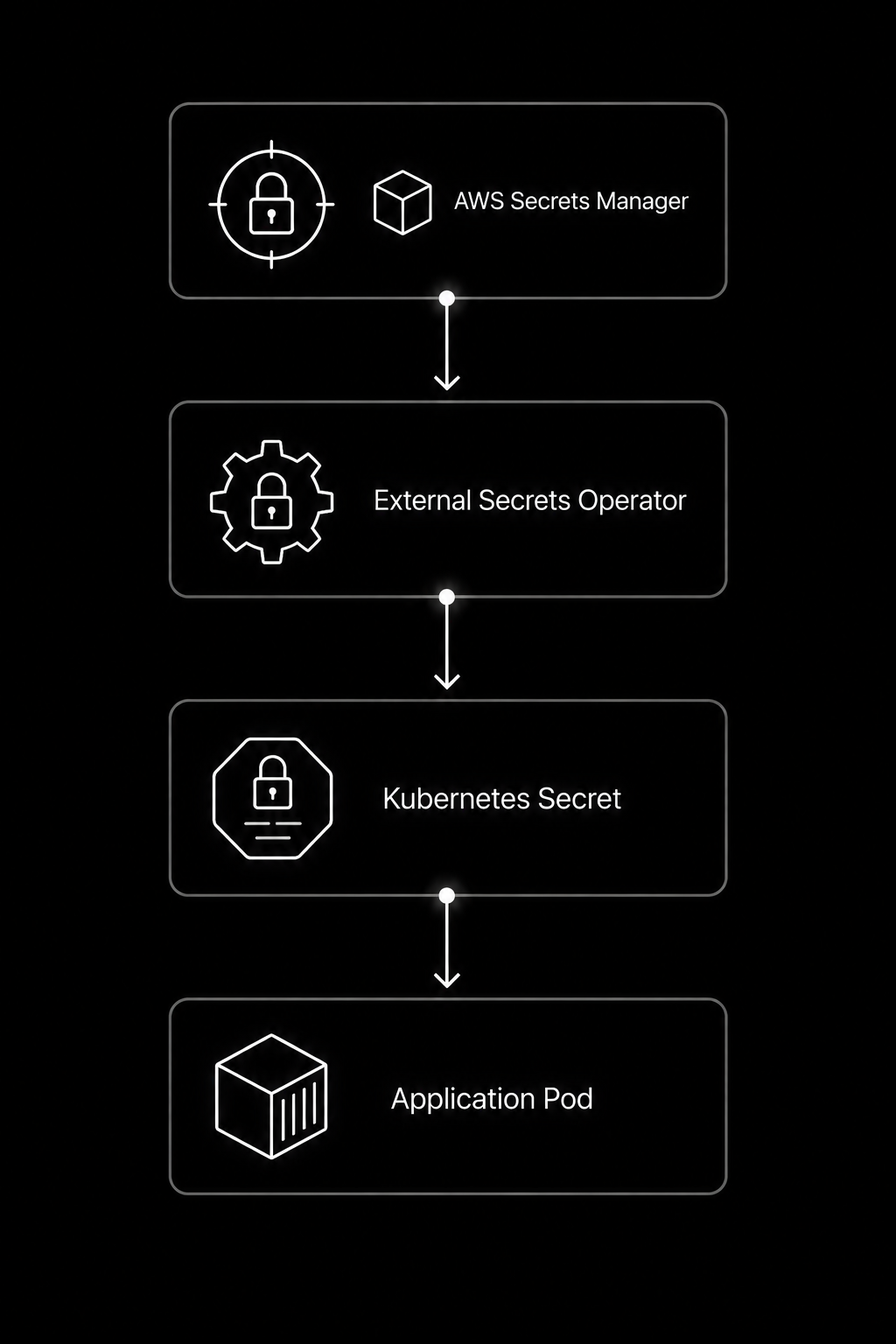
Benefits include:
- Centralized secret management
- Automatic synchronization
- Reduced manual updates
- Cloud-native integrations
Sealed Secrets
One of the biggest challenges in GitOps is storing Secrets inside Git repositories.
Sealed Secrets, developed by Bitnami, solve this problem by encrypting Secrets before they are committed.
Workflow:
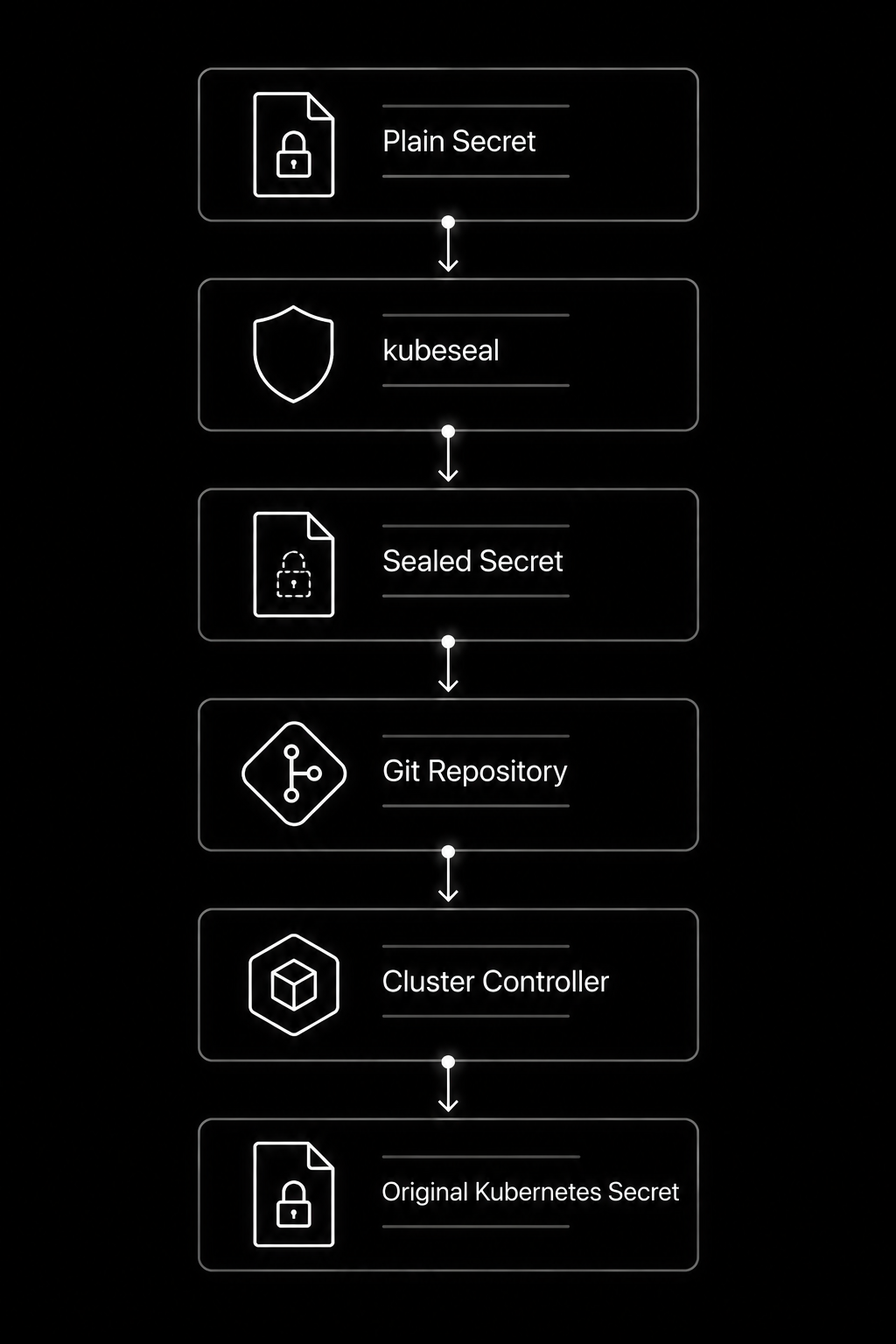
Even if someone accesses the Git repository, they cannot decrypt the Secret without the cluster’s private key.
HashiCorp Vault Integration
HashiCorp Vault is one of the most widely used enterprise secret management platforms.
Vault offers:
- Dynamic database credentials
- Automatic credential expiration
- PKI certificate management
- Encryption services
- Secret leasing
- Detailed audit logs
Instead of storing a static database password for years, Vault can generate temporary credentials that expire automatically after a specified period.
This significantly reduces the attack surface.
Secrets Store CSI Driver
The Secrets Store CSI Driver mounts secrets directly from external providers into Pods without permanently storing them as Kubernetes Secrets.
Supported providers include:
- AWS Secrets Manager
- Azure Key Vault
- Google Secret Manager
- HashiCorp Vault
Advantages:
- No long-lived Kubernetes Secret objects
- Automatic synchronization
- Reduced credential exposure
- Easier compliance with enterprise security policies
Common Mistakes and How to Fix Them
| Mistake | Why It’s a Problem | Recommended Fix |
| Storing passwords in ConfigMaps | Credentials are exposed in plain text | Use Kubernetes Secrets |
| Committing Secrets to Git | Anyone with repository access can view them | Use Sealed Secrets or External Secrets Operator |
| Using cluster-admin permissions | Excessive access increases attack surface | Apply least-privilege RBAC |
| Forgetting Encryption at Rest | Secrets remain readable in etcd | Enable EncryptionConfiguration |
| Sharing one Secret across multiple applications | Increases blast radius if compromised | Create application-specific Secrets |
| Never rotating credentials | Long-lived credentials are easier to exploit | Automate secret rotation |
Troubleshooting Common Issues
1. Pod Didn’t Pick Up ConfigMap Changes
Cause:
The ConfigMap is consumed through environment variables.
Solution:
Restart the Deployment.
kubectl rollout restart deployment my-app
2. Secret Not Found
Error:
secret “postgres-secret” not found
Check whether the Secret exists.
kubectl get secrets
Also verify that the Secret is created in the correct namespace.
3. Pod in CrashLoopBackOff
Possible reasons:
- Missing Secret
- Incorrect Secret key
- Wrong ConfigMap reference
- Invalid environment variable names
Inspect the Pod.
kubectl describe pod <pod-name>
Check logs.
kubectl logs <pod-name>
4. Permission Denied While Reading Secret
Verify RBAC permissions.
kubectl auth can-i get secrets \

--as=system:serviceaccount:production:app-service-account
5. ConfigMap Mounted but File Missing
Verify the mounted directory.
kubectl exec -it <pod-name> -- ls /etc/config
Also check whether the ConfigMap name matches the Deployment configuration.
ConfigMaps vs Secrets: Expanded Comparison
| Feature | ConfigMap | Secret |
| Intended Use | Configuration | Sensitive Data |
| Stores Passwords | ❌ | ✅ |
| Stores API Keys | ❌ | ✅ |
| Stores Certificates | ❌ | ✅ |
| Environment Variable Support | ✅ | ✅ |
| Volume Mount Support | ✅ | ✅ |
| Base64 Encoding | ❌ | ✅ |
| Encryption at Rest | ❌ | Supported |
| Automatic Volume Refresh | ✅ | ✅ |
| Pod Restart Needed for Env Vars | ✅ | ✅ |
| Suitable for Git | Yes | Only if encrypted |
| External Secret Manager Support | Rare | Common |
| Typical Examples | URLs, Ports, Feature Flags | Passwords, Tokens, Certificates |
Kubernetes Interview Questions
1. What is the difference between ConfigMaps and Secrets?
ConfigMaps store non-sensitive configuration, whereas Secrets store confidential information such as passwords, API keys, and certificates.
2. Are Kubernetes Secrets encrypted?
No. They are Base64 encoded by default. To encrypt them, enable Encryption at Rest or use an external secret management solution.
3. Can ConfigMaps and Secrets be mounted as files?
Yes. Both can be mounted as volumes or injected as environment variables.
4. Why doesn’t my Pod automatically receive ConfigMap updates?
Pods load environment variables only during startup. Restart the Pod or Deployment to use updated values.
5. Which is more secure: environment variables or mounted Secrets?
Mounting Secrets as files reduces the risk of exposing sensitive data through process listings, debug tools, or application logs.
Production Best Practices Checklist
- ✔ Store only non-sensitive data in ConfigMaps.
- ✔ Keep credentials exclusively in Secrets.
- ✔ Enable Encryption at Rest for Kubernetes Secrets.
- ✔ Implement RBAC using the principle of least privilege.
- ✔ Rotate Secrets on a regular schedule.
- ✔ Avoid committing Secrets to Git repositories.
- ✔ Use External Secrets Operator or HashiCorp Vault for enterprise deployments.
- ✔ Monitor Secret access with Kubernetes audit logs.
- ✔ Separate development, staging, and production Secrets.
- ✔ Scan Kubernetes manifests for exposed credentials before deployment.
Conclusion
ConfigMaps and Secrets are complementary Kubernetes resources that solve different problems. ConfigMaps simplify application configuration management by separating environment-specific settings from application code, while Secrets protect confidential information such as passwords, API keys, and certificates.
For production workloads, simply using Secrets is not enough. Organizations should combine Encryption at Rest, RBAC, external secret management solutions, and regular credential rotation to build a layered security model. Tools like External Secrets Operator, Sealed Secrets, Secrets Store CSI Driver, and HashiCorp Vault further strengthen security by integrating Kubernetes with enterprise-grade secret management platforms.
As a result, DevOps teams can build Kubernetes deployments that are secure, scalable, and easier to maintain by understanding when to use ConfigMaps versus Secrets and implementing these best practices.. As cloud-native applications continue to evolve, adopting a robust configuration and secret management strategy is no longer optional—it’s a fundamental requirement for operating production-ready Kubernetes clusters.
About the Author