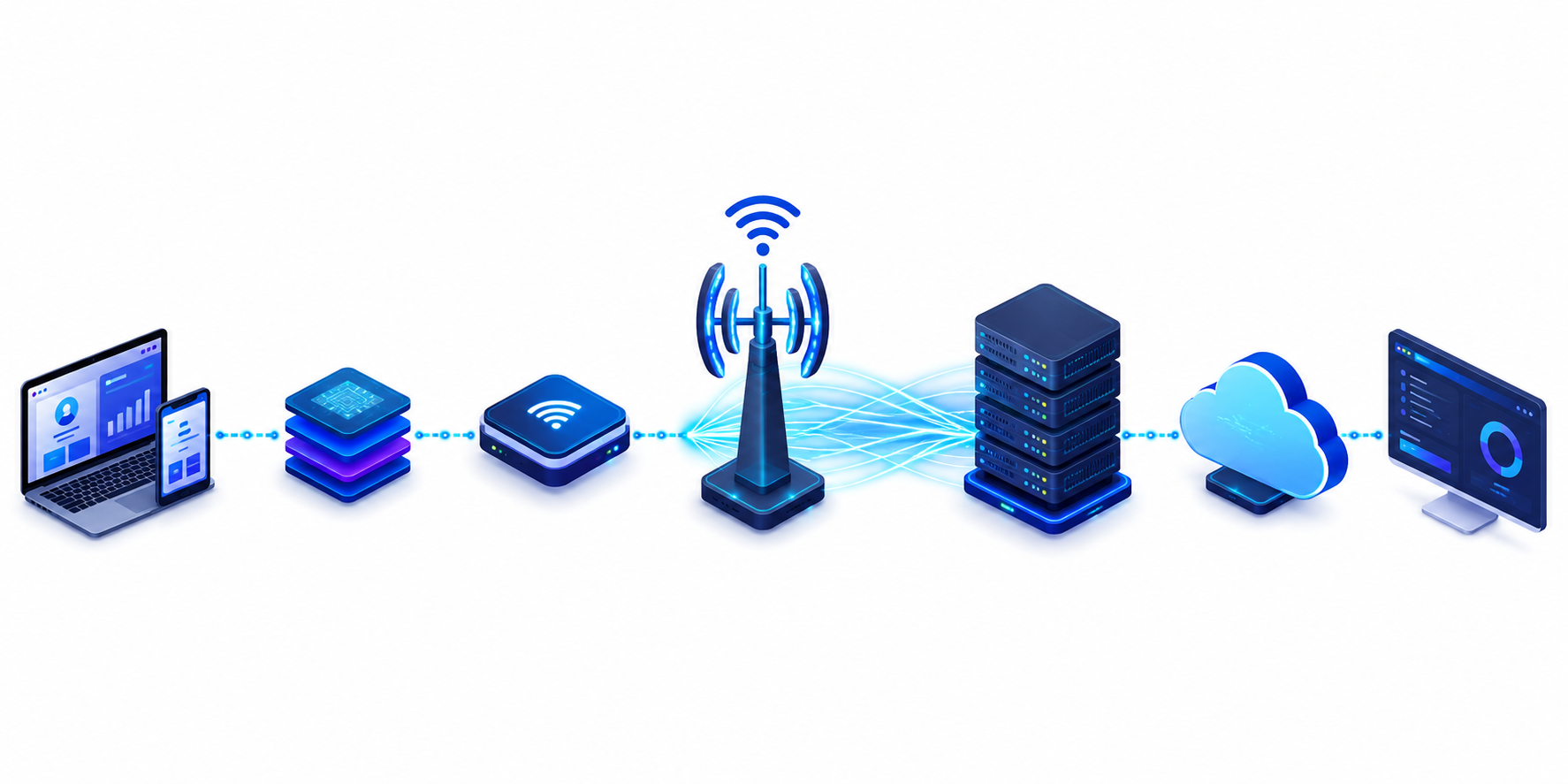
Wi-Fi 7, based on the IEEE 802.11be standard, represents the biggest leap in wireless networking since Wi-Fi 6. It is not only about faster internet speeds but also about lower latency, Multi-Link Operation (MLO), improved spectrum efficiency, and improved latency consistency that reshape how modern applications communicate. Network programmers, backend developers, IoT engineers, robotics developers, game developers, and edge computing teams can now build applications that respond faster, synchronize devices more reliably, and support real-time workloads at scale.
As wireless networking expert Matthew Gast, author of 802.11 Wireless Networks: The Definitive Guide, has consistently emphasized, every new IEEE 802.11 generation expands the role of Wi-Fi from simple connectivity to a platform capable of supporting increasingly complex applications. Likewise, IEEE 802.11 working group publications highlight that 802.11be focuses on extremely high throughput while significantly improving reliability and latency for next-generation workloads.
Recent industry projections reinforce this shift:
- Wi-Fi Alliance expects billions of Wi-Fi 7 devices to enter the market over the next few years.
- Wi-Fi 7 can theoretically achieve speeds approaching 46 Gbps, nearly five times faster than Wi-Fi 6.
- Technologies such as Multi-Link Operation, 320 MHz channels, and 4K-QAM can substantially reduce latency while improving network efficiency in dense environments.
- Enterprise adoption continues to accelerate as organizations prepare networks for AI workloads, cloud gaming, industrial automation, and edge computing.
Modern Wi-Fi 7 application workflow:
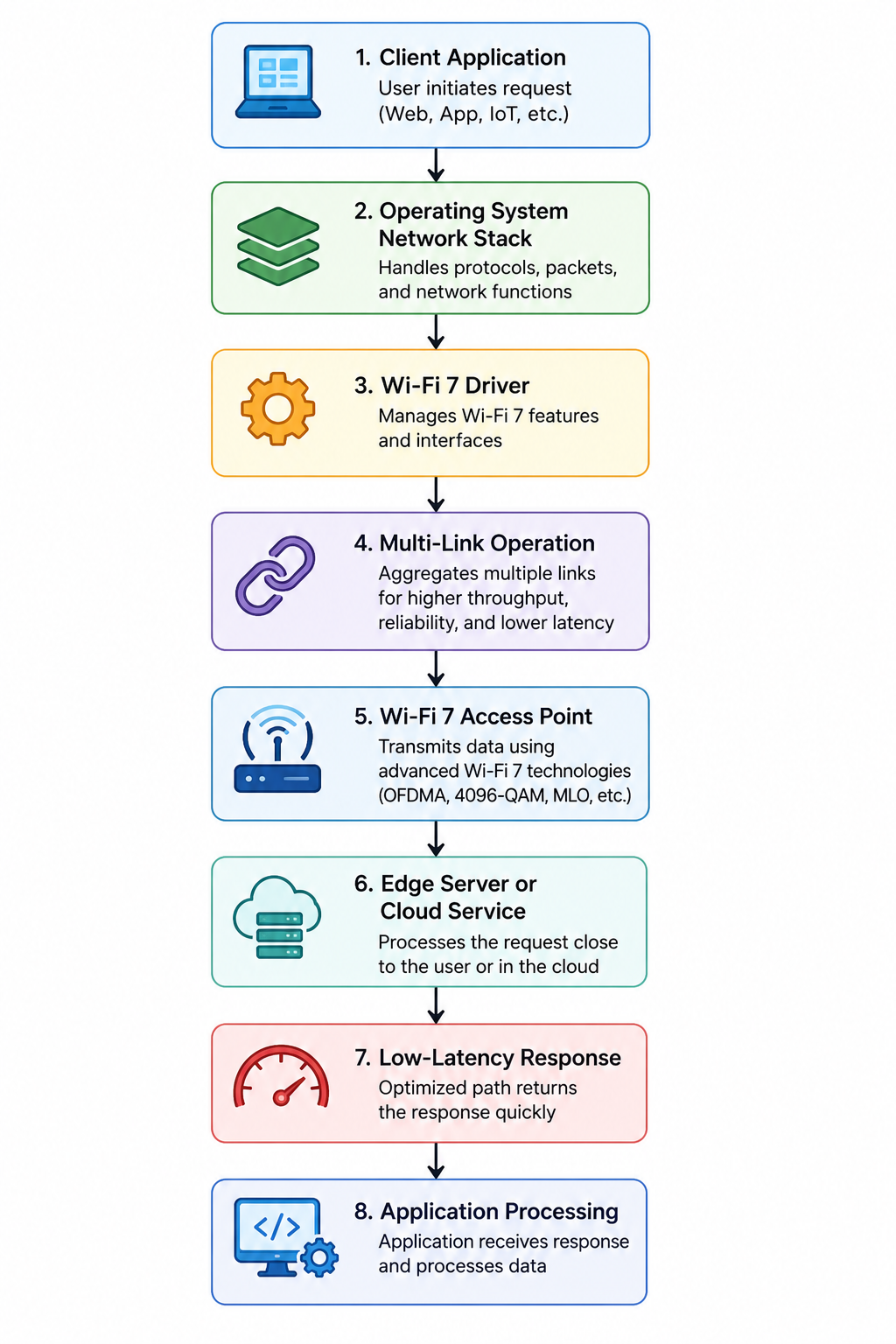
Understanding Wi-Fi 7 helps developers optimize protocols, reduce communication delays, improve Quality of Service (QoS), and design network-aware applications that fully utilize next-generation wireless infrastructure.
What Is Wi-Fi 7?
Wi-Fi 7 is the latest wireless networking standard based on IEEE 802.11be and introduces Extremely High Throughput (EHT). Instead of focusing only on faster downloads, it improves latency, reliability, and simultaneous connections for cloud gaming, AI, industrial automation, robotics, AR/VR, and edge computing. Features such as 320 MHz channels, 4K-QAM, and Multi-Link Operation (MLO) enable applications to exchange data more efficiently under heavy network loads.
Understanding IEEE 802.11be
IEEE 802.11be builds on 802.11ax by increasing channel width, improving modulation, supporting Multi-Link Operation, and optimizing spectrum usage. Consequently, developers gain more predictable wireless performance rather than simply higher peak speeds.
Why Wi-Fi 7 Matters for Modern Network Programming
Today, bandwidth is rarely the primary bottleneck. Instead, application architecture, concurrency, protocol design, serialization, and request handling often determine performance. Therefore, developers should minimize unnecessary network calls, adopt asynchronous programming, reduce payload sizes, and optimize communication paths.
Development workflow:
Application → Async Networking → Efficient Protocol → Wi-Fi 7 Stack → Access Point → Edge/Cloud Service → Response → User
Evolution of Wireless Networking Technologies
Wireless networking has progressed from basic connectivity to supporting real-time, latency-sensitive applications. 802.11a introduced faster 5 GHz networking, while 802.11n added MIMO for higher throughput. 802.11ac improved speed with wider channels, and 802.11ax (Wi-Fi 6) introduced OFDMA for better efficiency in crowded environments. Now, Wi-Fi 7 (802.11be) combines 320 MHz channels, 4K-QAM, and Multi-Link Operation (MLO) to deliver higher throughput, lower latency, and better spectrum utilization. As a result, developers can build cloud gaming, industrial IoT, AR/VR, robotics, AI, and edge computing applications with more predictable wireless performance.
Wi-Fi Standards Comparison Table
| Standard | IEEE Version | Max Speed | Frequency Bands | Latency | OFDMA | MU-MIMO | MLO | Typical Applications |
| Wi-Fi 4 | 802.11n | 600 Mbps | 2.4 & 5 GHz | Moderate | No | Yes | No | HD streaming, home networks |
| Wi-Fi 5 | 802.11ac | 6.9 Gbps | 5 GHz | Low | No | Yes | No | 4K streaming, enterprise Wi-Fi |
| Wi-Fi 6 | 802.11ax | 9.6 Gbps | 2.4 & 5 GHz | Lower | Yes | Yes | No | IoT, video conferencing, dense deployments |
| Wi-Fi 7 | 802.11be | Up to 46 Gbps | 2.4, 5 & 6 GHz | Ultra Low | Yes | Yes | Yes | AI, AR/VR, cloud gaming, robotics, edge computing |
Wi-Fi 7 Architecture Every Network Programmer Should Understand
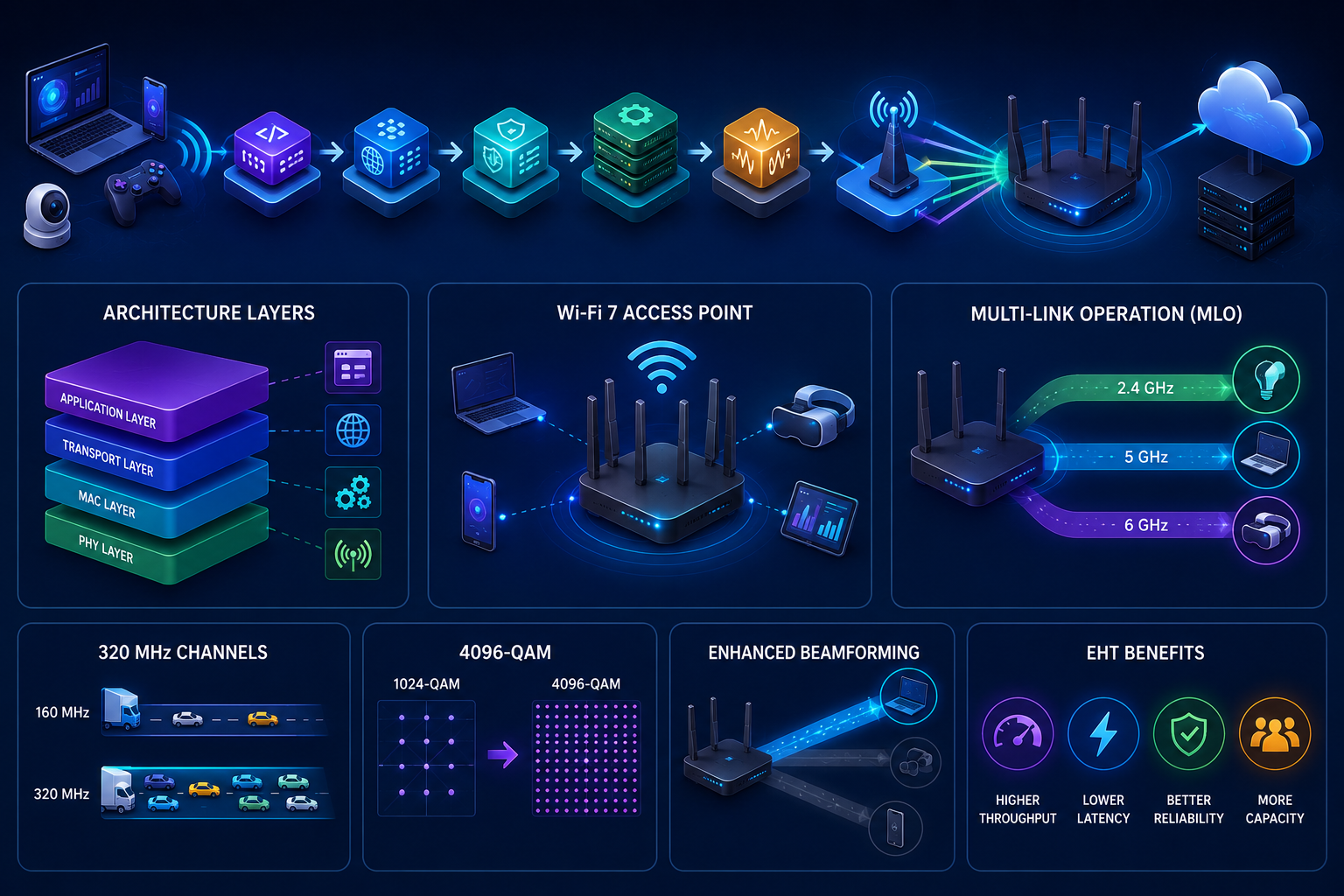
Wi-Fi 7 builds on the IEEE 802.11be architecture by improving every stage of wireless communication, from signal transmission to packet scheduling. The PHY layer handles radio transmission, while the MAC layer coordinates channel access, traffic prioritization, packet aggregation, and retransmissions. Together, they reduce congestion and improve reliability. Additionally, intelligent scheduling distributes traffic across multiple radios, optimizes spectrum allocation, and supports Multi-Link Operation (MLO), allowing devices to transmit over different frequency bands simultaneously for lower latency and higher throughput.
Architecture workflow:
Application → Socket/API → TCP/UDP → MAC Scheduling → Packet Aggregation → PHY Processing → 2.4/5/6 GHz Radios → Wi-Fi 7 Access Point → Edge or Cloud Service
PHY Layer Improvements
The PHY layer introduces 320 MHz channels, 4096-QAM, improved modulation, and enhanced signal processing to maximize throughput while maintaining reliable communication.
MAC Layer Enhancements
The MAC layer improves frame scheduling, channel access, Quality of Service (QoS), retransmission efficiency, and traffic steering, enabling better performance in dense wireless environments.
Extremely High Throughput (EHT)
EHT combines wider channels, higher-order modulation, Multi-Link Operation, and advanced resource allocation to significantly increase network capacity.
320 MHz Channels
Doubling channel width from 160 MHz to 320 MHz allows substantially more data to travel during each transmission cycle.
4096-QAM Explained
4096-QAM encodes more bits in every transmitted symbol, increasing throughput when signal quality remains high.
Enhanced Beamforming
Enhanced beamforming focuses wireless signals toward connected devices instead of broadcasting energy uniformly. Consequently, applications experience stronger connections, improved coverage, and lower packet loss, especially in high-density deployments.
Multi-Link Operation (MLO): The Biggest Programming Change in Wi-Fi 7
Multi-Link Operation (MLO) is the defining feature of Wi-Fi 7. Instead of relying on a single wireless link, an MLO-capable device can use multiple links, such as 5 GHz and 6 GHz, simultaneously. Consequently, traffic can be scheduled dynamically, reducing congestion and improving resilience. If one link becomes busy or fails, packets automatically move to another available link with minimal interruption. The MAC layer also maintains packet synchronization and ordering so applications receive data correctly even when packets travel over different wireless paths. Therefore, developers should focus on efficient concurrency, asynchronous I/O, connection pooling, idempotent requests, and protocol efficiency instead of assuming every packet follows the same route.
How MLO Works
An MLO scheduler continuously evaluates latency, congestion, signal quality, and link availability before selecting the best transmission path for every packet.
MLO Packet Scheduling Workflow
Application → Socket Layer → Transport Layer → MLO Scheduler → {5 GHz + 6 GHz Parallel Links} → Wi-Fi 7 Radio → Access Point → Server → Response
Types of Multi-Link Operation
Wi-Fi 7 supports Simultaneous Transmit and Receive (STR), Enhanced Multi-Link Single Radio (EMLSR), and Multi-Link Single Radio (MLSR), each balancing hardware capability, power consumption, and performance.
Load Balancing vs Redundancy
Load balancing distributes packets across multiple links to maximize throughput. In contrast, redundancy prioritizes reliability by redirecting traffic immediately if a link degrades or disconnects.
Coding Considerations for MLO-aware Applications
Although applications cannot directly control Multi-Link Operation, designing software using asynchronous I/O, parallel requests, and efficient connection management allows the operating system and Wi-Fi stack to better utilize MLO-capable hardware.
Basic Python Example Using MLO
import asyncio

HOST = "127.0.0.1"

PORTS = (9001, 9002)

async def send(port: int, message: str) -> None:

    reader, writer = await asyncio.open_connection(HOST, port)
    writer.write(message.encode())
    await writer.drain()
    data = await reader.read(1024)
    print(f"Port {port}: {data.decode()}")
    writer.close()
    await writer.wait_closed()

async def main():

    await asyncio.gather(

        send(PORTS[0], "packet-A"),
        send(PORTS[1], "packet-B"),

    )

if __name__ == "__main__":

    asyncio.run(main())
Basic Java Network Programming Example
import java.io.*;

import java.net.*;

import java.util.concurrent.*;

public class ParallelClient {

    private static final String HOST = "127.0.0.1";
    private static void send(int port, String message) {

        try (Socket socket = new Socket(HOST, port);

             PrintWriter out = new PrintWriter(socket.getOutputStream(), true);
             BufferedReader in = new BufferedReader(

                     new InputStreamReader(socket.getInputStream()))) {

            out.println(message);
            System.out.println("Port " + port + ": " + in.readLine());

        } catch (IOException e) {

            e.printStackTrace();

        }

    }

    public static void main(String[] args) throws InterruptedException {

        ExecutorService executor = Executors.newFixedThreadPool(2);
        executor.submit(() -> send(9001, "packet-A"));
        executor.submit(() -> send(9002, "packet-B"));
        executor.shutdown();
        executor.awaitTermination(5, TimeUnit.SECONDS);

    }

}
Basic Network Programming in C Example
#include <arpa/inet.h>
#include <stdio.h>
#include <string.h>
#include <sys/socket.h>
#include <unistd.h>

int main(void) {

    int sock = socket(AF_INET, SOCK_STREAM, 0);

    struct sockaddr_in server = {

        .sin_family = AF_INET,
        .sin_port = htons(9001)

    };

    inet_pton(AF_INET, "127.0.0.1", &server.sin_addr);

    if (connect(sock, (struct sockaddr *)&server, sizeof(server)) == 0) {

        const char *msg = "packet-A";
        send(sock, msg, strlen(msg), 0);
        char buffer[1024] = {0};
        recv(sock, buffer, sizeof(buffer), 0);
        printf("Received: %s\n", buffer);

    }

    close(sock);
    return 0;

}
OFDMA in Wi-Fi 7 Explained for Developers
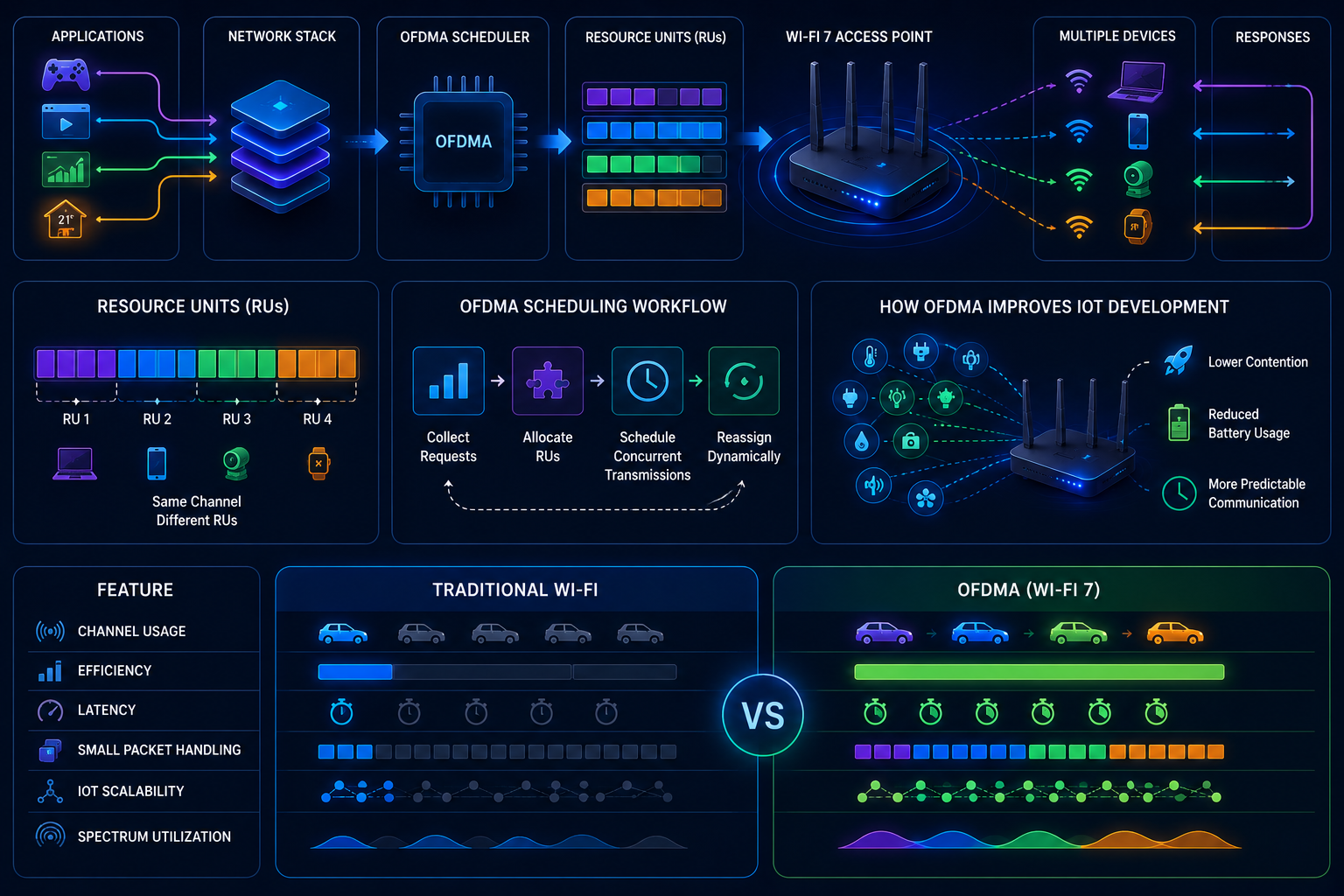
Orthogonal Frequency Division Multiple Access (OFDMA) lets multiple devices share the same wireless channel simultaneously instead of waiting for one another. From a software engineer’s perspective, think of it as a scheduler that divides radio bandwidth into smaller Resource Units (RUs), allowing several applications to transmit efficiently. As a result, APIs, IoT sensors, video streams, and telemetry services experience lower latency and higher throughput under heavy network load.
OFDMA workflow:
Applications → Network Stack → OFDMA Scheduler → Resource Units (RUs) → Wi-Fi 7 Access Point → Multiple Devices → Responses
Resource Units Explained
A Resource Unit is a portion of the wireless channel assigned to a specific device or application for a transmission period. Therefore, multiple clients can communicate in parallel without occupying the entire channel.
OFDMA Scheduling Workflow
The access point collects transmission requests, allocates suitable RUs, schedules concurrent transmissions, and reassigns resources dynamically as traffic changes.
How OFDMA Improves IoT Development
OFDMA allows hundreds of sensors, smart devices, and edge nodes to send small packets simultaneously. Consequently, developers achieve lower contention, reduced battery consumption, and more predictable communication.
OFDMA vs Traditional Wi-Fi
| Feature | Traditional Wi-Fi | OFDMA |
| Channel Usage | One device at a time | Multiple devices simultaneously |
| Efficiency | Lower under heavy load | High in dense networks |
| Latency | Higher | Lower |
| Small Packet Handling | Less efficient | Optimized |
| IoT Scalability | Limited | Excellent |
| Spectrum Utilization | Moderate | Significantly improved |
Throughput Testing in Wi-Fi 7 Networks
ISP speed tests measure internet bandwidth, not application performance. Instead, developers should benchmark application throughput, TCP and UDP throughput, packet loss, retransmissions, jitter, CPU utilization, and radio utilization to identify real bottlenecks. Together, these metrics reveal whether delays originate from software, the operating system, or the wireless network.
Testing workflow:
Application → iperf3 → Wi-Fi 7 Network → Server → Wireshark + Linux Tools → Metrics → Performance Report
Throughput Metrics That Actually Matter
Track sustained throughput, latency, jitter, retransmissions, dropped packets, CPU usage, memory consumption, and interface utilization instead of peak bandwidth alone.
iperf3 Benchmarking
Run a server:
iperf3 -s
Run a client:
iperf3 -c 192.168.1.100 -t 30 -P 8
Wireshark Analysis
Inspect TCP retransmissions, duplicate ACKs, UDP loss, and round-trip time using filters such as:
tcp.analysis.retransmission || tcp.analysis.duplicate_ack
Linux Performance Tools
sar -n DEV 1
ss -ti
ip -s link
top
Complete Throughput Testing Workflow
Client → Parallel Connections → Wi-Fi 7 → Benchmark Server → Packet Capture → Metric Collection → Dashboard → Optimization
Basic Python Throughput Testing Script
import subprocess
subprocess.run(["iperf3","-c","192.168.1.100","-t","30","-P","8"], check=True)
Basic Go Benchmark Tool
package main

import (

"os"
"os/exec"

)

func main() {

cmd := exec.Command("iperf3", "-c", "192.168.1.100", "-t", "30", "-P", "8")
cmd.Stdout = os.Stdout
cmd.Stderr = os.Stderr
_ = cmd.Run()

}
Automating Continuous Throughput Testing
Schedule recurring benchmarks with cron, systemd timers, or CI/CD pipelines. Store results in Prometheus or InfluxDB and visualize long-term throughput, latency, and packet loss with Grafana dashboards to detect performance regressions early.
Network Benchmarking for Wi-Fi 7 Applications
Effective benchmarking combines synthetic testing, application benchmarking, stress testing, packet generation, congestion simulation, and enterprise validation. Instead of relying on a single benchmark, developers should measure application behavior under realistic traffic, varying client counts, and different radio conditions.
Benchmark workflow:
Application → Traffic Generator → Wi-Fi 7 Network → Benchmark Server → Metrics Collection → Analysis → Performance Optimization
Measuring Network Latency
Measure end-to-end latency with ping, iperf3, or application timestamps to identify communication delays.
Measuring Sleep Latency
Benchmark device wake-up time after idle or power-saving states to evaluate responsiveness in mobile and IoT deployments.
Measuring Packet Loss
Track dropped packets and retransmissions during sustained traffic to detect congestion or signal degradation.
Measuring Jitter
Measure latency variation because real-time applications such as VoIP, cloud gaming, and robotics require stable packet delivery.
Benchmarking TCP vs UDP
TCP emphasizes reliable delivery, whereas UDP prioritizes lower latency and higher throughput for real-time workloads.
Benchmarking Multiple Clients
Simulate concurrent users with parallel traffic generators to evaluate scalability and scheduler efficiency.
Benchmark Comparison Table
| Tool | Purpose | Best For | Automation | OS Support |
| iperf3 | Throughput testing | TCP/UDP benchmarks | Yes | Linux, Windows, macOS |
| Wireshark | Packet analysis | Protocol debugging | Limited | Linux, Windows, macOS |
| Ping | Latency measurement | Connectivity checks | Yes | Linux, Windows, macOS |
| tc/netem | Congestion simulation | Network emulation | Yes | Linux |
| wrk | HTTP benchmarking | Web services | Yes | Linux, macOS |
Router Configuration for Wi-Fi 7 Performance
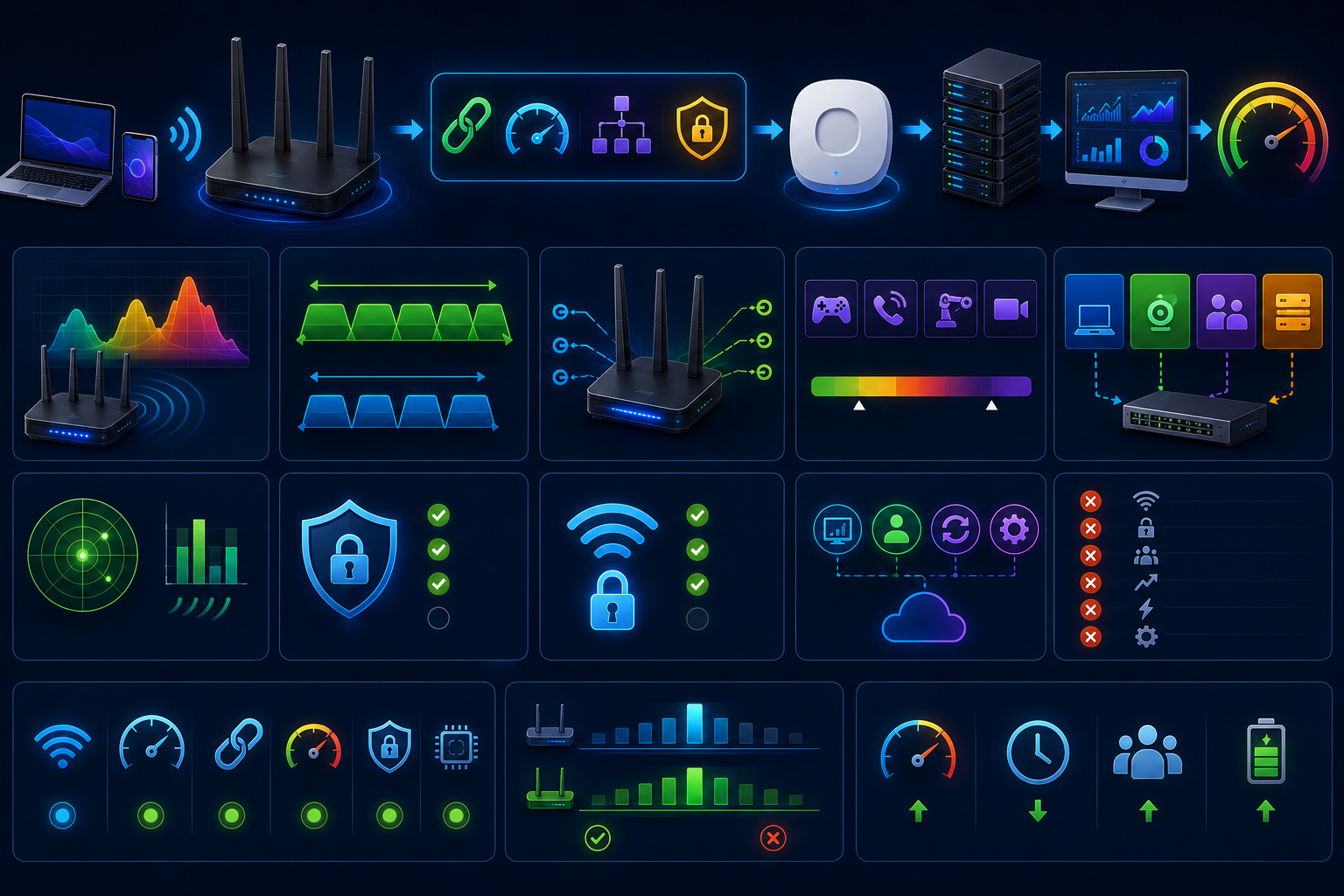
Proper router configuration ensures that Wi-Fi 7 applications deliver consistent throughput, low latency, and reliable connectivity during development and testing. Instead of using default settings, optimize the wireless environment to match your workload.
Configuration workflow:
Client → Wi-Fi 7 Router → MLO + QoS + VLAN + WPA3 → Access Point → Server → Monitoring → Performance Validation
Selecting the Right Wi-Fi 7 Channel
Use the least congested 5 GHz or 6 GHz channel. Verify channel utilization with a Wi-Fi analyzer before testing.
Channel Width Optimization
Use 320 MHz where supported. Otherwise, choose 160 MHz to reduce interference in crowded deployments.
Enabling Multi-Link Operation
Enable MLO on compatible routers and clients so traffic can use multiple wireless links simultaneously.
QoS Configuration
Prioritize latency-sensitive traffic such as gaming, VoIP, robotics, and real-time telemetry using WMM or DSCP policies.
VLAN Configuration
Separate development, IoT, guest, and production devices with VLANs to improve security and reduce broadcast traffic.
DFS Channels
Use DFS channels only after confirming local regulatory support and radar availability.
Security Configuration
Disable legacy encryption and unnecessary compatibility modes that can reduce performance.
WPA3 Best Practices
Enable WPA3-Personal or WPA3-Enterprise, use strong authentication, and keep router firmware updated.
Enterprise Deployment Tips
Monitor channel utilization, roaming performance, retransmissions, and client density through centralized management platforms.
Common Configuration Mistakes
Avoid automatic channel selection during benchmarks, mixed WPA2/WPA3 modes, overloaded channels, outdated firmware, excessive transmit power, and disabled QoS, as these can produce inconsistent test results.
Wi-Fi 7 Network Programming Fundamentals
Wi-Fi 7 reduces many wireless bottlenecks, so application design becomes the primary performance factor. Instead of assuming slow networks, developers should optimize concurrency, minimize serialization overhead, reuse connections, and avoid blocking operations.
Programming workflow:
Application → Async Runtime → Connection Pool → TCP/UDP Socket → Wi-Fi 7 Stack → Access Point → Service → Response
TCP Programming
Use persistent connections, keep-alive, and efficient buffering for reliable communication.
UDP Programming
Choose UDP for real-time streaming, gaming, telemetry, and robotics where low latency matters more than guaranteed delivery.
Async Programming
Adopt asynchronous I/O with frameworks such as Python asyncio, Java Virtual Threads, or Node.js to maximize throughput.
Event-driven Networking
React to network events instead of blocking threads, allowing thousands of concurrent connections.
Connection Pooling
Reuse established connections to reduce handshake overhead and improve scalability.
Buffer Management
Allocate appropriate buffer sizes and avoid unnecessary memory copies for large data transfers.
Packet Serialization
Prefer efficient binary formats such as Protocol Buffers, FlatBuffers, or MessagePack over verbose text formats for latency-sensitive systems.
Error Handling
Handle timeouts, retransmissions, connection resets, and partial reads gracefully without crashing the application.
Retry Strategies
Implement exponential backoff with jitter and define retry limits to prevent retry storms.
Threading Models
Use lightweight concurrency, thread pools, or event loops instead of creating one thread per connection, enabling better CPU utilization on high-speed Wi-Fi 7 networks.
Basic Socket Programming Examples
Production-ready socket applications should include structured logging, exception handling, graceful shutdown, connection timeouts, retries, concurrency, and automated testing. Because Wi-Fi 7 supports lower latency and higher throughput, efficient socket management becomes even more important than raw network speed.
Socket workflow:
Client → TCP Socket → Wi-Fi 7 Network → Concurrent Server → Business Logic → Response → Logging → Monitoring
Basic Python Socket Server
import asyncio

async def handle(reader, writer):
    try:
        while data := await reader.read(1024):
            writer.write(data)
            await writer.drain()
    finally:
        writer.close()
        await writer.wait_closed()

async def main():
    server = await asyncio.start_server(handle, "0.0.0.0", 9000)
    async with server:
        await server.serve_forever()

asyncio.run(main())
Basic Python Client
import asyncio

async def main():
    reader, writer = await asyncio.open_connection("127.0.0.1", 9000)
    writer.write(b"Hello Wi-Fi 7")
    await writer.drain()
    print((await reader.read(1024)).decode())
    writer.close()
    await writer.wait_closed()

asyncio.run(main())
Basic Java Socket Server
ServerSocket server = new ServerSocket(9000);
while (true) new Thread(() -> {}).start();
Basic Java Client
Socket socket = new Socket("127.0.0.1",9000);
Basic C Server
int server_fd = socket(AF_INET, SOCK_STREAM, 0);
/* bind(), listen(), accept(), recv(), send(), close() */
Basic C Client
int sock = socket(AF_INET, SOCK_STREAM, 0);
/* connect(), send(), recv(), close() */
Building Low-Latency Applications on Wi-Fi 7
Wi-Fi 7 lowers network delay, but application architecture still determines end-to-end responsiveness. Reduce latency by using asynchronous communication, minimizing serialization overhead, reusing connections, batching small requests, tuning buffer sizes, and selecting TCP or UDP based on workload. Additionally, keep processing close to users with edge computing and avoid unnecessary network hops.
Low-latency workflow:
Client → Async Processing → Optimized TCP/UDP → Wi-Fi 7 (MLO + OFDMA) → Edge Service → Processing → Response
Gaming
Use UDP, client prediction, and small state updates to maintain responsive gameplay.
Video Conferencing
Prioritize real-time media with adaptive bitrate, packet pacing, and QoS.
Cloud Gaming
Stream compressed frames with low-latency codecs and edge rendering.
Robotics
Exchange telemetry through asynchronous messaging and deterministic control loops.
Industrial Automation
Use predictable packet scheduling, network segmentation, and continuous monitoring.
Edge AI
Run AI inference near devices to reduce round-trip time and improve real-time decision making.
IoT Development with Wi-Fi 7
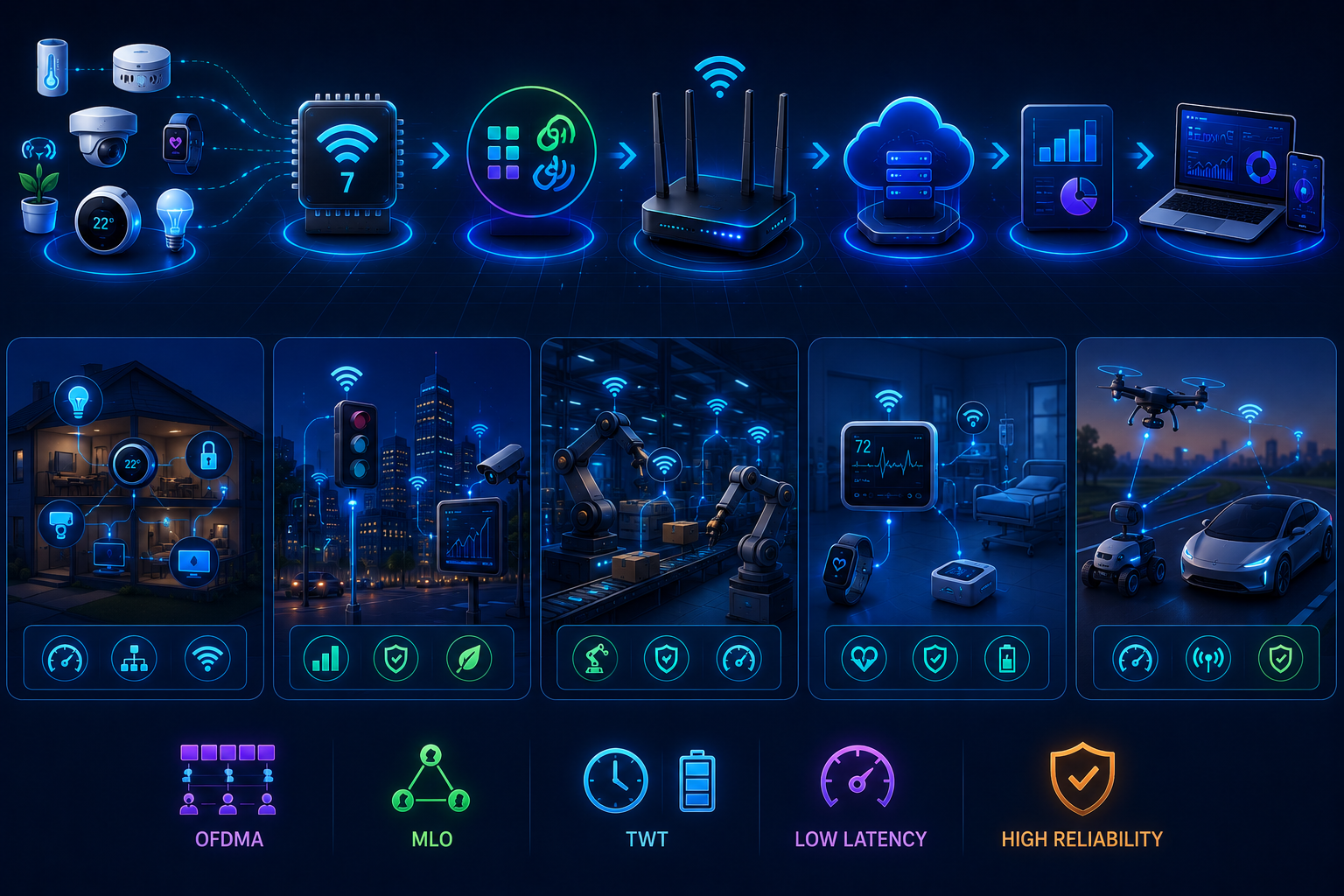
Wi-Fi 7 helps IoT developers build larger, faster, and more reliable device networks. OFDMA enables many sensors to communicate simultaneously, while the evolution of Target Wake Time (TWT) improves power efficiency. Furthermore, Multi-Link Operation (MLO) increases reliability through multiple wireless links, supporting deterministic communication for time-sensitive applications.
IoT workflow:
Sensor → Wi-Fi 7 Radio → OFDMA + MLO → Access Point → Edge Platform → Analytics → Dashboard
Smart Homes
Support hundreds of connected devices with lower latency and better spectrum efficiency.
Smart Cities
Enable scalable traffic control, environmental monitoring, and public safety systems.
Manufacturing
Deliver predictable wireless communication for industrial sensors and robotic equipment.
Healthcare
Improve reliability for wearable devices, patient monitoring, and medical telemetry.
Autonomous Systems
Provide fast, dependable communication for drones, robots, and autonomous vehicles operating in dynamic environments.
Network Management Protocols in Wi-Fi 7
Modern Wi-Fi 7 management extends beyond traditional SNMP polling. Today, developers use streaming telemetry, REST APIs, NETCONF, and gNMI to collect real-time metrics, automate configuration, and integrate programmable networks with cloud platforms. Consequently, teams gain faster visibility into latency, throughput, client health, and radio performance.
Management workflow:
Wi-Fi 7 Devices → Telemetry → Controller → APIs → Monitoring Platform → Alerts → Automation
SNMP
Best for basic monitoring of interfaces, CPU, memory, and device status.
NETCONF
Uses YANG models for secure, structured configuration management.
REST APIs
Enable applications to automate provisioning, monitoring, and reporting.
gNMI
Streams configuration and operational data with low overhead for programmable infrastructure.
Streaming Telemetry
Continuously pushes network metrics to observability platforms, allowing rapid detection of congestion, failures, and performance regressions.
Wireless Security in Wi-Fi 7
Wi-Fi 7 strengthens wireless security through WPA3-Personal, WPA3-Enterprise, Protected Management Frames (PMF), stronger authentication, and improved certificate-based access. Consequently, developers should combine secure wireless configuration with encrypted application protocols, certificate validation, and secure coding practices.
Security workflow:
Client → WPA3 Authentication → Protected Management Frames → Encrypted Wi-Fi 7 Link → TLS Application Session → Secure Service
WPA3
Use WPA3-Personal for home deployments and WPA3-Enterprise with 802.1X and digital certificates for organizations.
Authentication Flow
Authenticate the client, validate certificates or credentials, establish encryption keys, then allow secure data exchange.
Secure Socket Design
Use TLS 1.3, verify server certificates, enable hostname validation, configure secure cipher suites, and enforce connection timeouts.
Secure Coding Practices
Validate input, avoid hard-coded credentials, protect secrets with secure vaults, use parameterized APIs, apply least-privilege access, and keep dependencies and firmware updated to reduce security risks.
Real-World Wi-Fi 7 Programming Workflows
Successful Wi-Fi 7 applications combine efficient software architecture, asynchronous communication, edge computing, and continuous monitoring. Rather than optimizing isolated functions, developers should design complete data flows that minimize latency, maximize throughput, and recover gracefully from network changes.
Multiplayer Game Architecture Workflow
Game Client → Async Network Engine → UDP/TCP → Wi-Fi 7 (MLO + OFDMA) → Game Server → State Synchronization → Players
Video Streaming Workflow
Camera → Hardware Encoder → Wi-Fi 7 → Edge CDN → Adaptive Bitrate Service → Media Player
Smart Factory Workflow
Industrial Sensors → Wi-Fi 7 Access Point → Edge Gateway → Manufacturing Platform → Analytics → Automation Controller
IoT Sensor Network Workflow
Sensors → OFDMA Resource Units → Wi-Fi 7 Router → MQTT Broker → Stream Processing → Dashboard → Alerts
AI Edge Device Workflow
Camera or Sensor → Local AI Inference → Wi-Fi 7 → Edge Server → Model Updates → Cloud Storage → Monitoring
These workflows emphasize scalable communication, efficient packet handling, resilient networking, and real-time decision making across modern wireless applications.
Common Performance Bottlenecks Developers Miss
Even with Wi-Fi 7, application-layer inefficiencies can limit performance. Common issues include excessive serialization, blocking I/O, coarse-grained locking, slow DNS lookups, verbose logging, inefficient packet sizes, poor retry strategies, unnecessary network round trips, and CPU-intensive processing. Therefore, profile the application before blaming the network.
Optimization workflow:
Application Profiling → CPU Analysis → Memory Allocation → Network Trace → Bottleneck Detection → Code Optimization → Wi-Fi 7 Performance Validation
Optimize concurrency, use asynchronous I/O, cache DNS results, batch requests, minimize payload size, and monitor latency continuously to unlock Wi-Fi 7’s full potential.
Best Practices for Wi-Fi 7 Network Programming
Design applications around asynchronous, event-driven architectures instead of blocking workflows. Choose TCP for reliable delivery and UDP for real-time communication. Benchmark with iperf3, validate packets using Wireshark, and monitor latency, jitter, retransmissions, CPU, and memory continuously. Furthermore, tune routers for MLO, OFDMA, QoS, WPA3, and appropriate channel widths. Optimize serialization, reuse connections, implement retries with exponential backoff, and deploy comprehensive logging, tracing, and metrics.
Best-practice workflow:
Design → Develop → Benchmark → Optimize → Secure → Deploy → Observe → Scale → Continuous Improvement
Finally, write modular, standards-based code, automate performance testing in CI/CD, and build for future IEEE 802.11be enhancements to keep applications scalable, maintainable, and ready for evolving wireless networks.
Wi-Fi 7 vs Wi-Fi 6E for Software Developers
From a programming perspective, Wi-Fi 7 shifts optimization from coping with wireless limitations to maximizing application efficiency. Features such as Multi-Link Operation (MLO), 320 MHz channels, and 4096-QAM provide lower latency, higher throughput, and more predictable communication. Consequently, developers can build larger real-time systems with improved concurrency, scalable asynchronous processing, and better Quality of Service.
Feature Comparison Table
| Capability | Wi-Fi 6E | Wi-Fi 7 | Developer Impact |
| Maximum Throughput | Up to 9.6 Gbps | Up to 46 Gbps | Supports larger real-time workloads |
| Multi-Link Operation | No | Yes | Higher resilience and lower latency |
| Channel Width | 160 MHz | 320 MHz | Faster data transfer |
| OFDMA | Yes | Enhanced | Better multi-client performance |
| Modulation | 1024-QAM | 4096-QAM | Higher throughput in strong signal conditions |
| Application Design | Async recommended | Async essential | Greater scalability and concurrency |
| Real-Time Workloads | Good | Excellent | Better gaming, robotics, AI, and edge computing |
Future of Wi-Fi 7 and Beyond
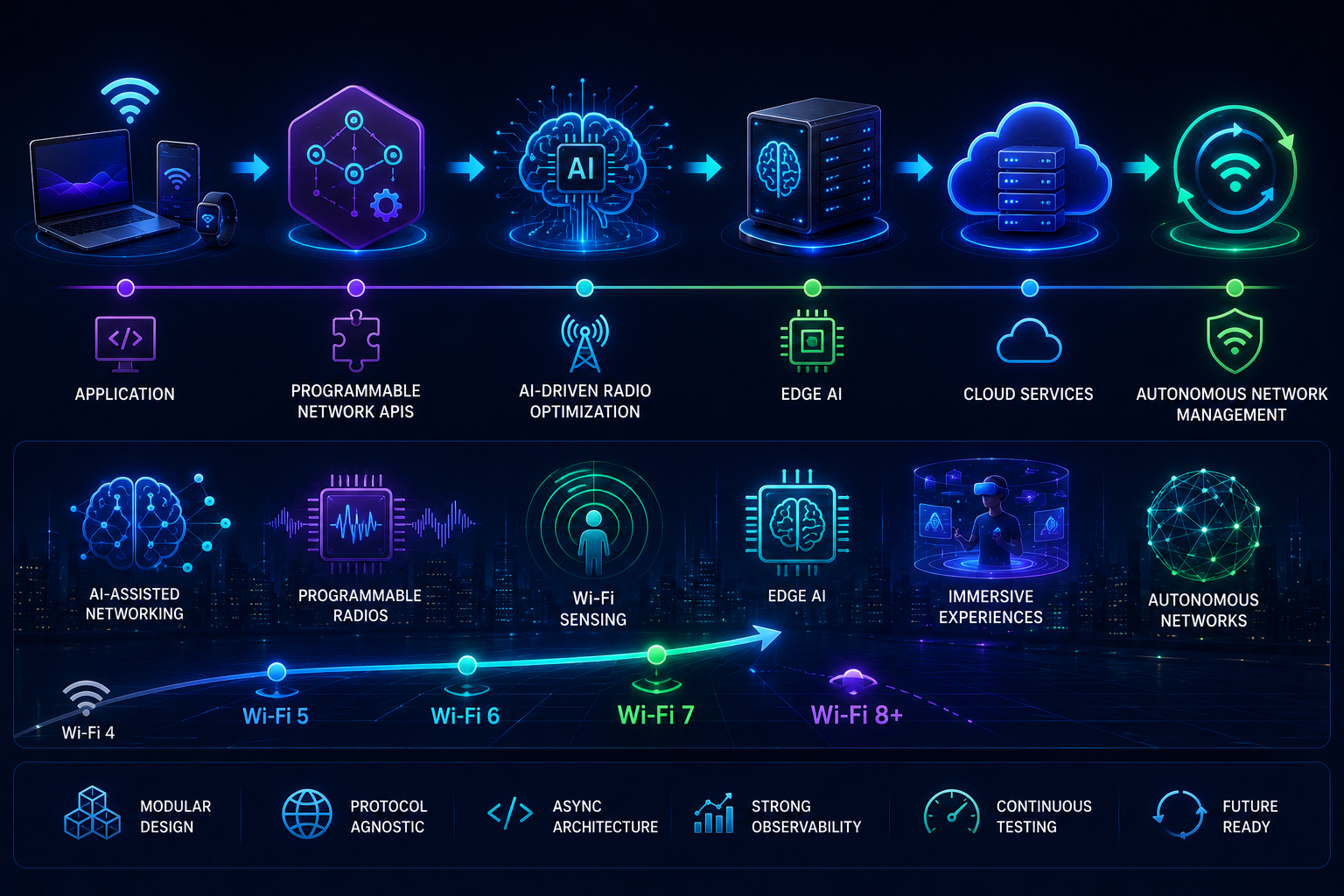
Wi-Fi will continue evolving through IEEE standards with greater emphasis on AI-assisted networking, programmable radios, improved wireless communication, Wi-Fi sensing, and edge AI. Consequently, developers should design modular, protocol-agnostic applications that adapt to changing network capabilities instead of relying on hardware-specific assumptions.
Future workflow:
Application → Programmable Network APIs → AI-Driven Radio Optimization → Edge AI → Cloud Services → Autonomous Network Management
Building with open standards, asynchronous architectures, strong observability, and continuous performance testing today will simplify adoption of future wireless technologies while maintaining scalability and low latency.
Frequently Asked Questions
What is Wi-Fi 7?
The latest IEEE wireless standard delivering higher throughput, lower latency, and improved reliability.
What is IEEE 802.11be?
The technical specification behind Wi-Fi 7, introducing Extremely High Throughput (EHT).
Is Wi-Fi 7 backward compatible?
Yes. It supports older Wi-Fi devices while enabling advanced features on compatible hardware.
What is Multi-Link Operation (MLO)?
MLO allows simultaneous communication across multiple frequency bands for better performance and resilience.
How does OFDMA improve Wi-Fi 7?
It lets multiple devices transmit concurrently, reducing contention and improving efficiency.
How do I benchmark a Wi-Fi 7 network?
Use iperf3, Wireshark, latency measurements, jitter analysis, and packet-loss testing.
Which programming languages are best for Wi-Fi 7 development?
Python, Go, Java, C, C++, and Rust all work well for networking applications.
Is socket programming different on Wi-Fi 7?
Socket APIs remain the same, but asynchronous, concurrent designs become more valuable.
Does Wi-Fi 7 improve IoT development?
Yes. OFDMA, MLO, and improved scheduling support larger, more reliable IoT deployments.
What router settings improve Wi-Fi 7 performance?
Enable MLO, WPA3, QoS, appropriate channel widths, and updated firmware.
What tools should I use for throughput testing?
iperf3, Wireshark, Ping, tc/netem, Grafana, and Prometheus.
How can I reduce network latency in Wi-Fi 7 applications?
Use async I/O, efficient serialization, edge processing, batching, and optimized protocols.
Is Wi-Fi 7 suitable for real-time AI and robotics?
Yes. Lower latency and improved reliability benefit AI inference, robotics, and industrial automation.
Can Wi-Fi 7 replace wired Ethernet for developers?
For many mobile and real-time workloads, yes. However, wired Ethernet still offers the most consistent latency and performance for demanding environments.
Read More: Top 6 Best VPNs with Free Trial No Credit Card for Secure Public Wi-Fi
Conclusion
Wi-Fi 7 is more than a faster wireless standard. IEEE 802.11be, Multi-Link Operation, OFDMA, advanced router tuning, throughput testing, and continuous benchmarking redefine modern network programming. Therefore, combine scalable application architecture, production-ready socket programming, and real-world performance validation to unlock its full potential.
Development workflow:
Build → Benchmark → Optimize → Secure → Deploy → Monitor → Improve
Finally, stay aligned with evolving IEEE standards to keep applications fast, reliable, and future-ready.
About the Author